

Somewhere between your ESP and the inbox, a filter just graded your email with a number. If that number came from SpamAssassin and reached 5.0, your message is sitting in a junk folder right now. Every Unspam spam test runs your email through SpamAssassin among other checks, and the data is reassuring: 89% of tested messages score in the safe 0 to 3.0 range. The other 11% usually have no idea which rule burned them.
This guide decodes the score properly: what the number is made of, the real rules with their real point values, where the score actually decides your fate (and where Gmail quietly ignores it), and the fixes that bring a high score down.
What is SpamAssassin?
Apache SpamAssassin is the most widely deployed open-source spam filter. It is not abandonware, whatever the version numbers in older guides suggest: the current release is 4.0.2 (August 2025), the 4.0 line brought full Unicode support for international mail plus a dedicated DMARC plugin, and the project ships continuously updated rules through its sa-update channel.
You meet SpamAssassin in more places than you might expect:
- Shared hosting. cPanel's "Spam Filters" feature is, in cPanel's own words, powered by Apache SpamAssassin, with a default threshold of 5. That covers millions of small-business mailboxes.
- Corporate and self-hosted mail. SpamAssassin runs inside gateway stacks built on Exim, Postfix, MailScanner, MIMEDefang, and Amavis.
- Testing pipelines. Because it is open and deterministic, it is the standard scoring engine in pre-send testing tools, including the SpamAssassin check inside Unspam's deliverability audit.
One honest caveat that stale competitor guides skip: Gmail, Outlook, and Yahoo do not use SpamAssassin. Google filters with its own machine-learning models (TensorFlow classifiers, later the RETVec model), and Microsoft describes its filtering as proprietary. Your SpamAssassin score matters directly for the cPanel-and-gateway world, and as a proxy for the content signals the big providers' models weigh. A clean score does not guarantee Gmail's inbox; a failing score reliably predicts trouble everywhere.
How the score actually works
Mechanically, a SpamAssassin score is a sum. The filter runs the message through hundreds of tests, each matched rule contributes its point value (positive or negative), and the total is compared against a threshold called required_score:
- Default threshold: 5.0. A message scoring at or above 5.0 is marked as spam; 4.9 passes, 5.0 fails.
- The threshold is configurable. The official documentation calls 5.0 "quite aggressive", suitable for a single user, and suggests ISPs set a more conservative 8.0 or 10.0. Hosts can also go stricter, which is why a 4.5 is not a comfortable place to live.
- The same rule can score differently per setup. Each rule carries up to four point values, selected by whether the Bayes engine and network tests are enabled on that server. The values below are for a full setup (Bayes plus network tests), which is what most production filters and Unspam's test run.
- Scores drift slightly over time. Live servers pull rescored rules via sa-update, so treat any published number as the shipped default, not a constant of nature.
Here is what a real score looks like when it adds up:
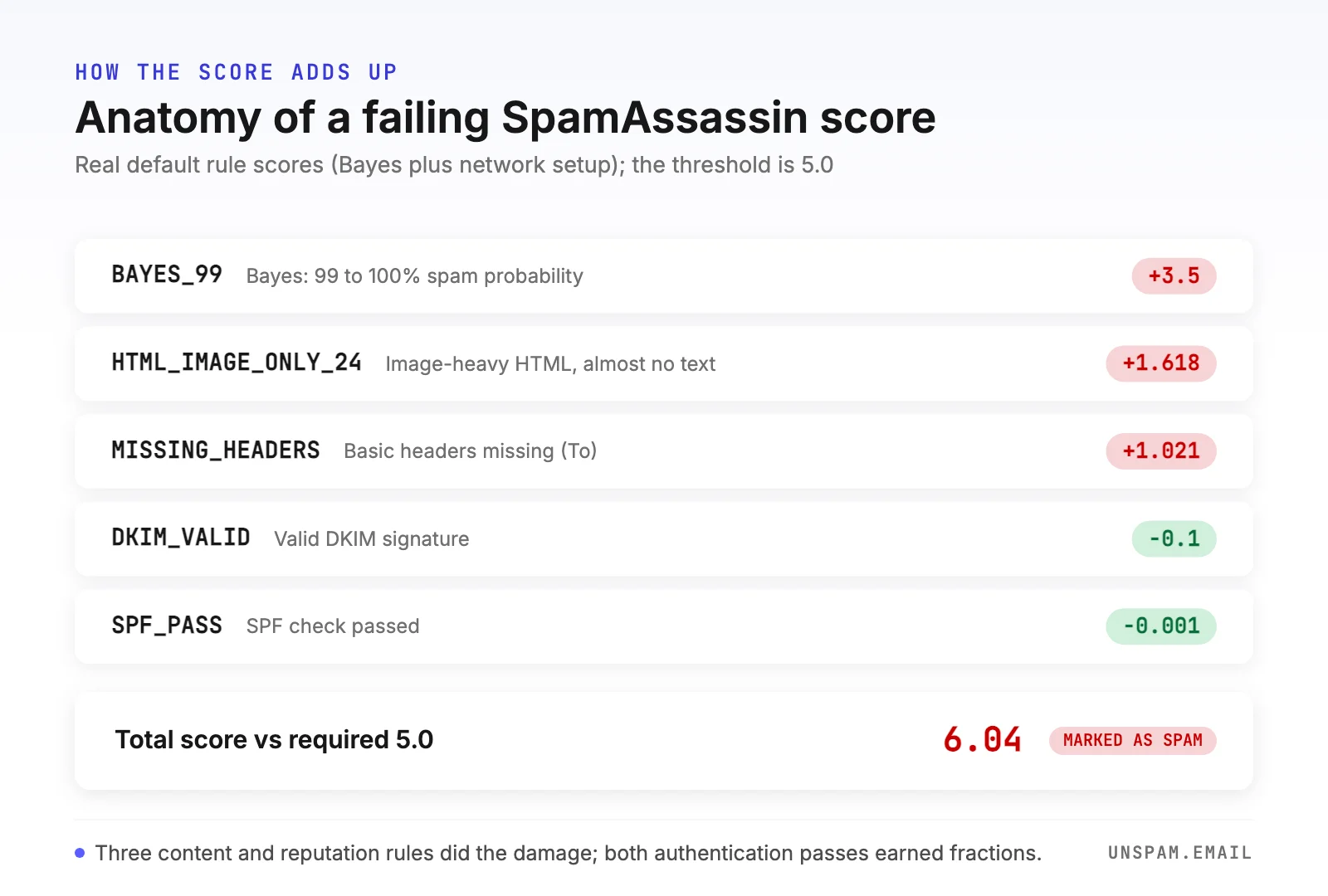
Three rules did the damage; the two authentication passes barely moved the needle. That asymmetry is the single most useful thing to understand about SpamAssassin.
Passing authentication earns you a rounding error. Failing content checks costs you whole points. Authentication is a floor, not a bonus.
The rules, decoded with real point values
These are actual default scores from the official ruleset (values for a full Bayes-plus-network setup):
| Rule | What it means | Points |
|---|---|---|
BAYES_99 | Bayes engine: 99 to 100% spam probability | +3.5 |
BAYES_999 | Bayes: 99.9 to 100%, stacked on top of BAYES_99 | +0.2 |
RCVD_IN_PBL | Sending IP is in Spamhaus PBL (shouldn't send mail directly) | +3.335 |
URIBL_BLACK | A link in the body is on the URIBL blacklist | +1.7 |
HTML_IMAGE_ONLY_24 | Image-heavy HTML with almost no text | +1.618 |
PYZOR_CHECK | Body matches a known-spam fingerprint (Pyzor) | +1.392 |
MISSING_DATE | Message has no Date header | +1.36 |
DCC_CHECK | Flagged as bulk by the DCC network | +1.1 |
MISSING_HEADERS | Missing basic headers such as To | +1.021 |
RAZOR2_CHECK | Body matches a known-spam fingerprint (Razor) | +0.922 |
DKIM_VALID | Message carries a valid DKIM signature | -0.1 |
SPF_PASS | SPF check passed | -0.001 |
BAYES_00 | Bayes engine: 0 to 1% spam probability | -1.9 |
GTUBE | The standard test string for verifying a filter works | +1000 |
Patterns worth noticing:
- Bayes dominates. A single BAYES_99 hit is 3.5 points, 70% of the way to the spam threshold on its own.
- Reputation rules hit hard. One Spamhaus PBL listing (+3.335) plus one blacklisted link (+1.7) is already a failing score.
- Broken plumbing is expensive. Missing Date or To headers usually mean a homegrown sending script; they add points for looking machine-generated, before a human ever reads a word.
- Negative rules exist. Clearly legitimate mail can score below zero. A negative score is not an error; it is a compliment.
The Bayes engine, and why "avoid the word free" is dated advice
The BAYES rules come from a trained probabilistic classifier (SpamAssassin's docs describe it as Bayesian-style, using a chi-square combiner). It scores the whole message statistically against what it has learned from real spam and real ham, and it adapts as administrators train it with sa-learn.
This is why the classic listicle advice about banning individual words misses the point. No single word carries a fixed penalty; the engine judges the entire message in context. A cardiology newsletter can say "heart medication" safely, while a message that assembles the full statistical fingerprint of spam (pushy offer, image-only body, tracking-heavy links, no plain-text part) gets a BAYES_99 even if it avoids every famous trigger word. Trigger words still matter as a weak signal and as a human red flag, which is why we maintain a spam trigger words guide and a free spam word checker, but the engine behind the score is judging patterns, not vocabulary.
Network tests: the points you earn before writing a word
With network tests enabled, SpamAssassin asks the internet about you:
- DNS blocklists. The sending IP is checked against Spamhaus Zen (its SBL, CSS, XBL, and PBL components each carry their own rule and points) and SpamCop, among others.
- URI blocklists. Every domain you link to is checked against lists like URIBL and Spamhaus DBL. You inherit the reputation of every link in your footer.
- Fuzzy fingerprints. Razor, Pyzor, and DCC compare your message body against collaborative databases of circulating spam. Mass-mailed content that others reported adds points, no matter how it reads.
The practical consequence: part of your SpamAssassin score is decided by your infrastructure and list hygiene, not your copy. Check your sending IP and domain before blaming the content: the free IP blacklist checker and domain blacklist checker cover the same zones that cost points here.
How to read your score: the X-Spam-Status header
On any server running SpamAssassin, the verdict is written into the message headers, and learning to read it turns a mystery score into a to-do list:
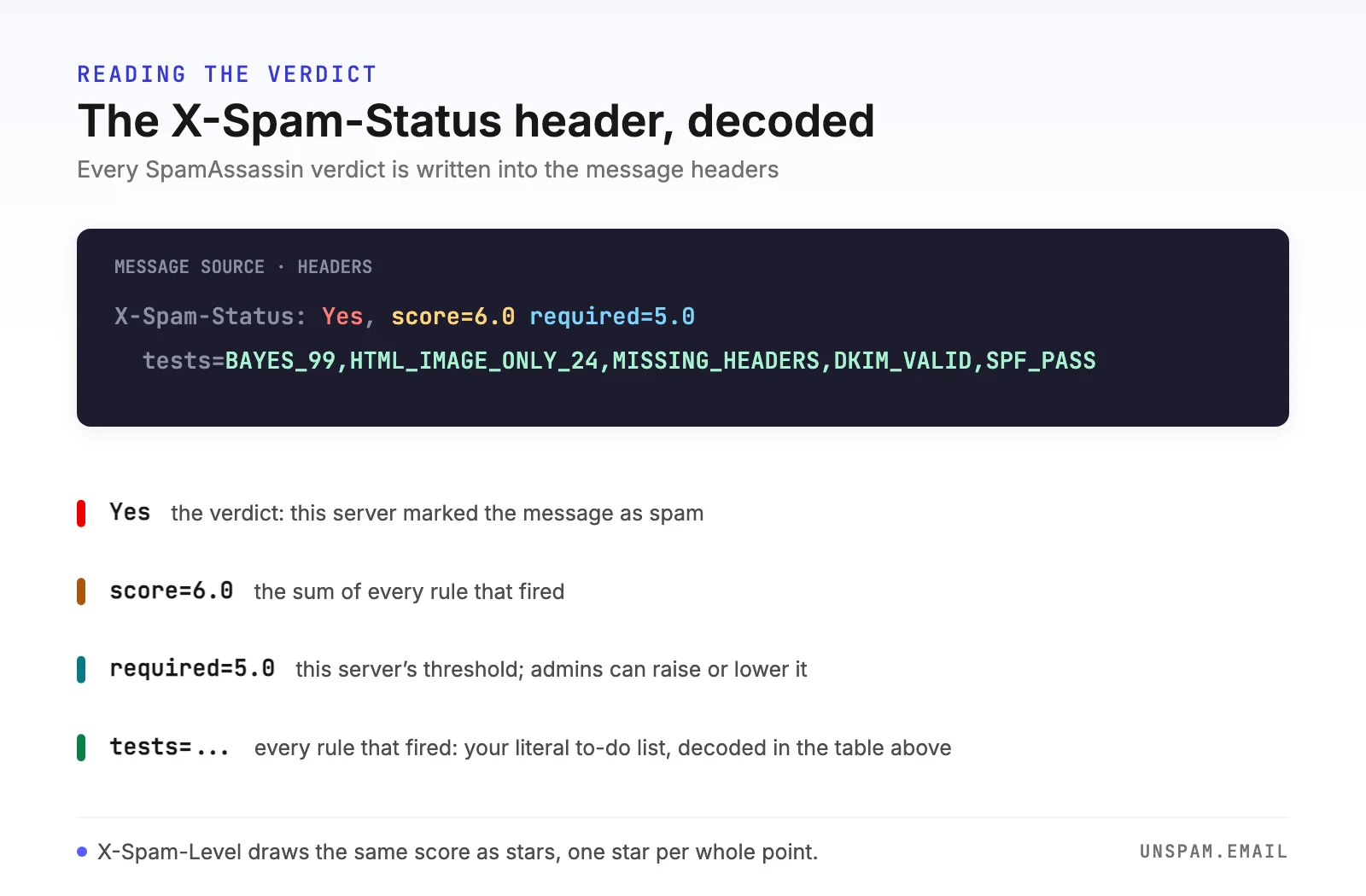
X-Spam-Statusstarts with the verdict (Yes or No), thenscore=(the sum),required=(that server's threshold), andtests=(every rule that fired, which is the part you actually act on).X-Spam-Leveldraws the score as a row of stars, one per whole point, so filtering rules can match on severity.X-Spam-Checker-Versiontells you which SpamAssassin version and ruleset judged you.
If the tests= list names the rules, and the table above tells you what each one costs, you can reconstruct exactly why a message failed. That is precisely what the SpamAssassin section of an Unspam deliverability report does for you automatically.
What is a good SpamAssassin score?
The bands are simple, and worth memorizing alongside the other deliverability thresholds:
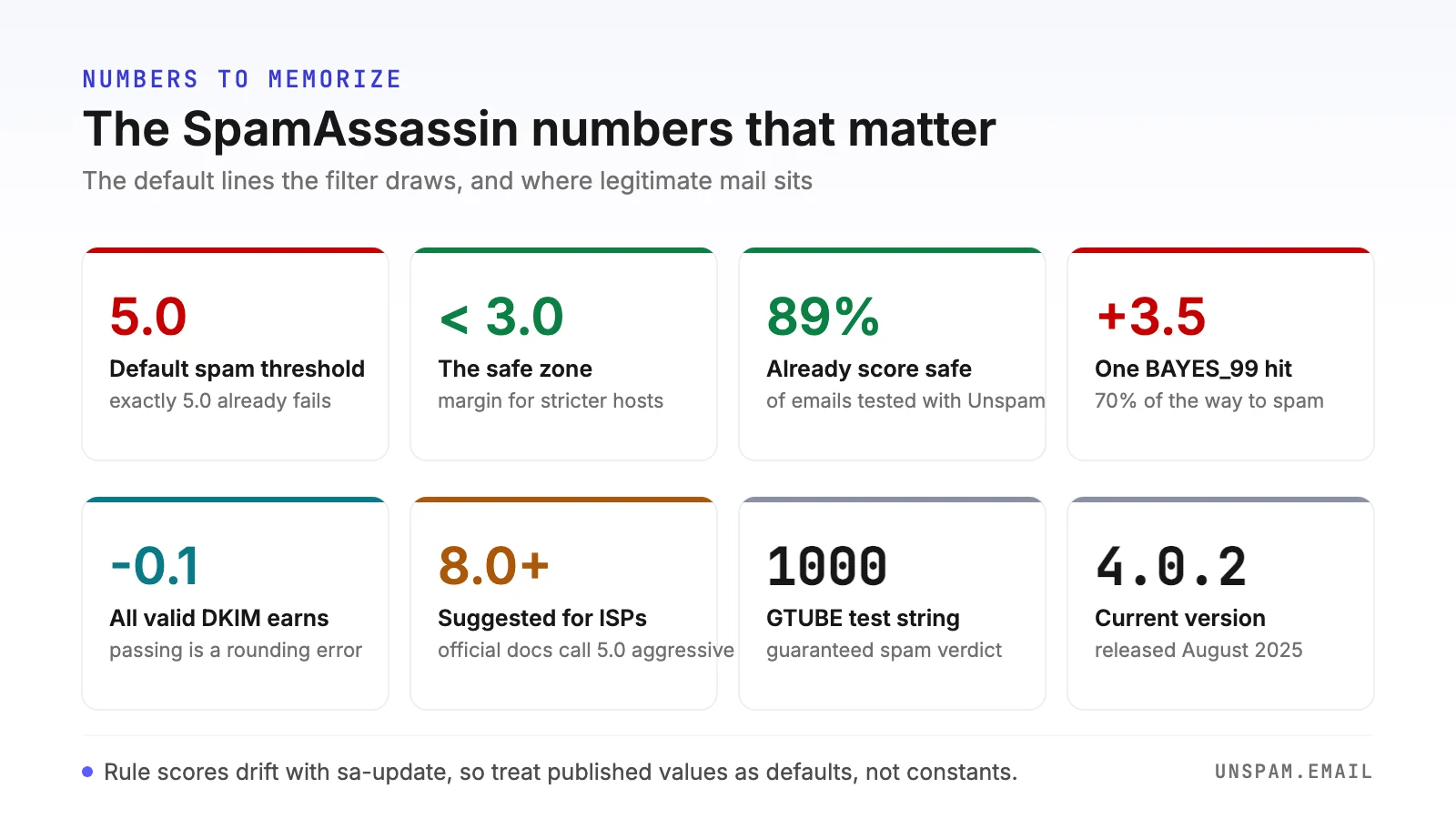
- Below 3.0: safe. Comfortable margin under every sane threshold. This is the band 89% of the emails tested with Unspam already reach, so it is a realistic target, not perfectionism.
- 3.0 to 4.9: passing, but exposed. One Bayes hit or one new blacklist listing away from failing, and already failing on hosts that tightened the default.
- 5.0 and above: marked as spam on a stock install. At double-digit scores, some setups quietly discard rather than deliver to junk (official guidance reserves auto-deletion for 15.0 and up).
A note on direction, because mixed-up guides cause real confusion: lower is better for SpamAssassin. If a testing tool shows you a score out of 100 where higher is better, that is a composite deliverability score, a different animal we cover in what is a spam score.
How to check your SpamAssassin score
Three ways, from fastest to most hands-on:
- Run a pre-send spam test. The free Unspam spam test scores your exact message with SpamAssassin and lists every rule that fired next to the SPF, DKIM, DMARC, blacklist, and HTML checks, in about 30 seconds, no signup required.
- Read a received copy. If the message already passed through a server running SpamAssassin, the verdict is sitting in the
X-Spam-Statusheader described above. Forward yourself a copy from the affected mailbox and read thetests=list. - Run SpamAssassin yourself. On your own server, pipe a raw message through it:
spamassassin -t < message.emlprints the score and a rule-by-rule report. Keep rules current withsa-update, train the Bayes engine withsa-learn --spamandsa-learn --ham, and verify the pipeline works by sending the GTUBE test string, which is designed to score 1000 points and land in spam every time.
The first option is the only one that grades your message before your list ever sees it, which is the point: a score you learn about from a bounce report is a score you learned about too late.
How to lower a high SpamAssassin score
Work down this list in order; it is sorted by points recovered per hour of effort.
- Fix what the rules literally name. Read the
tests=list from your report. MISSING_DATE and MISSING_HEADERS mean your sending script or ESP configuration is emitting malformed mail: fix the plumbing and those points vanish entirely. - Clear your reputation rules. If RCVD_IN_ or URIBL_ rules fired, no copy edit will save you. Delist the IP or domain first (our blacklist removal guide covers the major lists), and audit every linked domain, including link shorteners and tracking domains you do not control.
- Authenticate everything, then stop expecting credit for it. Publish and align SPF, DKIM, and DMARC (the full walkthrough); verify with the SPF, DKIM, and DMARC checkers. This removes penalty rules and satisfies the DMARC plugin in SpamAssassin 4.0, but remember the asymmetry: it earns fractions, it prevents whole points.
- Rebalance the content. Always ship a plain-text part alongside HTML, keep a real text-to-image ratio (the HTML_IMAGE_ONLY rules exist because image-only mail is a classic spam evasion), and cut the patterns that trip filters.
- Respect the Bayes engine. You cannot trick a statistical classifier with synonyms. Send content people actually engage with, to people who asked for it, and the Bayes rules become your ally: BAYES_00 hands back 1.9 points.
- Test before every send. Scores change with rule updates and list status, so a message that passed last quarter can fail today. A pre-send spam test catches it while it is still free to fix.
Check your score now
You do not have to guess which band you are in. Run your email through the free Unspam spam test: it scores the exact message with SpamAssassin, shows every rule that fired with its point value, and runs the SPF, DKIM, DMARC, blacklist, and content checks beside it, in about 30 seconds, no signup required. If you are in the 89%, you will know. If you are in the 11%, you will finally know why.
