

Getting an email delivered and getting it into the inbox are two different things. A message can be "delivered," meaning the receiving server accepted it, and still land in spam where nobody sees it. Across the messages we test at Unspam, 82% pass a full deliverability check, 14% draw warnings, and 4% fail outright, while the global primary-inbox rate sits around 59%. That gap is where campaigns quietly lose revenue.
This checklist is the pre-send routine that closes it. Work through it before any important send, especially now that Google and Yahoo enforce sender requirements (since February 2024) and Microsoft applied the same bar to Outlook (since May 2025). Every step below links to a free tool you can run in seconds, and each one is backed by what we actually measure across real sending domains.
The email deliverability checklist at a glance
- Authenticate the domain: SPF, DKIM, and DMARC, all aligned
- Confirm the domain and sending IP are off blacklists
- Clean and verify the recipient list
- Warm up any new domain or IP
- Audit the content, formatting, and links
- Add a one-click List-Unsubscribe header
- Send on a consistent schedule and protect engagement
- Run a spam test and an inbox placement test before you send
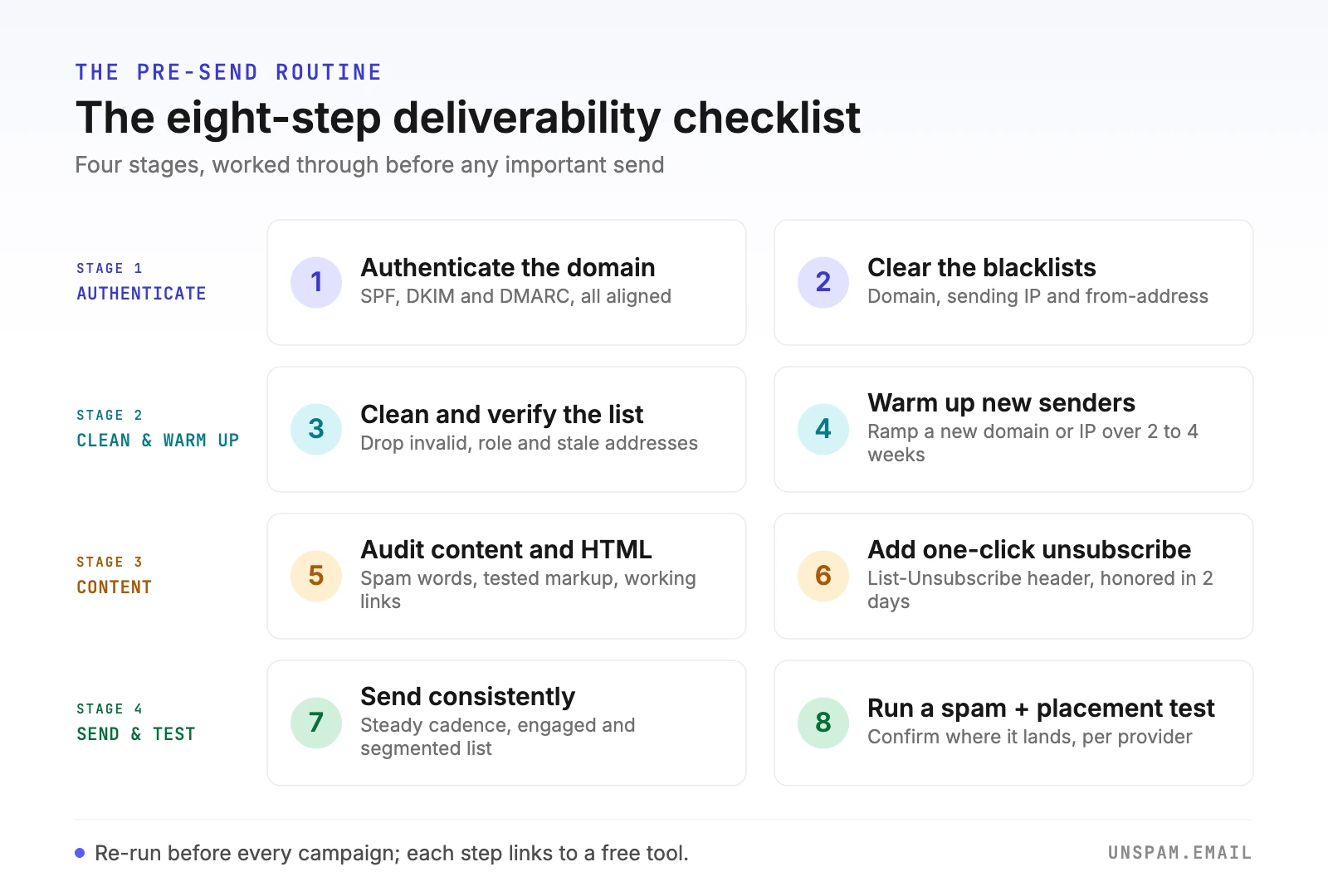
Each step is expanded below, with the data and the provider rules behind it.
What we see across the emails we test
Most deliverability advice repeats the same generic tips. The numbers below are different: they come from the emails actually run through Unspam, so they show where senders really stand rather than where guides assume they do. Two patterns stand out, and neither is obvious from a blended "average deliverability rate."
Inbox placement is not one number
The same test message lands very differently depending on the mailbox provider:
| Mailbox provider | Primary-inbox rate |
|---|---|
| ProtonMail | 95% |
| Zoho | 93% |
| Gmail | 68% |
| Outlook | 48% |
| AOL | 42% |
| Yahoo | 40% |
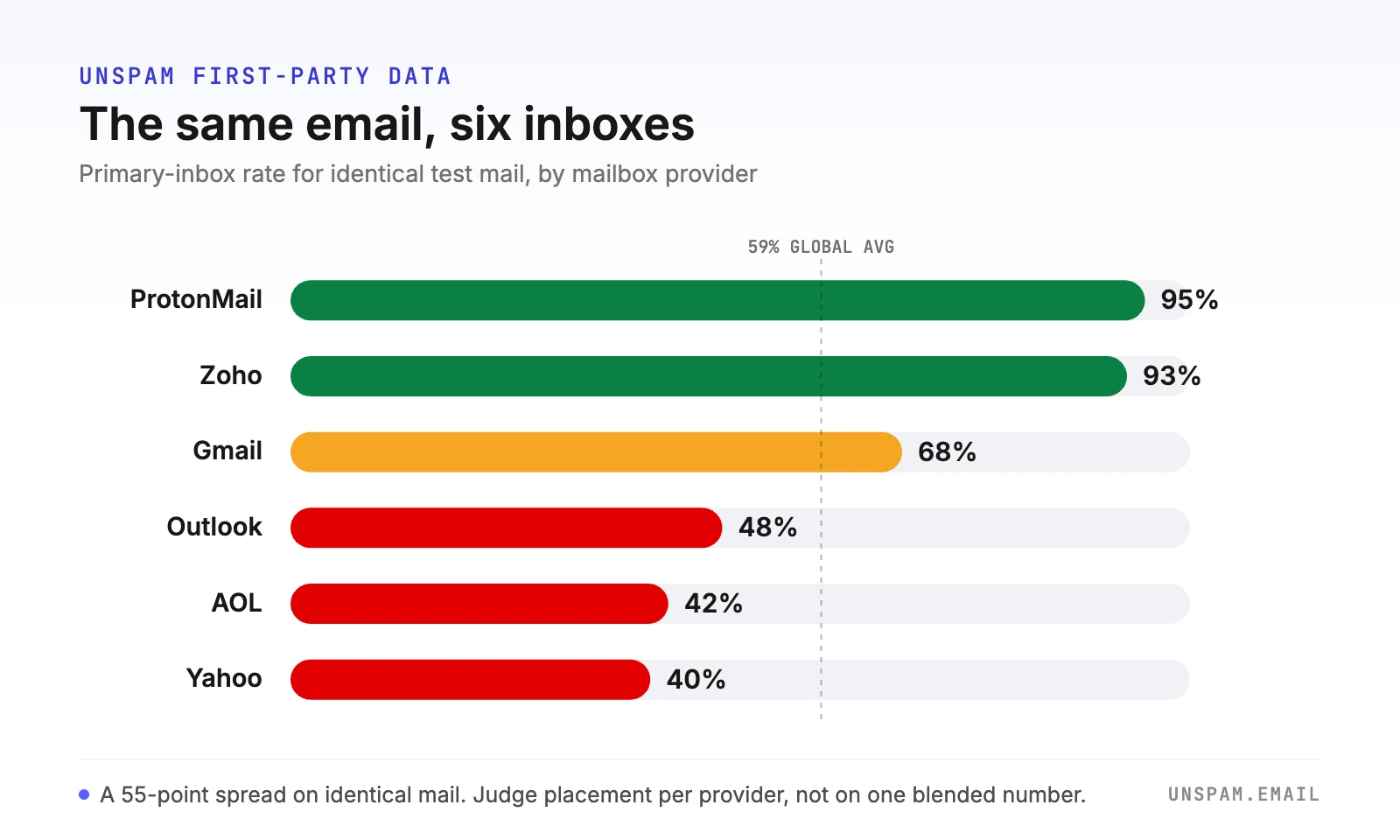
That is a 55-point spread on identical mail. A single blended average (about 59% to the primary inbox) hides the fact that Yahoo and Outlook are quietly filtering more than half of what Gmail lets through. Judge yourself per provider, not on one headline figure.
The authentication paradox
Across the domains we check:
- 90% pass SPF and 87% pass DKIM, so basic authentication is nearly universal.
- Only 58% publish DMARC, and DMARC is precisely the record the 2024 and 2025 provider rules enforce.
- 89% score in the safe SpamAssassin range (below 3.0), so raw content is rarely the primary problem.
- Only 30% pass our HTML best-practice checks, the lowest pass rate of anything we measure.
- Only 14% set a List-Unsubscribe header, despite it being a provider requirement for bulk mail.
- Just 0.28% of domains turn up on a domain blacklist, which is why a listing stands out so sharply when it happens.
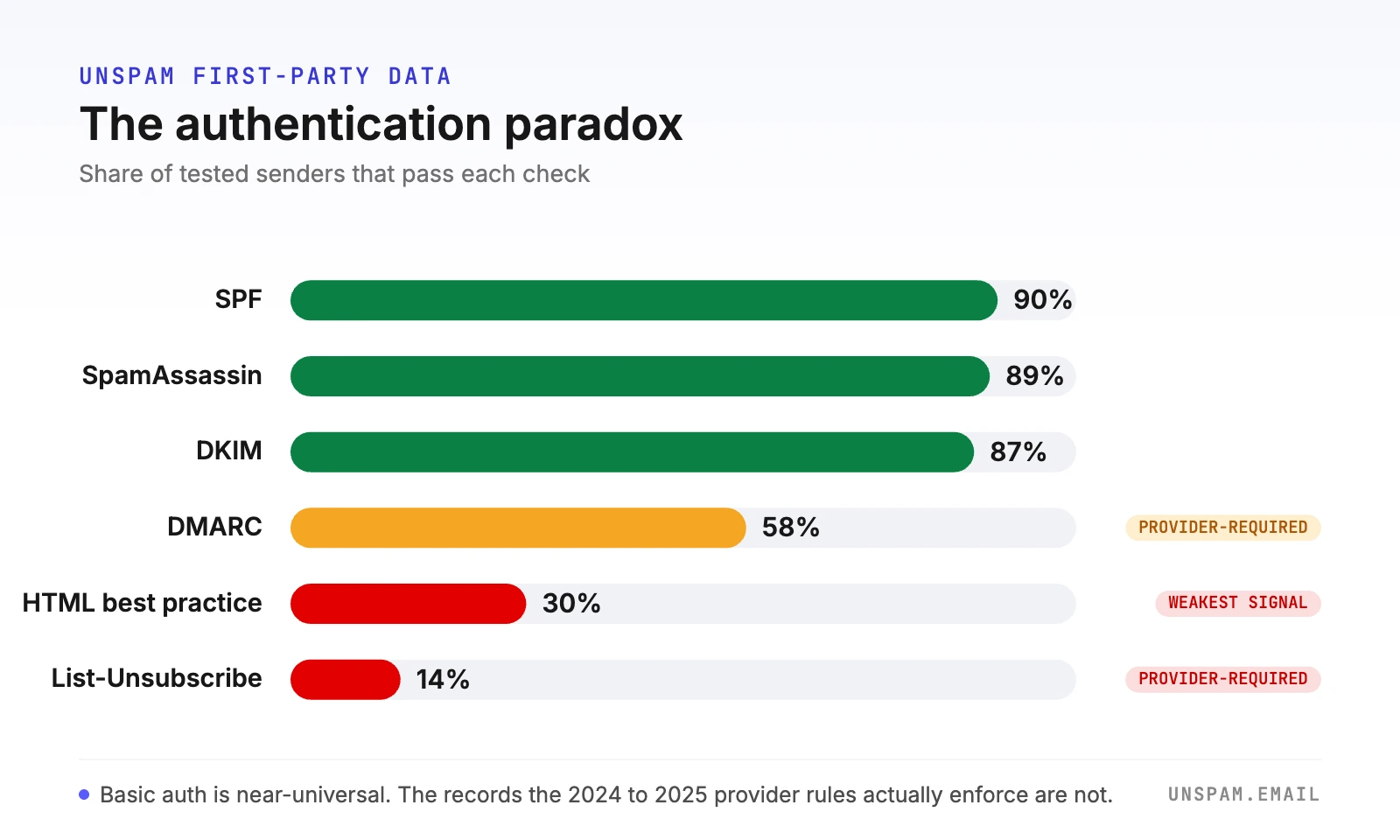
The takeaway: the fixes that move the needle are not usually the content ones people obsess over. They are DMARC alignment, engagement, and the unglamorous hygiene steps below.
Authentication gets your mail accepted. Reputation and engagement decide whether it reaches the inbox.
What the mailbox providers require (and where they differ)
The real authorities on deliverability are the mailbox providers themselves, and their published rules do not perfectly agree.
The two enforcement regimes
These two rule sets cover most inboxes:
| Requirement | Google & Yahoo (since Feb 2024) | Microsoft Outlook (since May 2025) |
|---|---|---|
| Applies to | 5,000+ a day to Gmail or Yahoo | 5,000+ a day to Outlook, Hotmail, Live |
| SPF + DKIM + DMARC | All three required | All three required (DMARC at least p=none, aligned) |
| One-click unsubscribe | Required (RFC 8058) | Expected for bulk mail |
| Spam complaint rate | Below 0.3%, aim under 0.1% | Kept low and monitored |
| If you fail | Junk folder, then rejection | Rejected outright (550 5.7.15) |
The standards behind the rules
Two more authorities shape the baseline:
- Standards bodies. The technical baselines come from the RFCs (SPF in RFC 7208, DMARC in RFC 7489, one-click unsubscribe in RFC 8058), and M3AAWG, the industry anti-abuse working group, publishes the sending best practices most consultants follow on list hygiene, warmup, and complaint feedback loops.
- SpamAssassin. The open-source filter behind many providers scores messages and flags them above 5.0 by default. In practice, aim well below that: a score under 3.0 is the safe zone, and that is where 89% of the messages we test already sit.
Where they differ is thresholds and enforcement (rejection versus junk folder, exact complaint limits). Where they all agree is the core: authenticate everything, make unsubscribing easy, and keep complaints low. Every step below serves that shared standard.
1. Authenticate your domain with SPF, DKIM, and DMARC
Authentication is the foundation, and for bulk senders it is now mandatory across Google, Yahoo, and Microsoft. Publish all three records, and make sure each one aligns with your From domain rather than merely passing.
| Record | What it proves | Lives as |
|---|---|---|
| SPF | Which servers may send for your domain | one TXT record starting v=spf1 |
| DKIM | The message is signed by your domain and unaltered | TXT record at selector._domainkey |
| DMARC | What to do when SPF or DKIM fails, plus how to report it | TXT record at _dmarc |
- SPF: publish a single TXT record that starts with
v=spf1, names every service that sends on your behalf, and ends with-all(or~allwhile you are still testing). Keep it under the 10 DNS lookup limit. Confirm it with the free SPF checker. - DKIM: make sure your sending platform signs with your own domain in the
d=tag, not its shared domain. A mismatchedd=is the single most common reason "authenticated" mail still fails DMARC alignment. Verify it with the DKIM checker. - DMARC: publish a policy, starting at
p=nonewith anruareporting address, then tighten towardquarantineorrejectonce your reports run clean. Check it with the DMARC checker.
Because only 58% of senders we test publish DMARC, this one record is the most common gap between "my email passes SPF" and "my email meets the provider rules." If this is new to you, start with email authentication explained.
2. Check your domain and IP against blacklists
A single blacklisting can sink an entire campaign, and no one notifies you when it happens, so you have to check yourself.
- Run your sending domain through the domain blacklist checker.
- Run your sending IP through the IP blacklist checker.
- Check your from-address reputation with the email blacklist checker.
- Cross-reference with Google Postmaster Tools and keep an eye on your sender score.
Domain-level listings are rare, only about 0.28% of the domains we test carry one, but they are costly precisely because they are unusual, so mailbox providers treat them as a strong negative signal.
3. Clean and verify your list
Bounces and spam-trap hits are among the fastest ways to damage a sending reputation, and they compound: a bad list lowers engagement, which lowers reputation, which lowers placement. Before a send:
- Remove invalid, role-based (info@, admin@), and long-inactive addresses.
- Verify anything you are unsure about with the free email verifier.
- Never send to purchased or scraped lists, which are the fastest route to a spam-trap hit.
- Keep your spam complaint rate under Gmail's 0.3% ceiling, and ideally under 0.1%.
A smaller, engaged list almost always outperforms a large, stale one, because mailbox providers weigh engagement far more heavily than volume.
4. Warm up new domains and IPs
A brand-new sending domain or dedicated IP has no reputation with mailbox providers, and blasting your full list from one looks exactly like spam. M3AAWG's guidance, and every practitioner's, is to ramp gradually:
- Start with your most engaged subscribers (recent openers and clickers).
- Increase volume steadily over two to four weeks.
- Watch complaints and bounces at each step, and slow down if either climbs.
Our guide on how to warm up a sending domain walks through a sample schedule. One caution that surprises people: a dedicated IP is not worth it at low volume, because thin volume on a cold dedicated IP performs worse than a healthy shared pool.
5. Audit your content and formatting
Content is a smaller signal than reputation, but it is the one you fully control, and it is where senders are weakest: only 30% of the emails we check pass our HTML best-practice tests. Before you send:
- Scan the subject and body for spam trigger words with the free spam word checker, and treat any match as a prompt to rewrite, not a hard rule.
- Use tested, cross-client HTML. Broken rendering drives the low engagement that hurts placement, so it matters even though filters do not score "ugly" HTML directly.
- Keep a sensible text-to-image balance and make sure every link resolves.
- Stay under Gmail's roughly 102KB clipping point so your unsubscribe link is never hidden.
- Aim for a SpamAssassin score below 3.0, the range where 89% of tested messages comfortably sit.
6. Add a one-click unsubscribe (List-Unsubscribe)
Google, Yahoo, and Microsoft all require bulk senders to support one-click unsubscribe through the List-Unsubscribe header, yet only about 14% of the senders we test actually set it. That is a large, easy win sitting untouched.
- Add both
List-UnsubscribeandList-Unsubscribe-Postheaders (RFC 8058) so the unsubscribe works in one click. - Keep the visible unsubscribe link in the body as well.
- Honor requests within two days, which is the window the provider rules specify.
An easy exit lowers complaints, because recipients who cannot find the unsubscribe use the spam button instead. See the List-Unsubscribe header guide for the exact headers.
7. Send consistently and protect your reputation
Mailbox providers reward predictable, wanted mail. Reputation is the single biggest lever on inbox placement, far bigger than any wording choice, so guard it:
- Send on a steady cadence rather than in erratic bursts.
- Honor unsubscribes quickly and make them easy.
- Sunset subscribers who have not engaged in 90 to 180 days so dead weight stops dragging your numbers down.
- Segment by engagement so your most active recipients see your mail first, which lifts the aggregate signals providers watch.
Read more in our guide to sender reputation.
8. Run a spam test and an inbox placement test before you send
The final step ties the rest together, and it is the one most senders skip.
- A free spam test scores your message against the same engines mailbox providers use and flags authentication, blacklist, and content problems in about 30 seconds.
- An inbox placement test delivers to real seed inboxes and shows where the email actually lands per provider, which matters because, as the table above shows, placement swings from 40% at Yahoo to 95% at ProtonMail on identical mail.
- Preview how the message renders on real devices before it goes out.
- Re-test after any fix to confirm it moved placement, not just delivery.
Deliverability thresholds worth memorizing
Keep these numbers on hand; they are the lines the providers and filters actually draw:
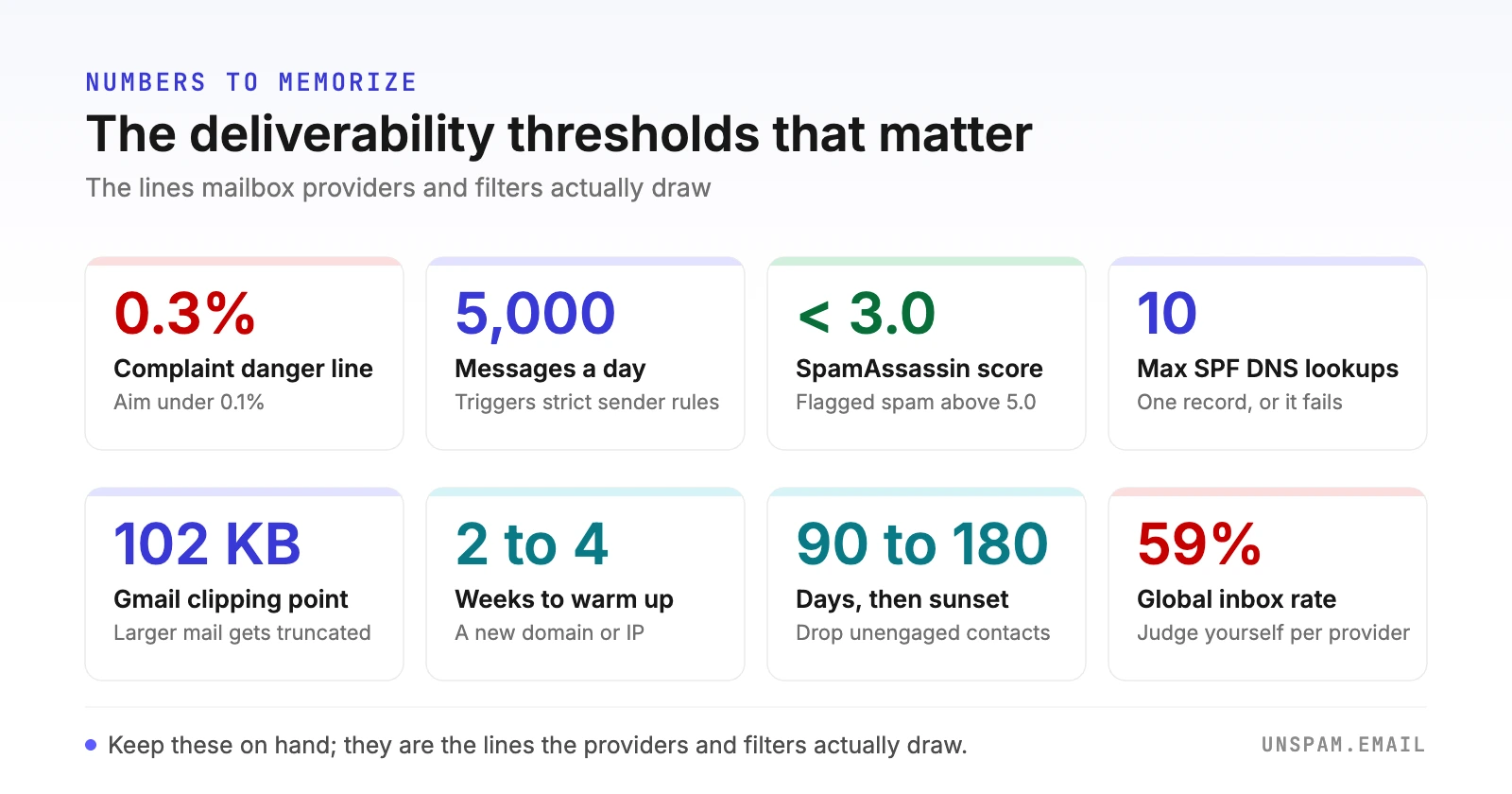
- Spam complaint rate: under 0.1% good, 0.3% is the danger line (Google, Yahoo, Microsoft).
- Bulk-sender threshold: 5,000 messages a day triggers the strict authentication rules.
- SpamAssassin score: below 3.0 is safe, above 5.0 is likely spam.
- SPF: one record, maximum 10 DNS lookups.
- Gmail clipping: messages over about 102KB get truncated.
- Warmup: two to four weeks for a new domain or IP.
- List hygiene: sunset unengaged contacts after 90 to 180 days.
The mistakes we see most often
The same avoidable errors show up again and again across the domains we test:
- Sending from the ESP's shared domain, so DKIM signs the wrong
d=and DMARC alignment fails silently. - Publishing SPF and DKIM but not DMARC, which leaves you out of compliance with the very rules being enforced (only 58% publish it).
- Going full volume from a cold domain instead of warming up.
- Mailing purchased or long-dead lists, which drives complaints and spam-trap hits.
- Shipping image-heavy or untested HTML that breaks in Outlook and Gmail.
- Skipping the final test, then discovering the spam problem from falling revenue instead of a report.
The pre-send checklist (copy this)
- SPF, DKIM, and DMARC published and aligned
- Domain and sending IP clear of blacklists
- List cleaned and verified, complaint rate under 0.1%
- New domain or IP warmed up gradually
- Content checked for spam words, tested HTML, and working links
- One-click List-Unsubscribe header in place
- Consistent schedule and an engaged list
- Spam test and inbox placement test passed
Deliverability is not one big fix, it is this handful of habits repeated before every send. Ready to check your next campaign? Run a free spam test and an inbox placement test before you hit send, no signup required.
