

Inbox placement is the share of your sent email that lands in the primary inbox rather than the spam folder, a promotions tab, or nowhere at all. It is the metric that answers the only question that really matters in email: did the message actually reach the person, somewhere they will see it?
Most senders never measure it. They watch their delivery rate, see 98% or 99%, and assume the job is done. But delivery and inbox placement are different things, and the gap between them is where email programs quietly fail. A 99% delivery rate can sit on top of a 40% inbox rate, which means almost half the audience never saw the email even though the server "delivered" it.
This guide explains what inbox placement is, how it differs from delivery rate and deliverability, what a good rate looks like in 2026 (with real per-provider benchmarks), and how to measure and improve it.
What is inbox placement?
Inbox placement rate is the percentage of accepted emails that reach the primary inbox instead of the spam folder, a tab, or the void. It is sometimes called inbox rate or seed placement.
The key word is accepted. Once a receiving server accepts your message (the step your sending tool reports as "delivered"), the provider's filter makes a second, invisible decision: inbox, spam, or tab. Your own sending statistics cannot see that decision, because it happens inside the recipient's mailbox provider. Inbox placement is how you measure it.
A simple way to picture the journey: your email is sent, then accepted (delivered) or bounced, and then, if accepted, placed in the inbox, spam, or a tab. Delivery measures the second step. Inbox placement measures the third.
Inbox placement vs delivery rate vs deliverability
These three terms get used interchangeably, but they measure different things. Confusing them is the single most common reason senders think their email is fine when it is not.
| Term | What it measures | The question it answers |
|---|---|---|
| Delivery rate | The share of emails the receiving server accepted instead of bouncing. Says nothing about where the message landed. | Did the server take my email? |
| Inbox placement rate | The share of accepted emails that reach the primary inbox rather than spam or a tab. | Did my email reach the inbox? |
| Deliverability | The whole discipline of getting email to the inbox: authentication, reputation, list quality, engagement, and content. | Why does or does not my email reach the inbox? |
Put plainly: a high delivery rate just means your email was not rejected outright. Inbox placement tells you whether it actually arrived somewhere a human will look. Deliverability is everything you do to make that happen. For the full set of numbers worth watching, see our guide to email deliverability metrics.
Why are my emails delivered but not in the inbox?
Because "delivered" only means accepted. After acceptance, the mailbox provider's filter decides placement using signals you do not control directly:
- Sender reputation. The provider's running trust score for your domain and IP, built from past sending. This is the heaviest factor. See sender reputation.
- Authentication. Whether your mail passes SPF, DKIM, and DMARC. Failing these is a fast track to spam.
- Recipient engagement. Opens, replies, and "not spam" actions tell the provider people want your mail. Low engagement tells it the opposite.
- List quality. Sending to dead addresses, spam traps, and people who never opted in damages placement for everyone on the list.
- Content and formatting. Spam-trigger wording, broken links, image-only emails, and risky HTML push a borderline message over the line. See spam trigger words to avoid.
The result is the "delivered does not mean seen" gap that defines modern email. An email can be accepted by Gmail and still be filtered straight to spam. For more on that, read Gmail deliverability and why your emails are not being delivered.
What is a good inbox placement rate?
For a healthy, permission-based list, aim for 90% or higher to the primary inbox. Anything below 80% means a meaningful slice of your audience is missing the message, and below 60% you have a real deliverability problem to fix.
Real-world averages run lower than that target. Across the emails tested through Unspam's deliverability benchmark over the trailing twelve months, 59% reach the primary inbox, 7% land in a tab, and 34% go to spam. That average is depressed because most people run a test precisely when they suspect a problem, so the sample skews toward senders actively diagnosing an issue. Your own well-run program should beat it.
The more important point: there is no single "inbox rate." Placement varies sharply by mailbox provider, so a global average hides the truth.
Inbox placement by provider
The same email can sail into the inbox at one provider and hit spam at the next. Here is how placement breaks down across providers in our benchmark, ordered from most to least forgiving.
| Provider | Reaches the inbox | Goes to spam |
|---|---|---|
| Amazon WorkMail | 100% | 0% |
| ProtonMail | 98% | 2% |
| Zoho | 94% | 6% |
| GMX | 81% | 19% |
| Gmail | 67% | 33% |
| Outlook | 52% | 49% |
| AOL | 39% | 61% |
| Yahoo | 38% | 62% |
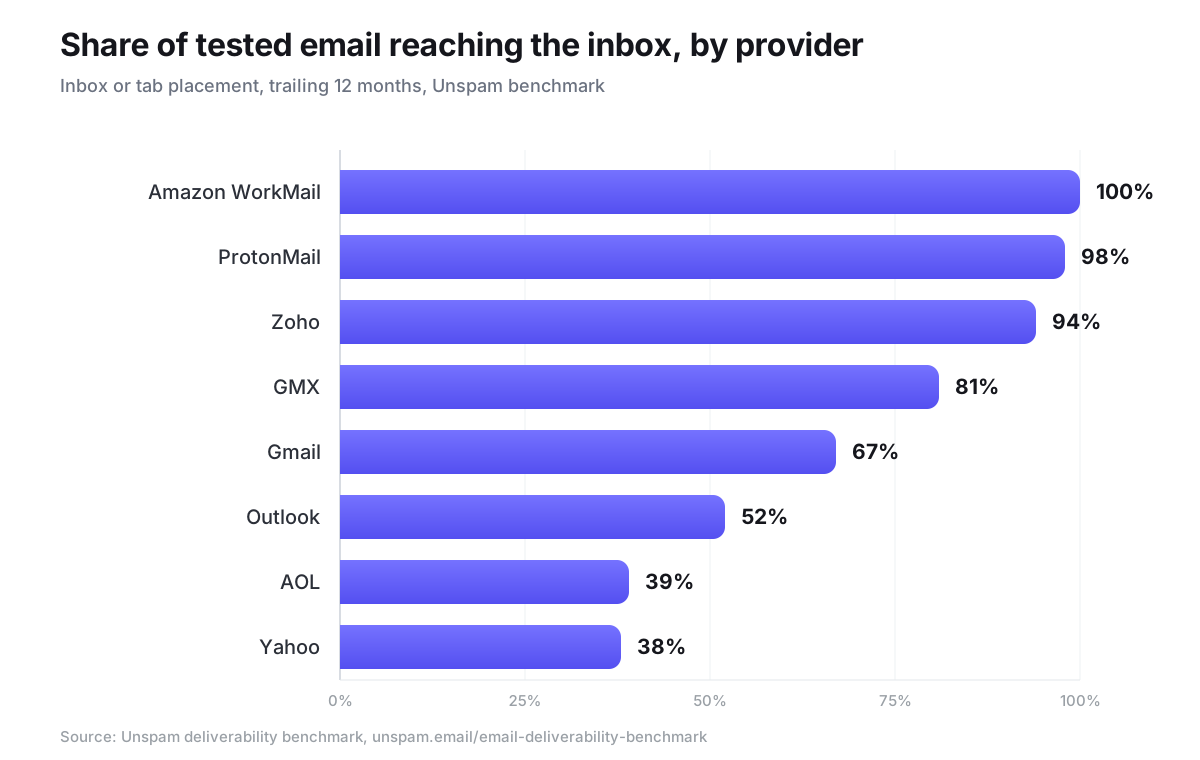
The spread is the lesson. The harsh consumer providers (Yahoo, AOL, and Outlook) filter aggressively, sending a third to nearly two-thirds of tested mail to spam, while Gmail sits in the middle and business or privacy-focused providers are lenient. Figures are rounded to the nearest percent. If your audience is mostly on Yahoo or Outlook, a 90% Gmail inbox rate will not save you, which is exactly why you have to test the providers your recipients actually use.
What about Gmail's tabs?
At Gmail, reaching the inbox is not the end of the story, because the inbox itself is split into tabs. Landing in Promotions instead of Primary is not spam, but it usually means far lower opens.
Of the Gmail mail that reaches the inbox in our benchmark, 82% lands in the Primary tab with no category, 14% in Updates, 3% in Promotions, and 1% in Forums. That is healthier than many marketers fear, but it depends heavily on content and engagement: transactional and conversational mail tends to reach Primary, while heavily templated, image-led campaigns drift to Promotions.
What moves inbox placement?
Placement is the output of five inputs. Improving your inbox rate means improving these, roughly in order of weight:
- Sending reputation. Consistent volume, low complaints, and few bounces build the trust filters reward.
- Authentication. Valid SPF, DKIM, and a published DMARC policy. In our benchmark, 90% of domains pass SPF and 87% DKIM, but only 57% publish a DMARC policy, so this is still a common, fixable gap.
- Engagement. Mail that gets opened and replied to gets inboxed. Mail that gets ignored or marked spam gets filtered.
- List hygiene. Clean, opted-in lists protect placement. Dead addresses and spam traps poison it.
- Content. Honest subject lines, a healthy text-to-image balance, working links, and no spam-trigger language.
How to measure inbox placement
You cannot measure inbox placement from your own dashboard, because it only shows delivery and bounces. You need seed testing: a panel of real mailboxes across the major providers that receives your email so a tool can record where each copy landed.
That is what an inbox placement test does. Send your campaign to the seed list, and you get a per-provider breakdown of inbox, spam, and tab placement, so you can see the Gmail-versus-Yahoo gap instead of guessing. Run a free inbox placement test to see where your email lands at Gmail, Outlook, Yahoo, and more, and pair it with a full email health check for the authentication and reputation signals behind the result.
How to improve inbox placement
Once you can measure it, the playbook is consistent:
- Authenticate everything. Set up SPF, DKIM, and DMARC before anything else.
- Protect your reputation. Warm up new domains, send consistently, and keep complaints low.
- Clean your list. Remove dead addresses, verify new signups, and honor unsubscribes immediately.
- Earn engagement. Send relevant mail to people who asked for it, and sunset recipients who never open.
- Tighten content. Keep subject lines honest, balance text and images, fix broken links, and avoid the words that trip filters.
- Re-test after every change. Confirm the fix moved inbox placement, not just delivery. A change that lifts your delivery rate but not your inbox rate has not actually helped.
Inbox placement is the difference between sending email and being seen. Measure it per provider, treat 90%+ as the goal, and keep the reputation, authentication, list, and content signals strong. That is how a "delivered" email becomes a read one.
