

Link tracking is the quiet trade every email sender makes: you wrap your links so the platform can count clicks, and in return you hand a filter one more thing to judge. Done well, it costs you nothing. Done the way most platforms ship it by default, it is one of the most common hidden reasons that clean, authenticated mail still lands in spam. The redirect itself is not the problem. The domain behind it, the number of hops, and whether that domain matches the rest of your email are.
This matters more than it looks. In our own data, more than one email in five we check contains at least one broken link, and many of those breaks are in tracking redirects, not the visible URL. Only 14% of senders pass the one-click List-Unsubscribe check, a header that is really just a well-behaved link. This guide covers how link tracking actually works, the specific ways it trips spam filters, the branded tracking domain that fixes almost all of it, and how to test a real send before it goes out.
What link tracking is and how it works
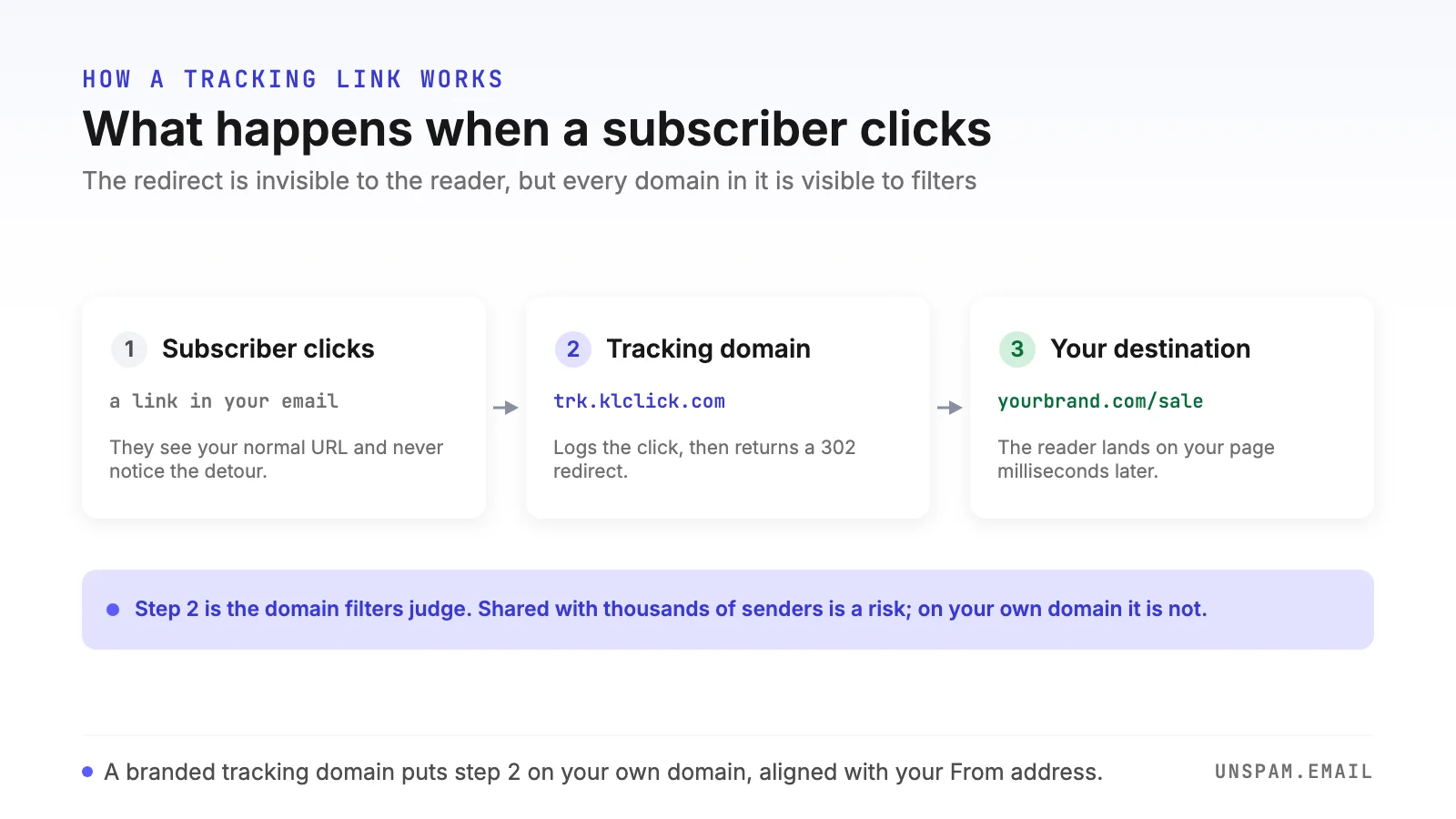
When you turn on click tracking, your platform does not leave your links alone. It rewrites every href to point at its own tracking domain, with the real destination encoded in the URL. A link that reads https://yourbrand.com/sale in the email body actually points at something like this:
<a href="https://trk.klclick.com/CL0/https://yourbrand.com/sale/1/abc123...">
  Shop the sale
</a>
When the subscriber clicks, the request hits the tracking domain first. The platform logs the click, then issues an HTTP 302 redirect to the real destination. The reader lands on your page a few milliseconds later and never sees the detour. Open tracking works the same way with a different mechanism: a 1x1 transparent pixel image is embedded in the message, and when the email loads that image, the request records an open.
So every tracked email carries two things a filter can inspect: a set of links that resolve through a redirect domain, and a remote image that phones home on open. Neither is inherently suspicious. What matters is whose domain that redirect uses, and how well it holds up.
Does link tracking hurt deliverability?
The honest answer is that tracking does not hurt deliverability by default, but the default configuration usually does. Mailbox providers process billions of tracked links a day and expect to see redirects; a well-implemented tracking link is close to invisible to them. The risk is not the concept, it is the execution.
Filters evaluate the reputation and safety of every domain in your email, not just the domain you send from. That includes the domain your links redirect through. If that domain is shared, mismatched, chained, or broken, the tracking layer becomes the weakest link in an otherwise strong send, and the whole message pays for it.
A filter does not stop at your From address. It follows your links, and it judges you by where they lead.
The five ways tracking links trip spam filters
1. Shared tracking domains you do not control
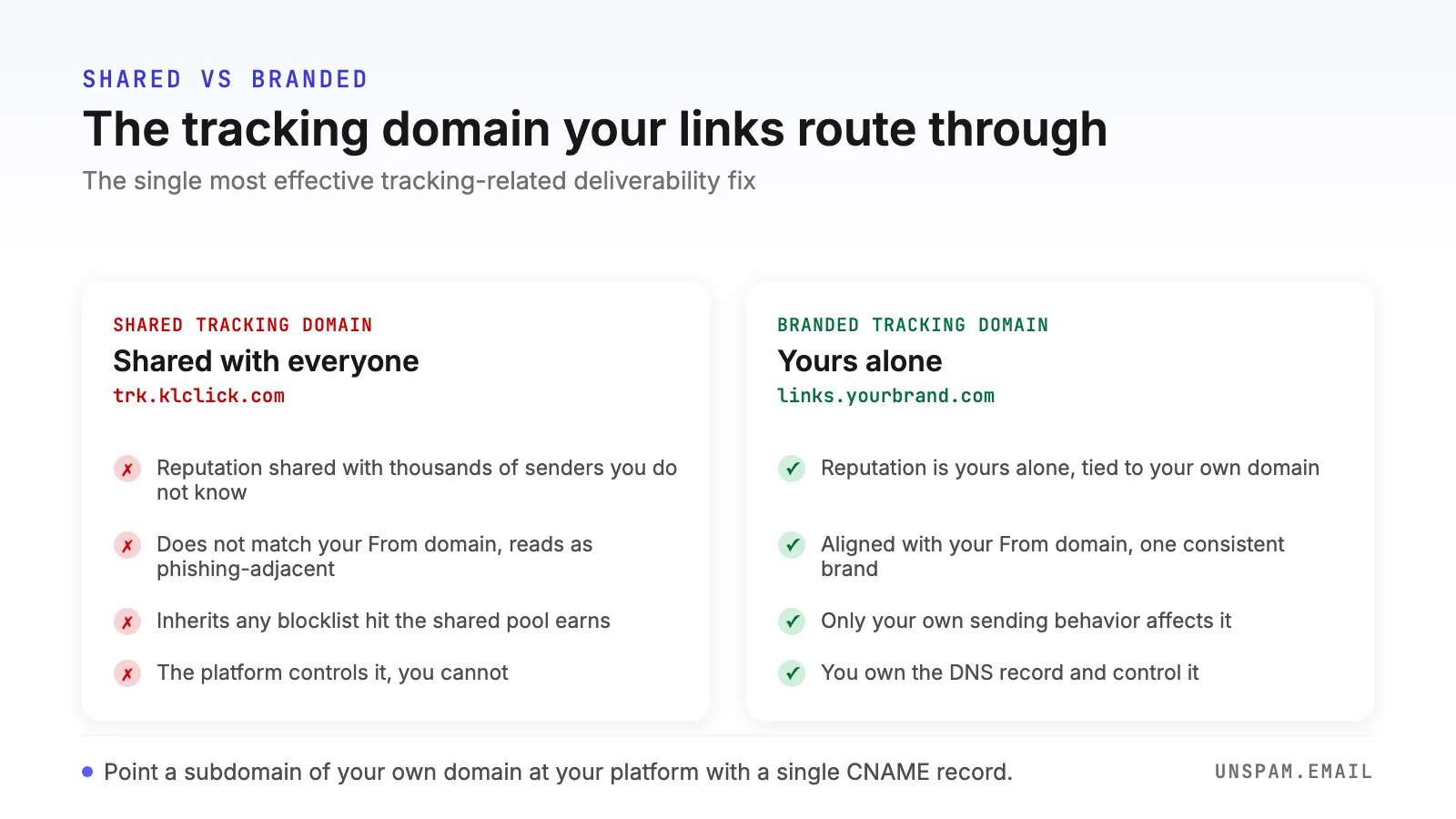
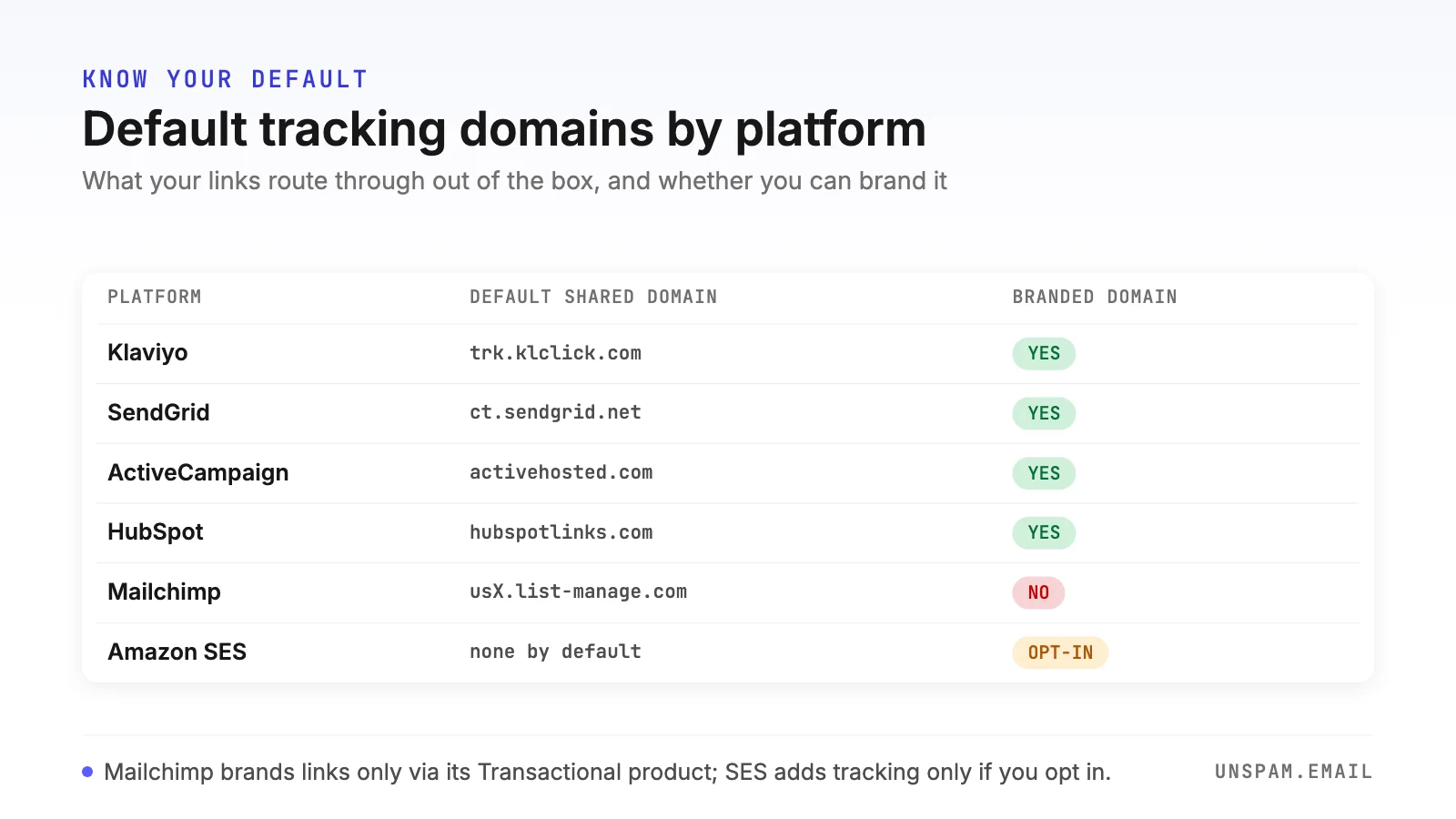
By default most platforms route your links through a shared tracking domain used by every other customer on the plan. Klaviyo uses trk.klclick.com, SendGrid uses ct.sendgrid.net, ActiveCampaign uses activehosted.com, HubSpot uses hubspotlinks.com, and Mailchimp rewrites links through usX.list-manage.com. You share that domain's reputation with thousands of senders you have never met, some of whom send far worse mail than you. When one of them gets the domain flagged, your links inherit the flag.
Some of these shared domains have a documented history of phishing abuse, precisely because attackers like to hide malicious destinations behind a trusted redirector. That history follows every legitimate sender on the same domain.
2. A link domain that does not match your From domain
Phishing works by making a message look like it comes from one brand while the links go somewhere else. Filters learned that pattern, so a mismatch between your From domain and your link domain reads as risk. When your mail says it is from yourbrand.com but every link points at trk.klclick.com, you are showing filters the exact shape they were trained to distrust, even though you are legitimate. Aligning your links to your own domain removes that signal entirely.
3. Redirect chains and URL shorteners
Every extra hop is another chance to look evasive. If your tracking redirect points at a bit.ly link that points at another redirect that finally lands on your page, filters see a chain designed to obscure the destination, which is exactly what real phishing does. Public URL shorteners are a well-known spam trigger on their own, and stacking them on top of tracking redirects compounds the problem. Keep it to a single hop: the tracking domain to the destination, over HTTPS, and nothing in between.
4. Broken and expired tracking links
A tracking link that returns an error, points at a dead redirect, or has expired is worse than no tracking at all. It frustrates readers, and filters treat broken links as a quality and trust signal. This is more common than senders expect: about 22% of the emails we check contain at least one broken link, and tracking redirects are a frequent culprit because they add a layer that can fail independently of your real URL.
5. Insecure (HTTP) tracking links
A tracking link served over plain HTTP instead of HTTPS is flagged by modern filters and browsers as insecure, and it undercuts the trust you built with authentication. Every link, tracked or not, should resolve over HTTPS. Most platforms do this now, but custom setups and older templates sometimes do not, so it is worth confirming.
Security gateways: the corporate inbox problem
There is a sixth failure mode that hits business recipients specifically. Enterprise security gateways like Microsoft Defender for Office 365, Proofpoint, and Mimecast rewrite and pre-scan links, following every URL in a message before the recipient ever clicks. When your links route through a shared tracking domain that any of these gateways distrusts, the whole message can be quarantined after your platform reports it as sent. You see clean delivery to Gmail and Yahoo, then silence from corporate domains. The trigger is almost never your authentication, which passes; it is the shared link domain. Senders hit this most on platforms that wrap links through a shared redirector, and the fix is the same one that solves the consumer-inbox problems: move your links onto your own domain. For the platform-specific version of this, see the ActiveCampaign and HubSpot deliverability guides.
Open tracking, the pixel, and Apple Mail Privacy Protection
Open tracking carries a smaller deliverability cost than click tracking, but it has its own trap. The 1x1 pixel adds a remote image request, and an email that is all images with a single tracking pixel and little live text leans toward the profile filters distrust. The bigger issue now is measurement, not placement. Since Apple Mail Privacy Protection launched, Apple pre-loads the tracking pixel on delivery for its users, logging an open whether or not anyone read the message. With a large share of opens now coming from Apple, open rates are inflated across most lists.
That breaks any logic built on opens. Engagement segments fill with people who never actually read you, and sunset flows that suppress non-openers stop firing correctly. Build your engagement and suppression rules on clicks and real on-site behavior instead, which are far harder to fake, and treat opens as a soft directional signal. Our guide to email engagement metrics covers which signals still mean something.
Shared versus branded tracking domain
A branded tracking domain, sometimes called a custom tracking domain or custom link domain, is a subdomain of your own domain that you point at your platform. Instead of trk.klclick.com, your links resolve through links.yourbrand.com. It is the single most effective tracking-related deliverability fix, and the difference is stark.
| Factor | Shared tracking domain | Branded tracking domain |
|---|---|---|
| Reputation | Shared with thousands of unknown senders | Yours alone, tied to your own domain |
| Alignment with From domain | Mismatched, reads as phishing-adjacent | Aligned, one consistent domain |
| Blocklist exposure | Inherits any listing the pool earns | Only your own behavior affects it |
| Phishing-abuse history | Carries the shared domain's past | Clean, starts from your reputation |
| Control | None, the platform manages it | You own the DNS record |
How to set up a branded tracking domain
Setup is a single DNS record on most platforms. You create a subdomain, add a CNAME record pointing it at the value your platform gives you, then enable the custom domain in the platform. For Klaviyo, for example, you publish a CNAME like this and connect it under the click tracking settings:
links.yourbrand.com. CNAME dct.klaviyodns.com.
The subdomain you choose is cosmetic. Common choices are links, trk, email, or click. What matters is that it is under your own registered domain so it aligns with your From domain. Here is where the default shared domain lives on the major platforms, and whether a branded option exists:
| Platform | Default shared domain | Branded tracking domain |
|---|---|---|
| Klaviyo | trk.klclick.com | Yes, CNAME to dct.klaviyodns.com (paid) |
| SendGrid | ct.sendgrid.net | Yes, brand a link subdomain |
| ActiveCampaign | activehosted.com | Yes, on higher-tier plans |
| HubSpot | hubspotlinks.com | Yes, set a Click tracking domain |
| Mailchimp | usX.list-manage.com | No custom link domain for standard sends |
| Amazon SES | None by default | Bring your own tracking or a configuration set |
Two platform notes worth knowing before you rely on this. Mailchimp does not offer a custom link-tracking domain for standard campaigns, only its separate Transactional product does, so a strict business audience is a genuine constraint there. Amazon SES does not rewrite your links at all unless you add open and click tracking through a configuration set, which means SES senders start with the lowest-risk default and only take on tracking-domain risk if they opt into it.
When to turn link tracking off
Tracking is not free on every message. On transactional and security mail, it can actively break the experience. Password resets, email verification, and magic-login links are single-use by design, and corporate security scanners follow every link in a message before the recipient does. A scanner that pre-clicks a one-time-use link wrapped in a tracking redirect can consume or expire it, so the real user arrives at a dead link and cannot reset their password.
For that reason, turn click tracking off on password resets, verification, and other one-time-use links, or make sure those links tolerate being fetched more than once. The analytics you lose on a password-reset email are worthless anyway, and the failed logins you prevent are not. Keep tracking where it earns its keep, on marketing campaigns where click data drives real decisions, and drop it where it only adds risk.
How to test whether your tracking links hurt deliverability
You cannot judge this from the platform's own reporting, which shows you the send, not how a real inbox treats it. Test the actual message:
- Send a real campaign to a seed address from a free spam test or an inbox placement test, using your normal sending path so the links are wrapped exactly as a subscriber would receive them.
- Inspect the wrapped links in the delivered message. Confirm the tracking domain is a subdomain of your own domain, not a shared one, and that each link resolves in a single HTTPS hop with no shortener in the chain.
- Check for broken links, which the spam test flags, and confirm no link returns an error or an insecure warning.
- Read placement per provider. If Gmail and Yahoo are clean but corporate domains filter you, the shared link domain is the prime suspect.
An email heatmap then shows whether readers actually reach and click your links once placement is solved, and deliverability monitoring watches for the reputation drift that a bad tracking domain causes over time. For the content side of the same problem, the spam word checker catches copy that compounds link risk.
The link tracking deliverability checklist
- Route click and open tracking through a branded tracking domain on your own domain
- Confirm your link domain matches your From domain (both under yourbrand.com)
- Keep every link to a single HTTPS hop, no URL shorteners in the chain
- Fix broken and expired tracking links before every send
- Turn off click tracking on password resets, verification, and one-time-use links
- Base engagement and sunset rules on clicks and on-site behavior, not opens
- Test a real send to a seed inbox and inspect the wrapped links per provider
Link tracking is worth keeping. It tells you what your audience actually cares about, and click data is one of the few engagement signals Apple's privacy changes have not corrupted. The goal is not to strip it out, it is to make it look like what it is: your own domain, sending your own subscribers to your own pages. Get the tracking domain right and the rest of your deliverability work stops leaking out through your links. Want to see how your next campaign's links hold up? Run a free spam test and read the result in about 30 seconds, no signup required.
