

So a test result or a raw header just told you dmarc=fail, and the natural first reading is the scary one: some receiver thinks your email is fake. That is rarely the story. Nearly every DMARC failure I look at is legitimate mail that authenticated as the wrong domain. SPF vouched for the ESP instead of you. DKIM verified, but against a shared key. A forwarder rewrote one header too many. The message was real; the paperwork pointed at somebody else.
The one-sentence answer: DMARC fails when a message cannot show even one authentication check that both passes and matches the domain in your From header. The rest is diagnosis and repair: what the verdict is built from, the seven causes that keep showing up in spam test results, what fixes each one, and when to tighten your policy afterward.
You are in crowded company, for what it is worth. Across the checks run through Unspam, 93% of senders pass SPF and 90% pass DKIM, yet only 48% pass DMARC. No other link in the authentication chain fails half as often, and the list below is essentially the anatomy of that gap.
What dmarc=fail actually means
DMARC does not inspect content, links, or sending volume. It asks exactly two questions about a message claiming to be from yourbrand.com:
- Did SPF pass, and is the domain it passed for aligned with the From domain? SPF validates the envelope sender (the Return-Path address used during the SMTP conversation), which the reader never sees. Alignment means that hidden domain and your visible From domain match.
- Did DKIM pass, and is the signing domain (the
d=tag in the signature) aligned with the From domain?
One aligned pass is enough. SPF can fail completely and DMARC still passes if an aligned DKIM signature verifies, and the other way around. No fact in this topic does more practical work than that single OR. It also explains why so many failures confuse people: both checks can pass individually while DMARC fails, because neither passed for your domain.
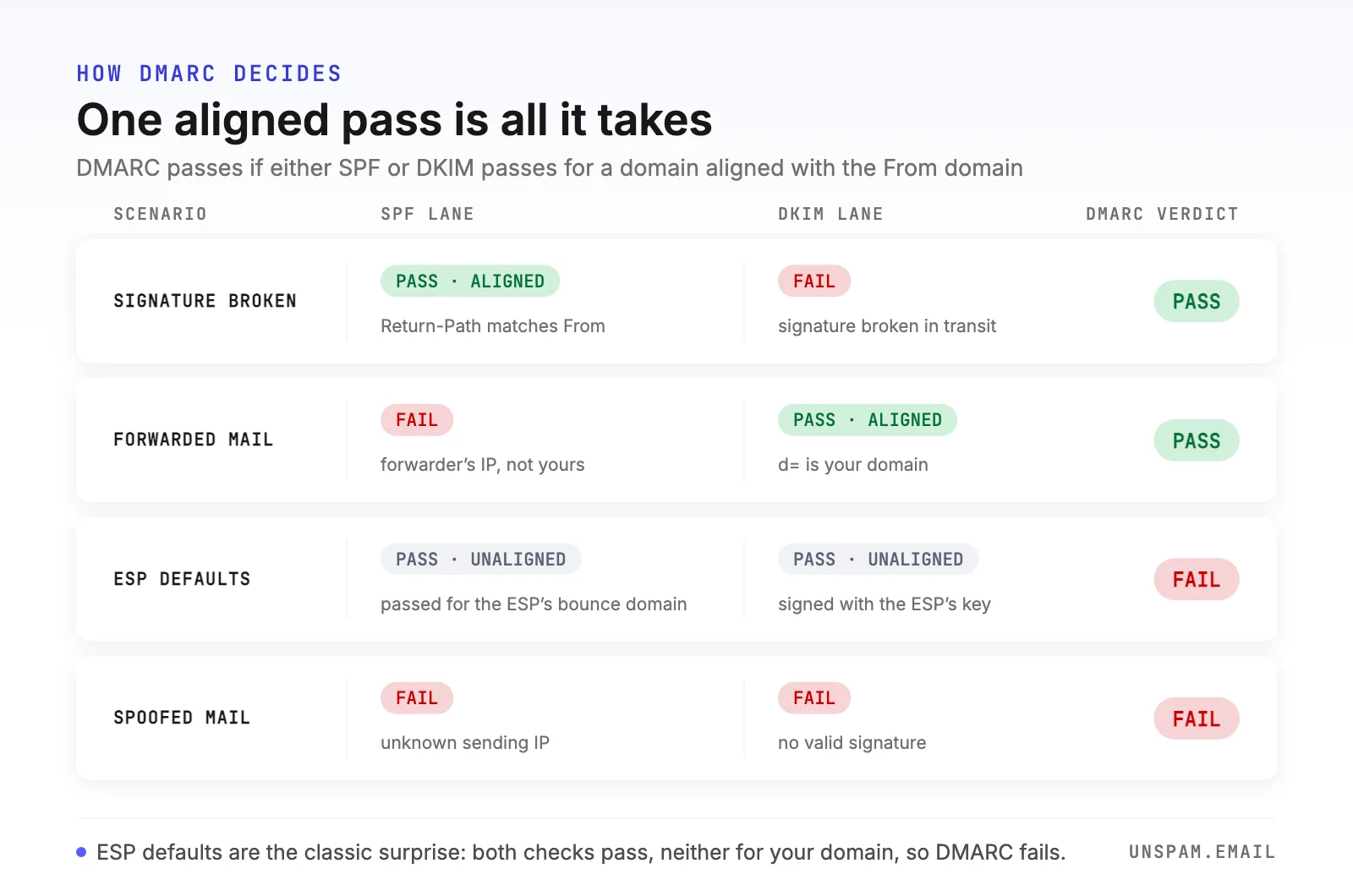
DMARC never asks "did authentication pass?" It asks "did authentication pass for the domain the reader actually sees?"
By default, alignment is relaxed: any subdomain of the same organizational domain counts, so mail signed by mail.yourbrand.com aligns with a From of yourbrand.com. Your record can demand strict alignment (adkim=s, aspf=s), requiring an exact match, which is a deliberate hardening choice and a common self-inflicted failure, as we will see. For a deeper comparison of how the two underlying checks differ, see DMARC vs DKIM.
First, find out why yours is failing
Do not fix blind. Every DMARC verdict comes with the evidence attached, in three places.
Run a pre-send test. The free Unspam spam test authenticates the exact message you are about to send and shows the SPF, DKIM, and DMARC results side by side, including which domains each check evaluated, next to the SpamAssassin, blacklist, and content checks. This is the only route that catches the failure before a subscriber sees it.
Read the Authentication-Results header. On any delivered message, the receiving server writes its verdict into the headers. In Gmail, open a message and choose Show original; the summary at the top and the raw Authentication-Results line tell the whole story:
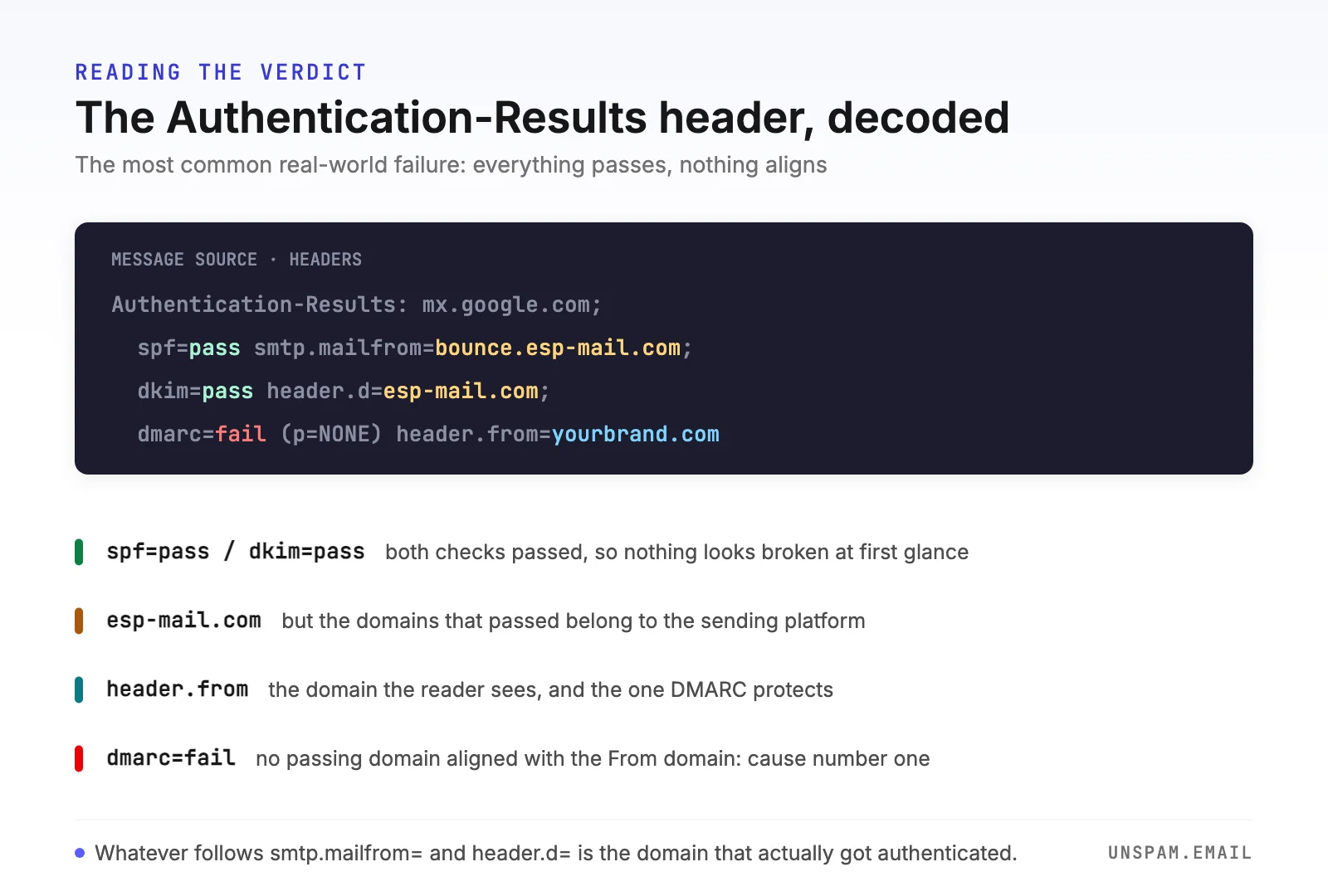
This example is the single most common real-world failure. Both checks pass, and DMARC still fails, because bounce.esp-mail.com and esp-mail.com do not align with yourbrand.com. The header hands you the diagnosis: the domains after smtp.mailfrom= and header.d= are the ones that earned the pass, and neither is yours.
Read your aggregate reports. If your DMARC record includes a rua address, receivers email you daily XML summaries of every source that sent mail as your domain: the IPs, the volumes, and how each authenticated. Reports are the only way to see failures on mail that never crossed your desk, including forwarded copies and spoofing attempts.
Before touching anything else, also point the free DMARC checker at your domain to confirm the record itself is present and syntactically sane.
The seven reasons DMARC fails, and the fix for each
Nearly every dmarc=fail traces back to one of these. I have ordered them by how often they turn up in real test results, so work from the top down.
| # | Cause | What the header shows | Fix in one line |
|---|---|---|---|
| 1 | ESP authenticates as itself | spf=pass and dkim=pass for the ESP's domains | Turn on custom domain authentication |
| 2 | Forwarding broke SPF | spf=fail from an IP you don't own, dkim=pass | Align DKIM; it survives forwarding |
| 3 | Mailing list rewrote the message | dkim=fail (body hash mismatch) | Nothing on your side; that is what ARC is for |
| 4 | Strict alignment, subdomain sender | pass for mail.yourbrand.com, fail on alignment | Use relaxed alignment or match exactly |
| 5 | SPF permerror | spf=permerror | Get under 10 DNS lookups |
| 6 | Broken DMARC record | dmarc=none or tools report no policy | One valid record on the _dmarc host |
| 7 | Actual spoofing | unknown IPs failing everything | Nothing; DMARC is doing its job |
1. Your ESP authenticates as itself, not as you
Out of the box, most sending platforms use their own infrastructure domains: the envelope sender is something like bounce.esp-mail.com so they can process your bounces, and the DKIM signature uses their shared key with their domain in d=. Both checks pass. For them. Your From domain gets no aligned pass, and DMARC fails exactly as the header above shows.
The fix is the setting every serious platform offers under a name like custom domain authentication, domain verification, or branded sending: you publish a few CNAME records they give you, and from then on messages are DKIM-signed as yourbrand.com (or a subdomain, which aligns under relaxed mode) and use a custom bounce domain like bounce.yourbrand.com for SPF alignment. Do DKIM first. An aligned DKIM signature alone flips DMARC to pass, even while the SPF side still points at the ESP.
2. A forwarder broke SPF
When someone auto-forwards your email (a university address forwarding to Gmail, an old domain forwarding to a new one), the forwarding server delivers it from its IP, which is not in your SPF record, so SPF fails. Forwarders that "fix" this by rewriting the envelope sender to their own domain make SPF pass again, but for their domain, which breaks alignment instead. Either way, the SPF lane is dead on forwarded mail, permanently and by design.
There is no patching SPF here; the repair is to stop needing it. A DKIM signature travels inside the message and verifies no matter which server relayed it, so a clean forward keeps an aligned dkim=pass and DMARC still passes. If your aggregate reports show a tail of SPF-only failures from mailbox providers' own IP ranges, that is forwarding, it is normal, and it is precisely why you should never publish an enforcing DMARC policy on the strength of SPF alignment alone.
3. A mailing list rewrote the message
Discussion lists are the harder cousin of forwarding: they typically add a subject tag like [members], append an unsubscribe footer, and resend from the list's own address. The footer and subject edits change the signed content, so your DKIM signature no longer verifies. The list's envelope breaks SPF alignment. Both lanes fail on mail that everyone involved wanted delivered.
Your options here are honestly limited, and I would rather say so than hand-wave. Modern lists mitigate the problem themselves, either by rewriting the From header to the list's domain (taking your domain out of the DMARC equation) or by adding an ARC seal that lets receivers vouch for the original authentication results. On your side: keep DKIM aligned so plain forwarding survives, and accept a small, harmless residue of list-related failures in your reports. If you run the list, enable its DMARC mitigation options.
4. Strict alignment when you need relaxed
If your record sets adkim=s or aspf=s, only an exact domain match counts: mail DKIM-signed by mail.yourbrand.com with a From of yourbrand.com passes relaxed alignment but fails strict. The pattern behind this one is always the same. A team enables strict mode as a hardening measure, forgets that the newsletter platform signs with a delegated subdomain, and manufactures its own failures.
Check whether your record carries adkim=s or aspf=s (the DMARC checker shows every tag). If the domains that legitimately send for you include any subdomain, either drop back to relaxed (delete the tag; relaxed is the default) or reconfigure the sender to sign with the exact From domain. Strict alignment is worth having only after your reports show a long, clean run with every source exactly matched.
5. SPF permerror: the ten-lookup limit
SPF records are evaluated with a hard budget: mechanisms that trigger DNS lookups (include, a, mx, redirect, exists) may not exceed ten in total, counted recursively through every nested include. Stack enough tools (an ESP, a CRM, a helpdesk, an old include nobody remembers), and evaluation aborts with permerror. A permerror can never become an aligned pass, so the SPF lane goes dark for every receiver, on every message.
Run your domain through the SPF checker, which counts the lookups for you, then remove includes for services you no longer use and consider consolidating or flattening the rest. While you are in there, make sure the record ends in ~all or -all; a +all tells the world anyone may send as you, which defeats the point of the whole authentication stack.
6. The DMARC record itself is broken
A surprising share of failures happen before any message is evaluated, in the DNS record:
- Two DMARC records. Merging domains, or two teams each adding one, leaves multiple TXT records on
_dmarc. The standard is unforgiving: receivers that find more than one record apply none of them. - Wrong host. The record must live at
_dmarc.yourbrand.com, not at the root and not atdmarc.without the underscore. - Syntax slips. The record must start with
v=DMARC1, tags are separated by semicolons, andruaaddresses need themailto:prefix. A typo likep=noninvalidates the policy.
Paste your domain into the DMARC checker and repair what it flags. If you would rather not hand-assemble the string, the free DMARC record generator builds a valid one from dropdown choices.
7. Someone really is spoofing your domain
Once the six misconfigurations are ruled out, what remains in your aggregate reports (unknown IPs, often geographically improbable, failing both checks on volume you never sent) is DMARC doing its job: catching forgery. This is the failure you want.
The only fix to apply here is restraint: do not loosen your policy because the reports look scary. Confirm the sources are not yours (shadow IT is real; that unknown IP is sometimes the billing system someone connected in 2019), then let your p=quarantine or p=reject policy eat the fakes. This protection is the reason sender reputation and DMARC enforcement go hand in hand.
"No DMARC record found": the five-minute fix
Tools and postmaster pages report this when there is no TXT record at _dmarc.yourdomain.com at all. Strictly speaking that is not a failure of any single message, but it stopped being a cosmetic gap in 2024, when Gmail and Yahoo began requiring senders of bulk email (Google draws the line at about 5,000 messages a day to Gmail) to publish at least a minimal DMARC policy with SPF or DKIM aligned to the From domain. Microsoft has applied the same requirement to Outlook consumer domains since May 2025. Today, no record means throttling, junking, or outright rejection at the biggest mailbox providers, which shows up as exactly the undelivered mail people then spend days chasing.
The starter record is one line, published as TXT on the _dmarc host:
v=DMARC1; p=none; rua=mailto:dmarc@yourbrand.com
It enforces nothing, satisfies the mailbox providers' minimum, and starts collecting the aggregate reports you need for everything else in this guide. Generate yours with the record generator mentioned above if you want the syntax handled for you.
What receivers do with a failing message
The consequence of dmarc=fail is whatever your own record requests, applied at the receiver's discretion:
| Policy | What you published | What typically happens to failing mail |
|---|---|---|
p=none | Monitor only | Delivered normally; failure is recorded and reported to you |
p=quarantine | Treat with suspicion | Sent to the spam folder |
p=reject | Refuse it | Bounced during delivery; the reader never sees it |
Two footnotes matter in practice. Receivers may override your policy in either direction, and the pct tag that used to sample enforcement is no longer part of the standard: RFC 9989 removed it in May 2026, so a receiver following the current standard applies your full policy to every failing message while one still on RFC 7489 honours the percentage. Sampling with pct now means two receivers treating the same mail differently, with no edit to your DNS. More importantly, p=none is not consequence-free. Filters at Gmail and Outlook weigh authentication results as a reputation signal regardless of your published policy, so a stream with chronic DMARC failures gets progressively worse inbox placement even while every message is technically delivered.
How to fix DMARC failures, step by step
This is the order that works, whether you are clearing one failing campaign or a whole domain:
- Publish or repair the record, at
p=none, with aruaaddress. Verify it with the DMARC checker. Enforcement comes last, not first. - Inventory your senders. Give the aggregate reports two to four weeks, then list every service that sends as your domain: ESP, transactional mail, CRM, helpdesk, billing, the office printer.
- Align DKIM everywhere first. For each legitimate sender, enable custom domain signing so
d=is your domain. DKIM survives forwarding, so it is the alignment that keeps working after the message leaves your hands. - Align SPF second. Set up custom bounce domains where the platform supports them, and get your record under the ten-lookup limit with the SPF checker.
- Verify per message, not per domain. Send a real message from each platform through the spam test and check all three verdicts with the DKIM checker alongside. Records can be perfect while a specific mail stream still signs with the wrong key.
- Ratchet up the policy. When reports show your legitimate sources passing, move to
p=quarantine, watch, thenp=reject. Use thet=ytest flag where you would once have staged withpct, because RFC 9989 removed the percentage and kept the test mode. That final step is the point of the whole exercise: it is what actually stops your customers from receiving fake invoices with your name on them.
Check the verdict before your subscribers do
A DMARC fail discovered in an aggregate report already cost you a campaign. The free Unspam spam test shows the same verdict before you send: SPF, DKIM, and DMARC evaluated on your exact message, with the domains each check saw, next to the spam score, blacklist, and content checks, in about 30 seconds, no signup required. If it says pass and aligned, send with a clear conscience. If it says dmarc=fail, you now know which of the seven causes to fix. None of them takes longer than an afternoon.
