

One phrase, three completely different numbers: that is the trap built into "spam score," and mixing them up sends people chasing fixes for problems they do not have. The number that decides where your email lands is a filter score, assigned by a spam filter to one specific message as an estimate of how spam-like it looks. Yet the same two words also name composite deliverability scores where higher is better, and, just to make search results messier, an SEO metric with no connection to email whatsoever.
Let me untangle the three first, then spend the rest of the guide on the one senders can actually do something about: what feeds it, what a good one looks like, and how to bring yours down before the next campaign goes out.
The three things people call a "spam score"
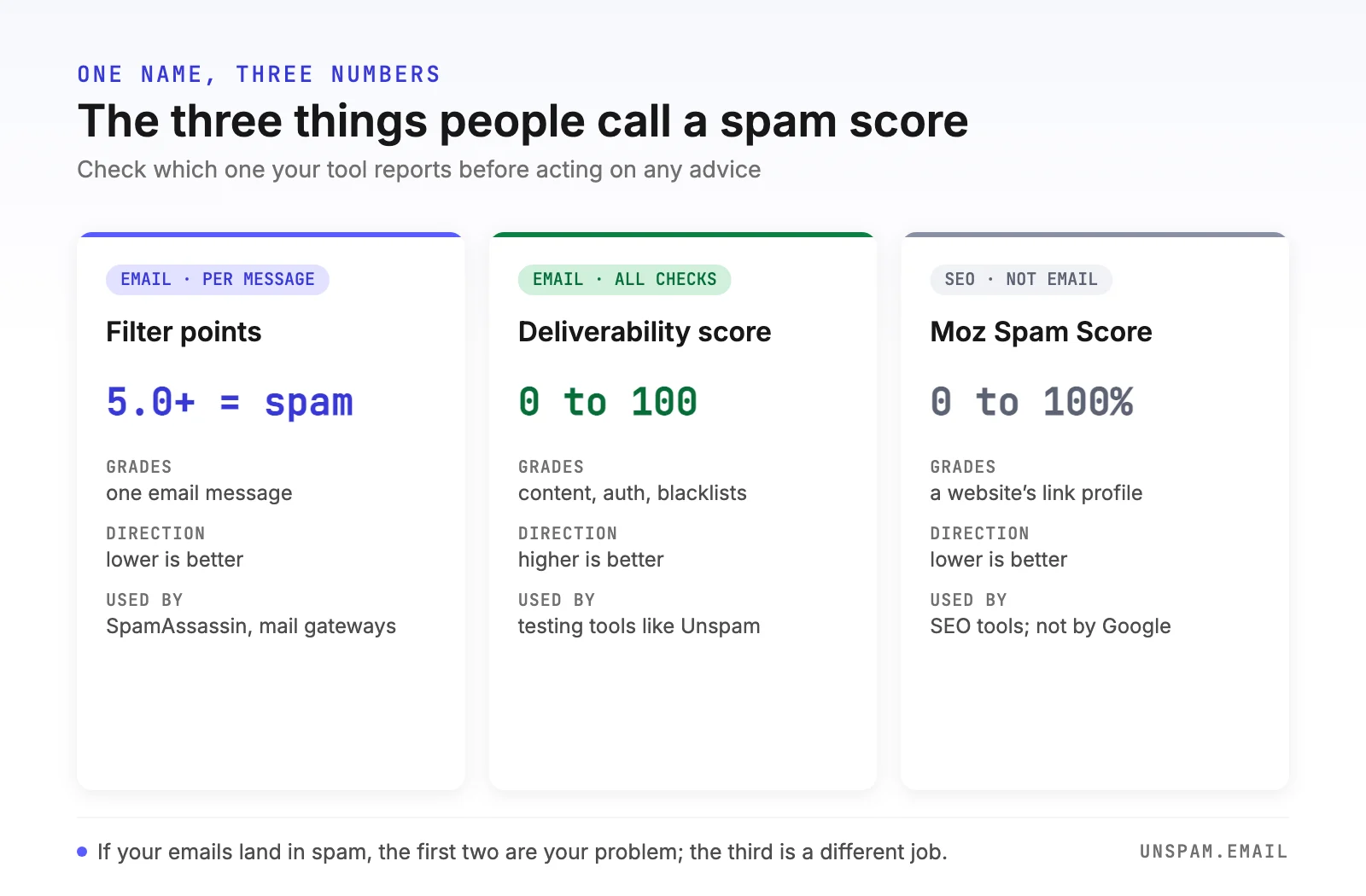
| Filter points (SpamAssassin style) | Deliverability score (0 to 100) | Moz Spam Score (SEO) | |
|---|---|---|---|
| Grades | One email message | One email, all checks combined | A website's link profile |
| Scale | Points, open-ended | 0 to 100 | 0 to 100% |
| Direction | Lower is better; 5.0+ = spam | Higher is better | Lower is better |
| Who uses it | Mail servers, gateways, spam tests | Testing tools like Unspam | SEO tools; not used by Google |
| Fix with | Content, authentication, list fixes | Same, per failing check | Backlink cleanup |
- Filter points. The classic meaning. Engines like Apache SpamAssassin run hundreds of rules against a message; each match adds or subtracts points, and crossing a threshold (5.0 by default) marks the message as spam. We decode that system rule by rule, with real point values, in the SpamAssassin score guide.
- Composite deliverability scores. Testing tools blend many checks (content scoring, SPF, DKIM, DMARC, blacklists, HTML quality) into one 0 to 100 grade. Unspam's health score works this way: higher is better, and the global average is currently 88 out of 100.
- Moz Spam Score. An SEO metric estimating how similar a website's backlink profile is to penalized sites. It is about search rankings, Google does not use it, and it cannot tell you anything about your email. If you searched for it, the fix lives in your link profile, not your campaigns.
One more number gets tangled into this: Sender Score, a 0 to 100 grade of your sending IP's reputation. That one rates the sender rather than the message; we cover it separately in the Sender Score guide.
Before comparing spam scores, check the direction. On one scale a 5 means disaster; on another it means you have work to do to reach 87.
How an email spam score is calculated
Strip away the branding and every email spam score draws on the same four groups of signals. Here is what a filter is actually weighing when it grades your message:
1. Content. The message itself: wording and structure (scored statistically, not word by word; see spam trigger words), the text-to-image balance, sloppy or deceptive HTML, subject line tricks, and attachment types. SpamAssassin's Bayes engine alone can swing a score by more than 5 points between clearly clean (-1.9) and clearly spammy (+3.5, plus stacking rules).
2. Authentication. Whether SPF, DKIM, and DMARC exist and align. The scoring is asymmetric: passing earns almost nothing (a valid DKIM signature is worth just -0.1 points in SpamAssassin), while failures, missing records, and misalignment add penalties and can fail provider policy outright. Authentication is the entry fee, not a competitive edge; here is the full setup.
3. Reputation. What the internet says about your infrastructure: whether your sending IP or domain sits on blocklists like Spamhaus, and whether the domains you link to are flagged. A single bad listing can add more points than any copy mistake, which is why checking your blacklists belongs before every major send.
4. Fingerprints and history. Collaborative databases (Razor, Pyzor, DCC) that match your message body against spam already circulating, plus, at the mailbox providers, your accumulated sender reputation: complaints, spam-trap hits, and how recipients engage.
Sit with that list for a second, because it explains a lot of frustration: only the first group is in your copywriter's hands. Everything else is infrastructure, DNS records, and list hygiene, which is exactly why "just reword the subject line" so often does nothing to a score.
What is a good spam score?
Filter points have crisp bands: below 5.0 passes a stock SpamAssassin install, below 3.0 is the safe zone with margin for stricter servers. Most senders are closer to safety than they fear; across the emails tested with Unspam, 88% already score in that safe range.
For composite 0 to 100 scores, read the bands the way Unspam's report does:
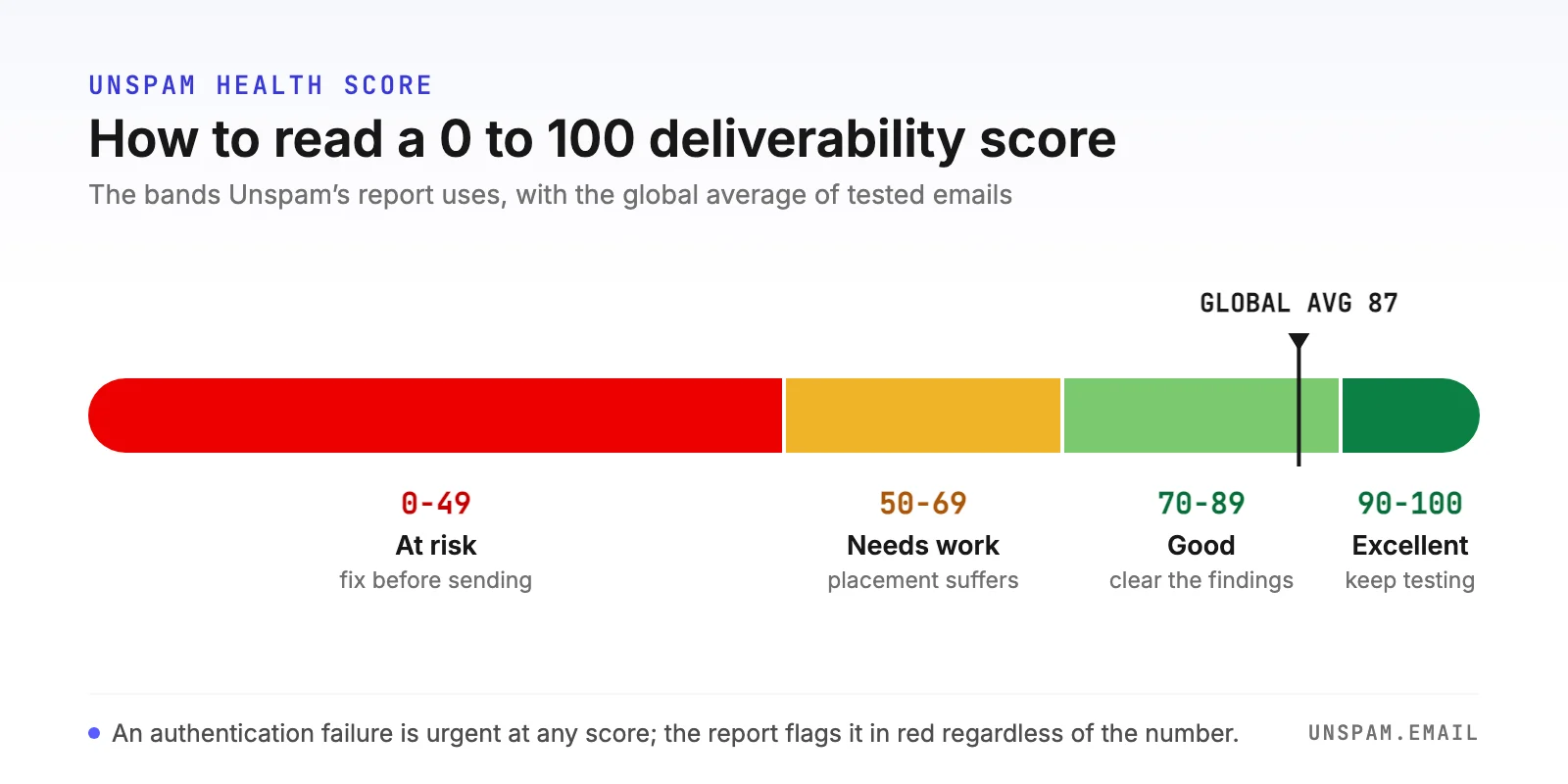
- 90 to 100: excellent. Everything material passes; keep testing before big sends.
- 70 to 89: good. Solid, with specific findings worth clearing; the global average (87) sits here.
- 50 to 69: needs work. Expect real placement problems at stricter providers.
- Below 50: at risk. Fix the failing checks before sending anything important.
One caution our own data keeps reinforcing: a strong headline score sitting on top of a critical authentication failure is false comfort, and it is precisely why Unspam's report flags auth failures in red no matter what the big number says. An SPF, DKIM, or DMARC failure is urgent even when the score looks fine.
Why a good spam score still doesn't guarantee the inbox
Think of the score as one gate in a longer gauntlet. Gmail and Microsoft run proprietary machine-learning filters (neither uses SpamAssassin), and those filters weigh things no pre-send content score could ever see: your domain's history with their users, each recipient's individual behavior, engagement across your recent sends.
Placement data makes the point better than theory. The identical, clean-scoring test message lands in the primary inbox at 98% on ProtonMail but only 22% on Yahoo. Same content, same score, wildly different outcomes, because once the content gate is passed, reputation and provider-specific filtering take over.
Use the score for what it does well, which is catching self-inflicted content and setup problems before a send costs you anything. Then verify where the mail actually lands with an inbox placement test across the providers your audience really uses. The two tests answer different questions, and senders who conflate them are usually the ones wondering why clean emails still go to spam.
How to check your spam score for free
Three ways, from fastest to most technical:
- Run a pre-send spam test. Send your draft to Unspam's free spam test and get the full picture in about 30 seconds: the SpamAssassin score with every fired rule, SPF, DKIM, and DMARC results, blacklist status, HTML and accessibility checks, and the composite health score, no signup required. This is the same deliverability check we recommend as the final step of any pre-send routine.
- Read the headers of a received copy. On any server running SpamAssassin, the
X-Spam-Statusheader lists the score, the threshold, and the exact rules that fired. Decoding that line is a skill worth having; the SpamAssassin guide walks through it field by field. - Watch the trend, not just the number. Scores move as rules update and lists change. A monthly re-test of your standard template, plus a check after any template, ESP, or domain change, catches drift while it is still cheap to fix. An automatic spam test runs that re-test on a cadence you set, so the drift shows up without anyone remembering to look.
How to lower your spam score
Ranked by points recovered per unit of effort, this is the order I would work in:
- Authenticate first. Publish and align SPF, DKIM, and DMARC, then verify with the free SPF, DKIM, and DMARC checkers. This clears penalty rules, satisfies the Gmail and Yahoo bulk-sender requirements, and stops the silent failures that cap everything else.
- Clear every blocklist. Check your IP and domain, and audit every domain you link to, including URL shorteners and tracking domains. Reputation rules carry some of the heaviest point values a filter assigns.
- Fix the content pattern, not individual words. Ship a plain-text part with your HTML, keep a real text-to-image balance, cut redundant links, and drop the known filter tripwires. Statistical filters judge the whole message, so aim for mail that reads as wanted, not for synonym swaps.
- Clean the list. Bounces, spam traps, and unengaged addresses feed the reputation side of every score you will ever receive. List hygiene is unglamorous and it works.
- Send consistently and watch engagement. Sudden volume spikes and cold audiences read as spammer behavior to the providers' models. Warm up new domains, keep a steady cadence, and sunset contacts who never open.
- Re-test before every important send. One template change can undo all of the above; 30 seconds of testing beats a week of list damage.
Test the score that actually matters
At this point you know which number to watch and which direction it should move, which already puts you ahead of most advice on the subject. The last step takes half a minute. Run your next email through the free Unspam spam test, read the SpamAssassin verdict and the health score side by side, and fix what the report names before your subscribers ever see the message. No guessing, no signup, and if the score already sits in the safe zone, you get to send with proof instead of hope.
