

Sender Score is a 0 to 100 rating that Validity assigns to a sending IP address, recalculated in most cases on a rolling 30-day average. Zero is the worst possible score and 100 is the best. Validity describes it as an IP address “measured against other IP addresses, much like a percentile ranking,” which means the number tells you where your IP sits relative to other senders rather than grading it against a fixed bar.
Two facts about Sender Score matter more than the number itself. It is one vendor’s proprietary measurement rather than an industry standard. And it is keyed to an IP address, while Gmail, Yahoo and Microsoft all gate on the authenticated domain. Understanding that gap is what turns a Sender Score lookup from a vanity check into a useful diagnostic.
What is Sender Score?
Sender Score is Validity’s numerical rating of the reputation of a single sending IP address, on a scale of zero to 100. Validity calculates it using the Validity Data Network, which it describes as “a collection of more than 80 mailbox and message security providers around the globe” that exchange sender reputation data with Validity.
The score is built from five published indices:
| Index | What Validity measures |
|---|---|
| Complaints | How complaints about that IP address compare to all other IP addresses observed by the network. Validity states the complaint score “is a rank based on your complaint rate.” |
| Volume | How much mail the network sees from that IP. Validity says sending volume “is not inherently good or bad, but it’s an important part of the overall reputation algorithm.” |
| External Reputation | How the IP address compares to all other IP addresses on reputation data drawn from outside the network, including blocklists. |
| Unknown Users | The rank of the IP address’s unknown user rate, meaning mail sent to addresses that do not exist. |
| Rejected | Mail refused by receiving servers before delivery. |
Validity is explicit that the headline number is not simply an average of those five. It calls Sender Score “a proprietary formula developed by Validity,” built by “modeling sending IPs versus their likelihood of engaging in behaviors viewed negatively by mailbox providers and filtering companies like Spamhaus,” and adds that the formula draws on “additional data elements not represented by any individual index.”
Two consequences follow. You cannot reconstruct your score from its parts, and you cannot fix a specific index and predict how far the total will move.
Who owns Sender Score, and is it an industry standard?
Validity owns and operates Sender Score, and it is not a standard. Return Path built the metric, and Validity acquired Return Path in 2019. Everything about the score, from the formula to the interpretation bands, is published by Validity, which sells reputation products alongside it.
Validity states the limits of its own product plainly. Its documentation says Sender Score “does not directly block or accept email,” that “receiving email networks and ISPs may query Sender Score and use the result as a means of assessing their email traffic and allowing or rejecting email,” and that “only the receiving network can ultimately determine if your email is delivered.”
The phrase to notice is “may query.” Validity names no mailbox provider that consumes the score, and the providers do not name it either. Gmail’s sender guidelines, the Google Postmaster Tools documentation, Microsoft’s Defender for Office 365 filtering documentation and Yahoo’s sender best practices contain no mention of Sender Score, Return Path, or any named third-party sender reputation score. All three companies document their reputation signals in detail, and none of them acknowledges a third-party IP score as an input.
How to check your Sender Score
Go to senderscore.org, enter the IP address you send from, and fill in the contact details the form requires. The lookup is free and returns a report headed with the IP address you submitted, alongside the component figures behind the score.
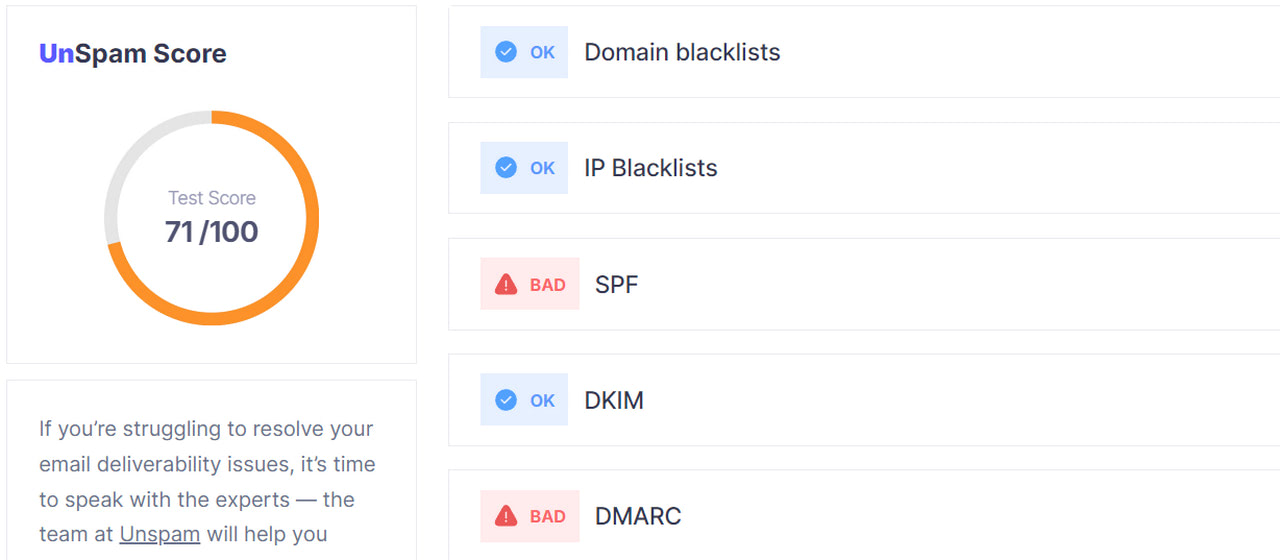
Sender score calculated by Unspam
Read two things in the Sender Score report besides the headline number. The component windows differ: the spam trap figure counts hits “over the past 7 days by this IP address,” while the volume class is based on mail seen “in the last 30 days.” And the report is scoped to that IP address alone, so if you do not know which IP your mail actually leaves from, the number is about somebody else’s infrastructure.
What is a good Sender Score?
Validity publishes three bands, and 80 is the line that matters.
| Band | Score | Validity’s own description |
|---|---|---|
| Good | 80 and above | “A history of healthy sending habits has resulted in a great email reputation.” |
| Fair | 70 to 80 | “You have a fine IP reputation score, but there’s room for improvement.” |
| Poor | Below 70 | “You need to repair your email reputation. Your IP has been flagged for engaging in risky sending behaviors.” |
The Fair band is worth reading carefully, because it is commonly misdescribed. Validity does not say a score of 75 makes you look suspicious. Its wording is that these senders have a solid grasp of email fundamentals and should keep following best practices. Sub-70 is where Validity uses the word “repair.”
One structural quirk sits underneath these bands. If the score behaved as a strict percentile, 70% of senders would sit below 70 by construction, which is not what Validity claims. The percentile wording is a simile in Validity’s own copy, not a formula, and the fixed bands are absolute. That tension is unresolved in Validity’s published material, so treat the bands as the vendor’s interpretation guidance rather than as a statistical property of the scale.
Sender Score measures an IP address, not your company
Sender Score belongs to an IP address, not to a brand, a domain, or a sending program. Validity’s methodology describes every index in terms of “that IP address,” and a live lookup returns results for the IP address you submitted.
That distinction decides whether the number means anything to you. If you send through Klaviyo, Mailchimp, SendGrid or any other provider on a shared IP pool, the Sender Score you look up is a property of the pool operator. Google states the mechanic directly: “DKIM and SPF quotas are specific to your domain,” but “the IP address quota is shared for all senders that use that IP address,” and “the activity of any senders using a shared IP address affects the reputation of all senders for that shared IP address.”
For a shared-IP sender, then, checking Sender Score is closer to auditing your provider than auditing yourself. That is still worth doing once, because a badly run pool is a real risk you can escape by switching providers or moving to a dedicated IP. It is not a measurement of your own sending.
Validity’s paid Engage platform does market Sender Score across “IPs and domains,” but Validity has published no methodology for a domain-level score, and the free lookup and all five index definitions remain IP-scoped.
Why your Sender Score can read 100 while your email lands in spam
A perfect Sender Score and a spam-foldered campaign are consistent, because the score and the filter are looking at different things. There are two separate reasons, and both are documented by the providers themselves.
The first is a keying mismatch. Sender Score keys on the IP. Gmail keys domain reputation to the authenticated domain: its Domain Reputation dashboard “only displays messages sent from the exact domain used for DKIM and SPF authentication.” Microsoft’s rejection for a non-compliant high-volume sender names the domain, not the IP: 550 5.7.515 Access denied, sending domain [SendingDomain] does not meet the required authentication level. Yahoo states that “each IP and DKIM domain has a reputation,” naming the DKIM domain rather than the envelope or From domain. Your IP can be spotless while the identifier the filter actually evaluates is not.
The second is a signal gap. Sender Score’s five indices cover complaints, volume, external reputation, unknown users and rejected messages. None of them carries engagement, content, or URL reputation. Gmail measures its spam rate as “the percent of your messages that are delivered to engaged recipient’s Inbox and then marked as spam by the recipient,” and requires bulk senders to keep that below 0.10% and never to reach 0.30%. Yahoo sets its threshold at 0.3% of mail delivered to the inbox. A campaign can be authenticated, complaint-free at the IP level, and still fail on the engagement signal that Sender Score never sees.
Return Path made this point in its own benchmark: “a high Sender Score on its own doesn’t translate to higher inbox placement rates,” because subscriber engagement, each mailbox provider’s own reputation calculations, and message content are “none of which are included in Sender Score calculations.”
What Sender Score is worth in 2026
Treat Sender Score as a cheap, lagging IP health check, not as a prediction of inbox placement. Three things set that ceiling.
The evidence for the score predicting placement is old and comes from Validity itself. The only published dataset breaking deliverability down by score band is the 2018 Sender Score Benchmark, measured on 2017 data. It reported that senders scoring above 90 averaged a 91% delivered rate against 68% for the 81 to 90 band, that at Gmail only senders above 90 averaged inbox placement over 80%, and that Microsoft was the hardest to reach with a maximum average inbox placement of 72%. That research covered more than 17,000 commercial senders, so it was substantial. It is also nine years old, and it predates the Gmail and Yahoo bulk sender requirements that took effect in February 2024 and Microsoft’s requirements of May 2025. Validity has published nothing since that segments deliverability by Sender Score band.
IP reputation carries less weight at the gateway than it used to. In Microsoft’s four-phase filtering stack, sending-IP reputation appears once, in Phase 1 Edge Protection, where “IP reputation and throttling blocks messages from known-bad connecting IP addresses.” Microsoft’s own assessment of that phase is that “edge blocks are now relatively simple for attackers to overcome,” and that “less traffic is blocked here than in years past.” The junk-or-inbox decision happens in the later phases, on authentication, content and machine learning.
The independent view has been consistent for a decade. Deliverability consultant Laura Atkins wrote in 2015 that “just because you have a great SenderScore doesn’t mean you’re going to have good delivery. Likewise, having a poor SenderScore doesn’t mean your mail is destined to be undelivered,” and that “most ISPs make the deliver or not deliver decision based on their own internal data, not on the IPs SenderScore.” Nothing the providers have published since contradicts that.
So the honest use is narrow and real. A Poor score is a genuine warning that something at the IP level, usually blocklisting or a list-quality problem, needs attention. A Good score tells you the IP is not the problem, which is useful precisely because it redirects your attention to the domain.
New Gmail protections for a safer, less spammy inbox
Sender Score compared with the reputation signals providers publish
Sender Score is the only one of the common reputation lookups that outputs a 0 to 100 number, which is exactly why senders over-weight it. The tools that come from the mailbox providers themselves report categories or raw counts.
| Tool | Run by | Keys on | What you get | Access |
|---|---|---|---|---|
| Sender Score | Validity | Sending IP | A number from 0 to 100 | Free, contact details required |
| Google Postmaster Tools | Domain and IP | Four ratings: Bad, Low, Medium, High, plus spam rate and compliance status | Free, DNS verification required | |
| Microsoft SNDS | Microsoft | Sending IP | Raw counts plus a green, yellow or red filter result | Free, IP ownership check required |
| Yahoo Sender Hub | Yahoo | DKIM domain | Complaint rate and delivered counts, no rating at all | Free, DKIM enrolment required |
| Cisco Talos | Cisco | IP or domain | Three email reputation levels: Good, Neutral, Poor | Free, no signup |
Four details in that table are routinely reported wrong. Google’s four ratings are Bad, Low, Medium and High, and “Fair” is not one of them. Google is retiring both the Domain and IP Reputation dashboards in Postmaster Tools v2, with a replacement promised and no date published, on the stated grounds that reputation data “is not easily actionable for most senders.” Talos computes a granular email reputation score from -10 to +10 and groups it into three labels “for simplicity reasons,” so its Neutral rating means “within acceptable parameters” and is commonly just a symptom of low volume, not a warning. And Microsoft SNDS is the only free feed for Outlook.com IP space, which makes its absence from most reputation guides a real gap.
If you want a single view instead of five lookups, run a message through the free email health check and read the authentication, blocklist and content results together.
How to raise a Sender Score that has dropped
Fix the inputs Validity actually measures, then wait out the window. Because the score is calculated in most cases on a rolling 30-day average, a change you make today is diluted by the previous 29 days of history until that window rolls past. Nothing you do produces a same-week result.
Work the five indices in order of how fast they move.
Clear blocklistings first, because they feed the External Reputation index and they are the one input with a same-day fix. Check your IP and your domain against the major zones, then follow each operator’s delisting process. The Unspam deliverability benchmark puts IP-level blocklisting at 6% of the sending IPs we test against 0.30% of domains, so the IP is where this problem concentrates.
Cut the unknown user rate by removing addresses that no longer exist. Hard bounces are the visible symptom, and cleaning the list is the fix. This also reduces the chance of hitting recycled spam traps, which the report counts on a seven-day window.

Email validation catches addresses that no longer exist
Bring the complaint rate down by making unsubscribing trivial and by suppressing disengaged segments. Complaints are ranked against other IPs rather than scored against a fixed threshold, so a small absolute number on a small volume can rank badly.
Then move to the domain, because that is where the mailbox providers are actually looking. Authentication is the lever with the widest gap: across the domains we test, 93% publish a valid SPF record and 90% sign with a working DKIM key, but only 48% publish a DMARC policy, leaving 52% with none. Those figures come from the Unspam deliverability benchmark and measure a different thing from Sender Score, which contains no authentication index at all. They are the clearest signal of where most senders are still exposed.
For the durable version of this work, the tactics that improve sender reputation and the wider email reputation strategies go further than a score repair. M3AAWG’s Sender Best Common Practices, Version 3.0 remains the reference document for senders, though it was published in February 2015 and predates DMARC enforcement norms, BIMI and the 2024 bulk sender rules.
Check the domain, not just the number
Look up your Sender Score, act on it if it is Poor, then spend the rest of your effort on the domain. That order reflects what each identifier is actually worth.
Sender Score answers one question well: is this IP address behaving like the IPs that get filtered? That is worth knowing, it costs nothing, and a Poor rating is a real signal to act on. It does not answer the question most senders are asking. The identifier that Gmail, Yahoo and Microsoft evaluate is the authenticated domain, and the signals that decide inbox placement include the engagement and content that Sender Score never measures. Return Path said as much in its own benchmark, and the providers’ documentation has only moved further in that direction since.
If you want to see both at once, run a full deliverability test and read the IP, the domain, the authentication and the content in a single report.
