

A transactional email service sends the one-to-one messages your application generates: password resets, receipts, shipping notices, verification codes. Picking one is usually framed as a price comparison, and that is the wrong frame. Every service on this page can put a message on the wire for a fraction of a cent. What separates them is whether the message arrives, and the features that decide arrival are the ones the pricing pages say least about: whether the service keeps your transactional stream away from your marketing stream, what it does about a shared IP pool, and what its documentation asks you to publish in DNS.
This page ranks services on those mechanics, quotes every price from the vendor's own pricing page with the date we read it, and publishes no number we could not verify at the source.
A transactional email service delivers application mail, not campaigns
A transactional email service is infrastructure that accepts a message from your application and delivers it to one recipient who triggered it. The trigger is the defining feature. Somebody resets a password, places an order, or requests a verification code, and a message goes out in response to that specific action.
Three properties follow from the trigger, and they are why transactional providers exist as a separate category from campaign tools.
Latency matters. A password reset that arrives in four minutes is a support ticket. Campaign sending has no equivalent deadline, so campaign infrastructure is built to queue and throttle in ways transactional infrastructure cannot afford.
There is no unsubscribe. A receipt is not marketing, so it does not carry a marketing opt-out, and in most jurisdictions it does not need consent the way a campaign does. That distinction is legal, not technical, and it breaks the moment you put a promotion in a receipt.
Volume is a function of your users, not your calendar. You cannot schedule it, and it spikes when your product succeeds.
A transactional email service is not an email marketing platform, and it is not an inbox. It has no campaign builder in the sense a marketing tool does, it does not manage subscriber lists as its primary job, and it never receives mail on your behalf.
Transactional and marketing mail belong on separate streams
Send both from the same domain and IP, and the marketing mail decides whether the receipts arrive. That is the single most consequential architecture decision on this page, and it costs nothing to get right at the start.
The mechanism is reputation. Mailbox providers score a sending identity, built from the domain and the IP that sends the mail, on how recipients react to it. Marketing mail draws complaints, because some fraction of any promotional list marks it as spam. Transactional mail draws almost none, because the recipient asked for it seconds earlier. Blend the two and the complaint rate from the marketing side attaches to the identity carrying the receipts.
The fix is to separate the identity, and there are three levels of it:
- A subdomain per stream. Send receipts from
mail.example.comand campaigns fromnews.example.com. Each subdomain accrues its own reputation, and this costs two DNS records. - A separate sending stream at the provider. Most transactional services support this natively, under names like streams, subaccounts or message streams. It keeps the two kinds of mail on different queues and different reporting.
- A dedicated IP for the transactional stream. This only helps above a volume floor. Below roughly 100,000 messages a month, a dedicated IP has too little traffic to build a stable reputation, and a shared pool that the provider actively manages will outperform it.
The third level is where most senders get the advice backwards. A dedicated IP is not automatically better. It is better once you send enough to keep it warm.
SMTP relay or API: the integration choice that outlives the vendor
Choose the SMTP relay when you want to switch vendors without touching application code, and the API when you want per-message data back. Every service here offers both, so this is a decision about your codebase rather than about the shortlist.
SMTP is the portable option. Your application already knows how to speak SMTP, most frameworks ship a mailer that does, and moving to a different provider means changing a hostname, a username and a password. Nothing in your code knows which vendor is on the other end. The cost is that SMTP gives you a single acceptance response and nothing else, so bounce and open data has to come back some other way, usually a webhook.
An API gives you the message identity at send time. You get a message ID in the response, you can attach your own metadata to it, and you can query its fate later. Template rendering, scheduling and per-message tagging usually live on the API and not on the relay. The cost is a vendor-specific integration, and a migration that touches application code.
The practical answer for most teams is SMTP for anything a framework already sends, and the API for the messages you need to trace individually.
The services, and what each one actually gives you
Every price below was read on the vendor's own pricing page on 29 August 2026. Where a vendor does not publish a figure, this page says so instead of guessing, and where a vendor's own pages disagree with each other, it says which one we used.
Postmark separates transactional and broadcast mail by default
Postmark is the only service here that makes stream separation the default rather than a configuration you discover later. Every account starts with a transactional stream and a broadcast stream on separate infrastructure, so receipts do not inherit a campaign's complaint rate without anyone having to plan for it.
Free tier is 100 emails a month with no expiry, which is a genuine free tier rather than a trial. Paid starts at $15.00/mo for 10,000 emails/month, overage $1.80 / 1,000. A dedicated IP starts at $50/month per IP and is restricted to accounts sending 300,000 or more a month on Pro or above, which is the correct restriction: below that volume a dedicated IP hurts more than it helps.
Amazon SES is the cheapest per message and the most work per message
Amazon SES costs $0.10 per 1,000 emails on its a la carte rate, less than any other service here, and it gives you the least around that. There is no template editor worth the name, the reporting is CloudWatch, and the bounce and complaint handling is an SNS topic you wire up yourself.
The free tier is not what most roundups say it is. The perpetual allowance of 62,000 messages a month for mail sent from EC2 is gone. New AWS accounts now get $200 in AWS Free Tier credits, available for six months after account creation and usable within twelve. Any comparison still printing 62,000 is reading a page Amazon has replaced, and that is checkable in one click on the SES pricing page.
Managed dedicated IPs are $15 per month per account, the cheapest dedicated IP in this comparison by a wide margin. Attachments are billed separately at $0.12 per GB. Our Amazon SES deliverability guide covers the domain setup.
Mailgun is built for developers, but stream separation costs you a plan tier
Mailgun's free plan is 100 emails a day with no expiry and no credit card, which makes it the easiest service here to evaluate properly before paying. Paid starts at $15/mo for 10,000 emails a month, overage $1.80 / 1,000.
The catch is where the deliverability feature sits. Mailgun's own help centre recommends separating marketing from transactional mail using IP pools, and IP pools are restricted to Scale plans, which start at $90/mo for 100,000 emails a month. Below that you can separate by sending subdomain, but both streams still leave from Mailgun's shared IPs. Additional dedicated IPs are $59/IP/month, the most expensive here.
Worth knowing before you sign up: new accounts get a sandbox subdomain that can only send to five authorised recipients, and an unverified domain is capped at 300 emails a day. That is the real onboarding friction, not the 100-a-day free cap.
Bird is where SparkPost went, and its old pricing page is still live
SparkPost is no longer sold as a product. Bird's own page is titled "SparkPost is now Bird Email", existing SparkPost accounts keep working, and new customers buy Bird.
Check which Bird pricing page you are reading. Bird serves two live, contradictory email pricing pages, both returning HTTP 200 and both titled "Email pricing". The current one lists Free, Startup, Growth and Enterprise, with paid starting at $15/month for 50,000 emails a month at $0.30 per 1,000. The other lists Starter and Premier at $20 for 50,000, which are the older SparkPost-lineage plans. Visiting sparkpost.com/pricing redirects onto the older grid, so a roundup that starts its research at the SparkPost domain publishes prices Bird no longer sells from. The figures here come from the current grid, corroborated against Bird's own billing knowledge base.
Free tier is 1,000 emails a month capped at 50 a day, stated on the page as "no time limit". Overage on Startup is $0.90 per 1,000. Dedicated IPs are $24.95/month each from the Growth tier up.
Bird requires no SPF record at the apex and documents why: SPF is evaluated against the envelope sender, which their return-path CNAME already points at authorised infrastructure. Bird also gates sending on a valid DMARC record existing first, which is unusual and, for a transactional sender, helpful.
Resend is the newest option and the simplest to integrate
Resend gives you 3,000 emails a month free, capped at 100 a day across three domains, with no time limit. Paid starts at $20/mo for 50,000 emails a month, which is the most generous entry tier here by volume.
Dedicated IPs are $30/mo on the Scale plan, offered to senders above 3,000 emails a day, and include automatic warmup. That volume gate is set about right. Our Resend deliverability guide covers the DNS setup.
SMTP2GO is the SMTP-first option
SMTP2GO is built around the relay rather than the API, which suits an application that already sends mail through a framework mailer. Free tier is 1,000 emails a month capped at 200 a day, perpetual. Paid starts at $15/mo for 10,000 emails a month.
One dedicated IP is included free on every plan from 100,000 emails a month up, which starts at $75/mo, and additional IPs are $19 per IP per month. SMTP2GO publishes its own volume floor for a dedicated IP making sense: 5,000 emails a day, at least three days a week. That is a more honest threshold than most vendors state.
Treat the $1.20 per 1,000 overage on the entry tier as provisional. It appears in the rendered page, while the served HTML still carries an older $1.00, so the figure is right but a reader viewing source will see something else.
Twilio SendGrid retired its free plan, and most comparisons have not noticed
SendGrid no longer has a perpetual free tier. Twilio's own changelog, dated 27 May 2025, retired the Free Email API and Free Marketing Campaigns plans, and the help centre confirms that accounts created from 25 March 2025 get a 60-day timed trial after which sending stops. The "100 emails a day, free forever" line that appears in nearly every transactional roundup describes a plan that no longer exists.
Paid starts at $19.95/mo for 50,000 emails a month on Essentials 50k. Overage on that tier is $0.0013 per email. Dedicated IPs are $30/mo per additional IP, and one is included on Pro plans; trial and Essentials accounts cannot have one at all.
Their pricing is also unusually hard to find: sendgrid.com/en-us/pricing redirects to a Twilio landing page carrying no prices, whose only pricing links point at Twilio's conversational AI products. Our SendGrid deliverability guide covers the domain setup.
Brevo and Mailjet sell one quota that campaigns and transactional both draw down
Brevo and Mailjet both price a single monthly allowance that marketing and transactional sending consume together, which makes their headline numbers look cheaper than they are for a transactional-only sender.
Brevo starts at $9.00/month for 5,000 emails a month, and its own volume slider is labelled "campaigns & transactional", so both streams eat the same 5,000. The free tier is 300 emails a day. Two things the price does not show: free-plan mail carries a "Sent with Brevo" footer, and removing branding on Starter is a $9/month add-on, which doubles the real entry cost for a transactional sender. A dedicated IP is $251 per year and only on Professional, which starts at $499/mo.
Brevo is also the only service here that does not ask for an SPF record, authenticating with DKIM and DMARC instead. Its automatic setup flow will overwrite an existing DMARC record with Brevo's own unless you opt into manual setup, which is worth knowing if you already publish a policy. Our Brevo deliverability guide covers that setup.
Mailjet starts at $9/month for 8,000 emails a month with no daily limit, and the free tier is 6,000 a month capped at 200 a day. Overage on the entry tier is $2.58 per 1,000, the highest here, and that figure is in Mailjet's help centre rather than on the pricing page. Dedicated IPs are bundled from the 100,000 tier up and carry no published price.
Mailchimp Transactional cannot be bought on its own

Mailchimp Transactional, still widely called Mandrill, is an add-on and not a product. Mailchimp's own pricing FAQ states it is available only as an add-on to the Standard and Premium plans, and that Essentials is not eligible.
That changes the real price. Blocks are $20 each and a block is 25,000 emails, but a Standard plan starts at $20/month, so the actual minimum to send any transactional email at all is about $40/month. Comparing the $20 block price against Postmark's standalone $15 understates Mailchimp by roughly half. Dedicated IPs are $29.95/month. Our Mailchimp deliverability guide covers the domain side.
The free allowance is a one-time demo of 500 emails total, restricted to addresses on your own verified domain and capped at 25 an hour. It never replenishes.
Loops prices by contacts, not by messages
Loops meters the size of your audience rather than the number of messages, so it does not belong in a price-per-thousand comparison at all. The entry paid tier is $49/mo for 5,000 stored contacts, and sends to those contacts are unlimited. The free plan allows 1,000 contacts and 4,000 sends in any rolling 30 day window, marketing and transactional combined.
That model suits a product whose transactional volume tracks its user count. It suits a high-volume, low-audience sender badly: a service sending 200,000 password resets to 5,000 users pays $49, while Amazon SES would charge about $20, and a service with 100,000 contacts and light sending pays $399.
Loops publishes no dedicated IP price or volume threshold.
What each service costs, verified 29 August 2026
Prices are USD as published on each vendor's own pricing page. Loops is absent because it meters contacts rather than messages, and a per-message column would misstate it in both directions.
| Service | Free tier | Entry paid | Included | Overage per 1,000 | Dedicated IP |
|---|---|---|---|---|---|
| Amazon SES | $200 credits, 6 months | a la carte | pay per use | $0.10 | $15/mo |
| Postmark | 100/mo, no expiry | $15.00/mo | 10,000/mo | $1.80 | from $50/mo, 300k+ only |
| Mailgun | 100/day, no expiry | $15/mo | 10,000/mo | $1.80 | $59/mo |
| SMTP2GO | 1,000/mo, 200/day | $15/mo | 10,000/mo | $1.20 | free from 100k/mo, else $19/mo |
| Bird | 1,000/mo, 50/day | $15/mo | 50,000/mo | $0.90 | $24.95/mo, Growth+ |
| Resend | 3,000/mo, 100/day | $20/mo | 50,000/mo | not published | $30/mo, 3k/day+ |
| Twilio SendGrid | 60-day trial only | $19.95/mo | 50,000/mo | $1.30 | $30/mo, Pro only |
| Brevo | 300/day | $9.00/mo | 5,000/mo, shared | not published | $251/yr, Professional+ |
| Mailjet | 6,000/mo, 200/day | $9/mo | 8,000/mo, shared | $2.58 | bundled from 100k/mo |
| Mailchimp Transactional | 500 total, one time | about $40/mo | 25,000/block | no per-email overage | $29.95/mo |
Three columns need reading carefully. Shared means campaigns and transactional draw from the same allowance, so the number is not comparable to a transactional-only quota. Mailchimp's entry price is the $20 block plus the $20 Standard plan it cannot be bought without. SendGrid's free tier is a 60-day trial, not a free plan.
Divide each entry price by the emails it includes and the order changes, because a higher monthly price often buys far cheaper mail.
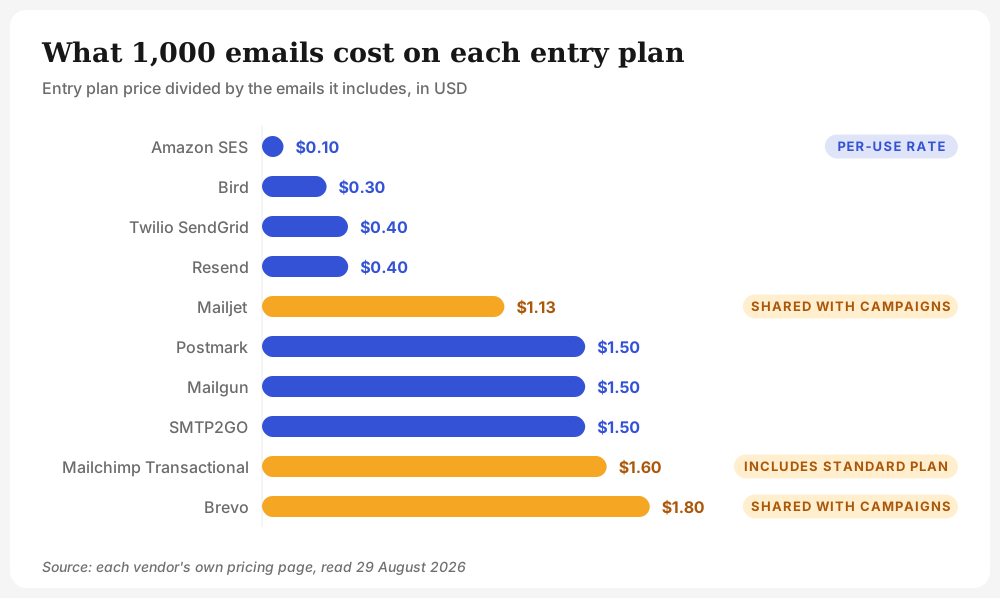
The cheapest way to send transactional email is Amazon SES at $0.10 per 1,000, and it stays cheapest at every volume. What you pay for that is the engineering time to build bounce handling, reporting and templates that the other services hand you.
Authentication is what actually decides arrival, and most senders publish it wrong
SPF, DKIM and DMARC decide whether a mailbox provider trusts your mail, and the gap between the three is where transactional mail quietly fails. Unspam's benchmark data, drawn from live tests run through 2026, shows the shape of the problem: 93% of domains publish a valid SPF record and 90% sign with a working DKIM signature, but only 48% publish a DMARC policy, leaving 52% with none at all.
That gap matters more for transactional mail than for campaigns, because a receipt that lands in spam produces a support ticket rather than a lower open rate.
The same data set shows what happens downstream. Across everything tested, 63% of emails reach the inbox and 33% land in spam. The global health score sits at 88 out of 100, which describes the senders who bothered to test, not the average sender. Full figures, updated daily, are on the Unspam deliverability benchmark.
Three things your transactional service cannot do for you:
- Publish DMARC. The provider can sign your mail with DKIM and can host an SPF include, but the DMARC record is a policy statement about your domain, and only you can publish it.
- Align the visible From domain. DMARC passes when the domain a recipient sees aligns with the domain that authenticated. A service sending from its own shared domain authenticates itself, not you.
- Fix a reputation you already damaged. No provider migration resets a domain's history.
How to verify the service you picked actually delivers
Send a real message through the service and measure where it lands, because a provider's own dashboard reports acceptance, not placement. Acceptance means the receiving server took the message. Placement means a human will see it. Those are different events, and only the second one matters.
Three checks, in the order worth running them:
- Check the authentication your provider set up. Run the sending domain through an email deliverability check to see SPF, DKIM and DMARC as a receiver resolves them, not as the setup wizard claimed.
- Send a live message and read the placement. Provider setup guides cover the account side; the send side is covered per platform in the how-to guides for SendGrid, Amazon SES and Brevo.
- Watch the identity over time. Placement moves with sender reputation, and reputation moves with what you send, so a single passing test is a snapshot rather than a guarantee.
Pick on architecture, verify on delivery
The service that suits you is decided by three questions, and price is the last of them. Does it keep your transactional stream away from your marketing stream without a plan upgrade? Does it document SPF, DKIM and DMARC in a way you can follow? And does its dedicated IP threshold match the volume you actually send?
Answer those, then measure. A provider dashboard reports that a receiving server accepted your message. It cannot tell you which folder a human found it in. Run your first real message through a free spam test and read the placement yourself.
