

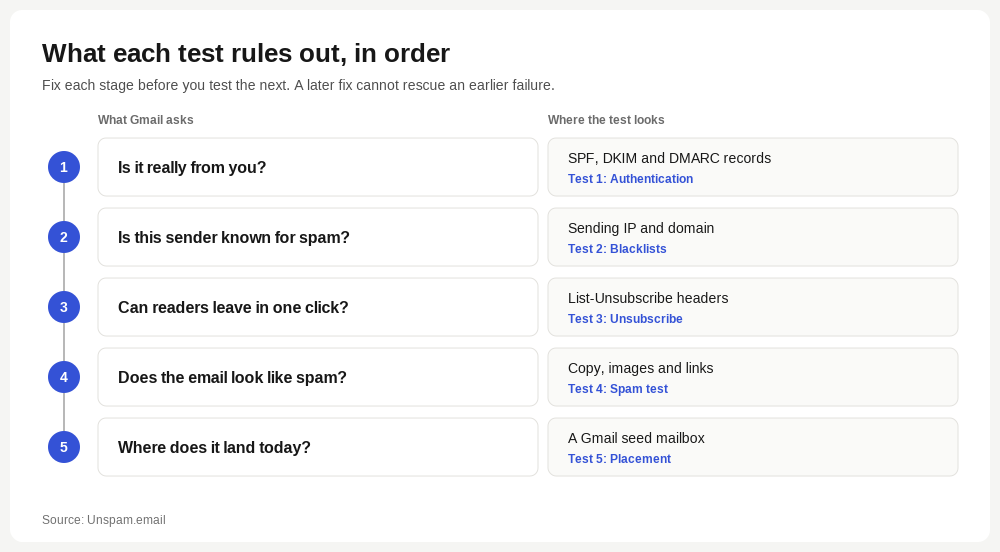
Before your next send, run five tests on the exact email you will send, in this order: authentication, blacklists, one-click unsubscribe, content and links, then a Gmail inbox placement test. Fix whatever fails, test again, and only then schedule it. The order matters because each test rules out a cause the next one cannot see: a content fix does nothing for a message Gmail already distrusts because SPF, DKIM or DMARC failed.
This guide covers what to do in the few days between a Black Friday send that landed in Gmail spam and the next one, such as Cyber Monday or a last-day reminder. For spam placement in general, at any provider, read the six causes of spam placement and how to fix each one.
First, check that it was spam and not the Promotions tab
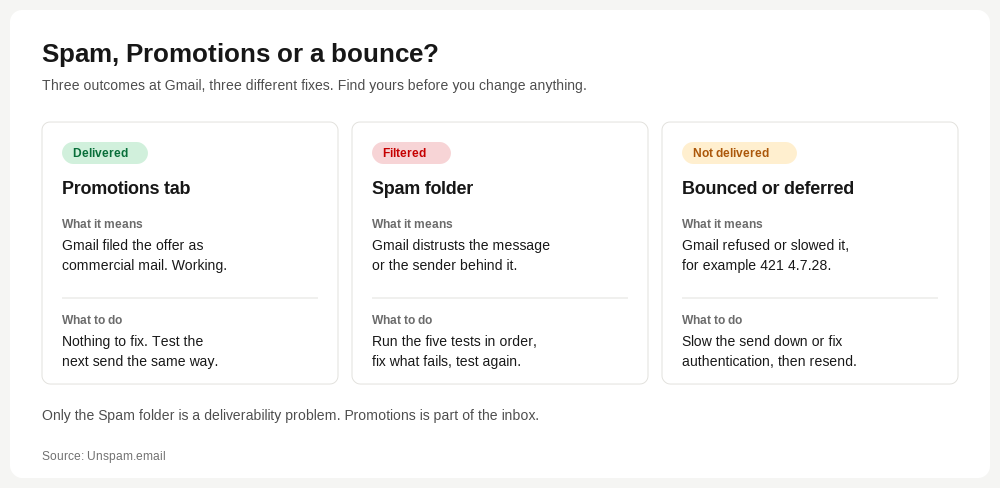
A Black Friday email in the Gmail Promotions tab was delivered to the inbox. Promotions is a tab of the Gmail inbox, and Gmail puts commercial mail there by design, so an offer that lands in Promotions is working as intended. Only the Spam folder is a deliverability problem.
Three signs tell you which one you have:
- Opens at gmail.com addresses fell far below other domains. If your email platform reports opens by recipient domain, a gap of that size between Gmail and Outlook or Yahoo points at spam, not Promotions.
- A test copy went to Spam. Send the campaign to a personal Gmail address you control and look for it in Spam, not only in Promotions.
- The send bounced or was deferred. A bounce is not spam placement and has a different fix. Gmail answers a sudden surge with a
421 4.7.28rate limit (Gmail has detected an unusual rate of email), and can reject unauthenticated mail with a5.7.26error. The Gmail bounce codes guide explains each one.
Black Friday sends change four things Gmail watches
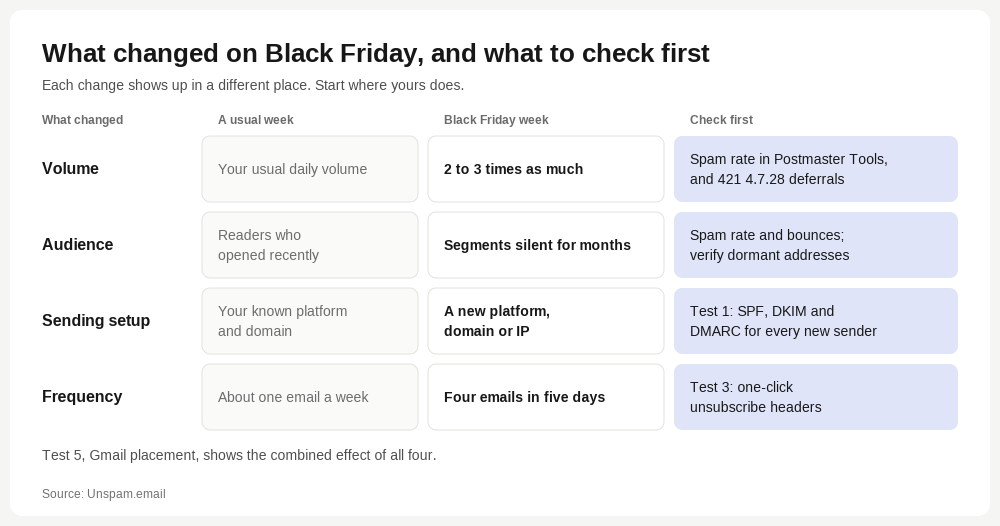
The campaign changed, not Gmail. A template that reached the inbox in October can land in spam in November because the Black Friday send looks different from your normal mail in four ways Gmail measures.
- Volume. Many brands send two or three times their usual volume on Black Friday. Google's sender guidelines say that "immediately doubling previously sent volumes suddenly could result in rate limiting or reputation drops" and ask senders to avoid sudden spikes.
- Audience. Holiday sends often reach segments that have not heard from you in months. Old addresses bounce, some have become spam traps, and readers who forgot they subscribed press Report spam.
- Sending setup. A new email platform, sending domain, IP address or link tracking domain set up for the season starts without the reputation your old setup had built, and is often missing from your SPF record or not signed with DKIM.
- Frequency. Early access, launch day, reminder and last chance can mean four emails in five days to people used to one a week, and each extra email is another chance to be reported.
Find the one that applies to your send, then start where it shows up. More volume shows up first in your spam rate in Google Postmaster Tools and in 421 4.7.28 deferrals. Older segments show up in the spam rate and in bounces. A new sending setup shows up in Test 1, authentication. More frequent mail shows up in Test 3, one-click unsubscribe. Test 5, Gmail placement, shows the combined effect of all four.
The Unspam pre-send check: five tests, in this order
The Unspam pre-send check is a five-test sequence, run on the exact email you are about to send, in a fixed order: authentication, blacklists, unsubscribe, content and links, then Gmail placement. Each test rules out a cause the next one cannot see.
- SPF, DKIM and DMARC pass and align with your From domain.
- Your sending IP and domain are on no blacklist.
- One-click unsubscribe works.
- The content and links pass a spam test.
- A Gmail inbox placement test shows where the campaign lands.
Run all five on the real campaign, with its real links, images and sending setup. A stripped-down test copy sent from a different tool can pass while the real campaign fails.
Test 1: SPF, DKIM and DMARC pass and align with your From domain
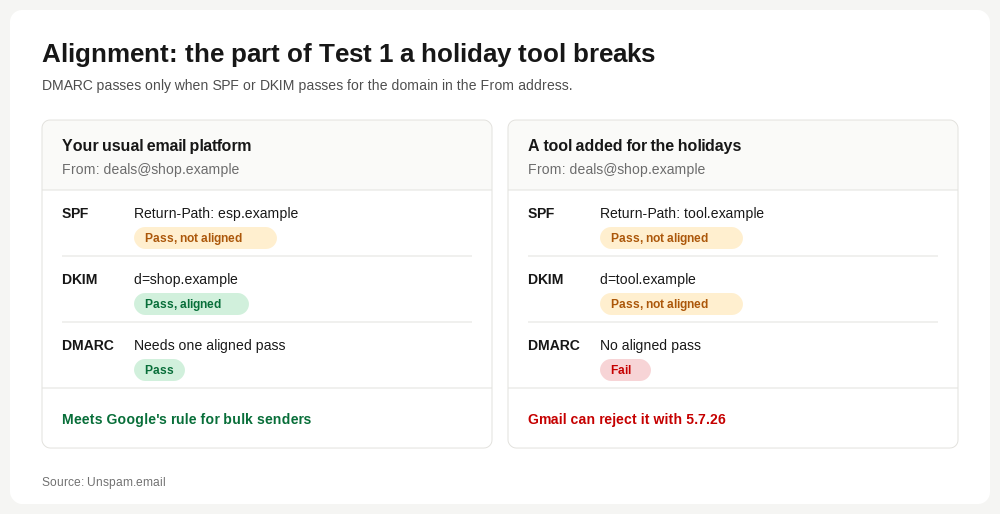
Gmail checks authentication before anything else. Google requires every sender to personal Gmail accounts to use SPF or DKIM, and requires bulk senders to use SPF, DKIM and DMARC, with the domain in the From address aligned with the SPF or DKIM domain. Google counts you as a bulk sender once you send close to 5,000 messages to personal Gmail accounts in a day, and that status never expires. A large Black Friday send can put you over the line for the first time.
Check each record with the free SPF checker, DKIM checker and DMARC checker. Only 48% of domains we test publish a DMARC policy, so a missing record is common, and for a bulk sender it is a failed requirement. A DMARC policy of p=none is enough to meet Google's rule.
The seasonal trap is a tool added for the holidays: a new email platform or link tracking domain that sends as your domain but is not in your SPF record, or sends without a DKIM signature for your domain.
Test 2: your sending IP and domain are on no blacklist
A listing on a major blacklist tells receivers that mail from your IP address or domain has been reported as spam. Check both on the day of the send: the IP blacklist checker looks up the address your email platform sends from, and the domain blacklist checker looks up the domain in your links and From address. Across our benchmark, 6% of sending IPs we test sit on at least one blacklist.
If your email platform sends from a shared IP address, a listing there is your platform's to resolve, so report it to their support. If your own IP address or domain is listed, the blacklist removal guide covers how to request delisting from each major list.
Test 3: one-click unsubscribe works
Google requires bulk senders to support one-click unsubscribe in marketing and promotional mail, using the List-Unsubscribe and List-Unsubscribe-Post headers defined in RFC 8058, and to show a clearly visible unsubscribe link in the message body. Unsubscribe requests have to be honored within 48 hours.
This matters more on Black Friday than any other week. A reader who wants fewer emails and cannot find a way out presses Report spam instead, and those reports are the number Gmail acts on. Only 14% of emails we test set a List-Unsubscribe header, so check that your platform adds both headers to this campaign, not only to your newsletter. The List-Unsubscribe header guide shows what correct headers look like.
Test 4: the content and links pass a spam test
Run the Unspam spam test on the real campaign. It gives you a unique address, and about 30 seconds after you send the campaign to it you get a 0 to 100 spam score with the SpamAssassin rules that fired, the state of your links, your authentication results and the blacklist check, with no signup.
Look closest at the links. A Black Friday email carries more of them than usual, and 20% of emails we test still contain a broken link. Link shorteners, an image with no text around it and a subject line in capital letters are the other common flags.
Content rarely sends a well-authenticated sender with a clean list to spam on its own. It tips a borderline message over the line. Words like "free" or "50% off" are normal in a Black Friday email, and the spam trigger words guide explains when wording actually matters.
Test 5: a Gmail inbox placement test shows where the campaign lands
The Unspam inbox placement test sends your real campaign to seed mailboxes at Gmail, Outlook, Yahoo and other providers and reports where each copy landed. At Gmail it shows whether the email reached Primary, Promotions, Updates or Spam. This is the only test of the five that answers the question directly: where does this exact email land at Gmail today.
When a Gmail seed lands in Spam, the result opens a "Spam at Gmail" panel with the checks to fix first, authentication, blacklists, and content and links, followed by the steps Gmail itself offers: its sender guidelines, Postmaster Tools, the Sender Contact Form and asking recipients to click Not spam.
A seed result has a limit worth stating. Seed mailboxes have no history with your brand, so the test shows how Gmail treats the message and your sending setup, not how your own subscribers have reacted to you. Read it together with the spam rate below.
Read your Gmail spam rate before you send again
Your Gmail spam rate decides whether any fix will hold. Google asks senders to keep the spam rate reported in Google Postmaster Tools below 0.10% and never to reach 0.30%, and it calculates the rate daily. If the Black Friday send pushed you over 0.30%, clean authentication and content will not save the next send on their own: you have to send to fewer, more engaged people first.
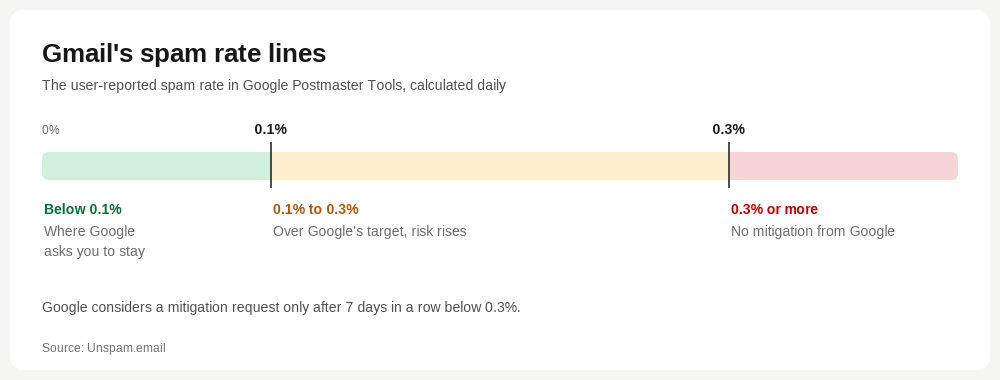
Postmaster Tools is free and shows your spam rate for mail sent to personal Gmail accounts once you send enough volume. The Google Postmaster Tools guide covers setting it up and reading each dashboard.
Send Cyber Monday to the people who opened recently
Narrowing the audience is the fastest lever you have between two sends three days apart. Google's own advice for senders building volume is to start with engaged users and increase slowly.
- Send to recent openers and clickers first. A common working window is anyone who opened or clicked in the last 60 to 90 days.
- Hold back the segments you reactivated for Black Friday. If they produced the bounces and complaints, they will do it again on Cyber Monday.
- Keep the volume close to the Black Friday send. Do not double it to make up for the mail that landed in spam.
- Verify dormant addresses before you mail them again. The Unspam email verifier flags invalid and risky addresses, and the email list hygiene guide covers keeping the list clean afterward.
Four mistakes to avoid before Cyber Monday
The days after a spam send are when a quick fix most often makes things worse.
- Moving to a new domain or email platform. A new domain starts with no reputation, Google applies its sender requirements to new domains on an accelerated timetable, and three days is not enough to warm one up. The domain warm-up guide explains why it takes weeks.
- Sending to the whole list to catch up. More volume to less engaged readers is what put the Black Friday send in spam.
- Asking subscribers to add you to their contacts as the only fix. It helps the readers who do it and changes nothing for the rest.
- Changing several things at once. Fix one thing, run the inbox placement test again, and keep what moved the result.
If the test still lands in Gmail spam
If the five tests pass and the Gmail seed still lands in spam, the cause is usually reputation, which only time and wanted mail repair. Two Google channels exist for senders who already meet the guidelines.
- The Sender Contact Form. Google accepts mitigation requests only from senders who follow its sender guidelines, describes a mitigation as temporary, and asks for at least 2 weeks between submissions. Bulk senders become eligible once their spam rate stays below 0.3% for 7 consecutive days.
- Recipients clicking Not spam. When a Gmail user marks your email Not spam, Gmail learns that your future mail belongs in their inbox.
For the December run, automatic inbox placement tests can repeat the Gmail placement check on a schedule, so a change in where you land shows up before a big send. If the problem persists, the Unspam email deliverability consultants can audit your setup and work through the fixes with your team.
How to recover from Gmail spam, step by step
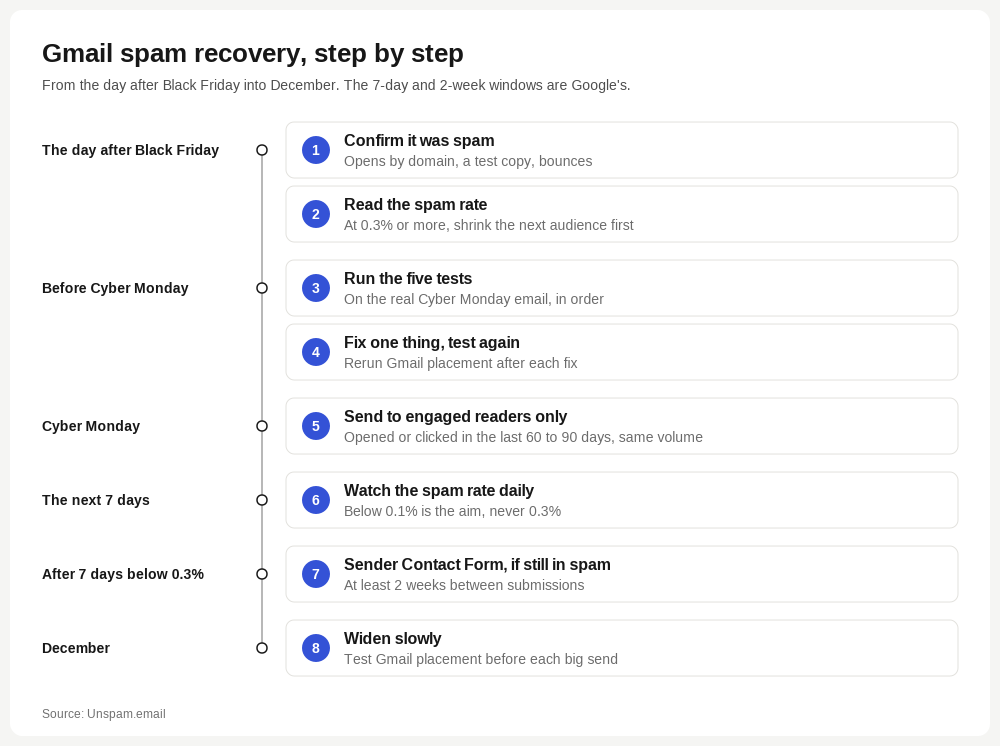
Recovering from a Black Friday send in Gmail spam takes eight steps, from the day after Black Friday into December, and the order matters because each step relies on the one before it.
- Confirm it was spam, the day after Black Friday. Compare opens at gmail.com with other domains, look for a test copy in a personal Gmail account, and check for bounces. An email in the Promotions tab was delivered and needs no fix.
- Read your Gmail spam rate in Google Postmaster Tools the same day. At 0.3% or more, the next send has to go to fewer, more engaged people before any other fix can hold.
- Run the Unspam pre-send check on the real Cyber Monday email. Test authentication, blacklists, one-click unsubscribe, content and links, then Gmail placement, in that order.
- Fix one failure at a time, and run the Gmail placement test again after each fix. Keep the changes that moved the result and undo the ones that did not.
- Send Cyber Monday only to people who opened or clicked in the last 60 to 90 days. Keep the volume close to the Black Friday send and hold back the segments you reactivated.
- Watch your Gmail spam rate every day for the next 7 days. Google calculates it daily and asks senders to stay below 0.1% and never to reach 0.3%.
- If the Gmail seed still lands in spam after 7 consecutive days below 0.3%, submit the Sender Contact Form. Google describes a mitigation as temporary and asks for at least 2 weeks between submissions.
- Widen the audience slowly through December. Add older segments a little at a time, and run a Gmail placement test before every large send.
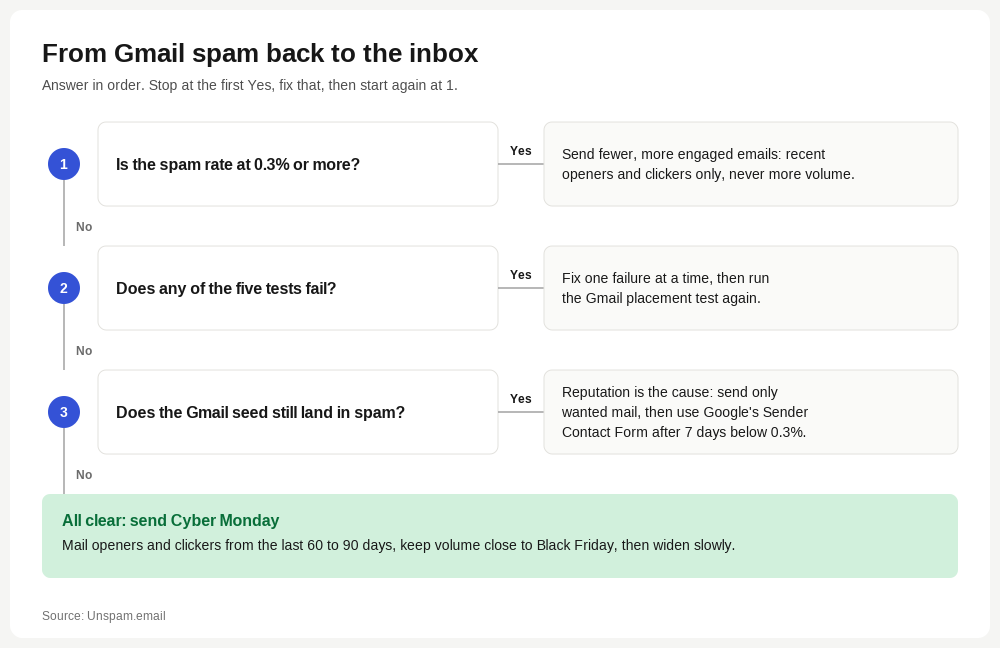
When you are unsure which fix applies right now, three questions settle it: is the spam rate at 0.3% or more, does any of the five tests fail, and does the Gmail seed still land in spam? The first Yes is the problem to fix.
Gmail's sender thresholds, as Google publishes them
These are Google's figures from its Email sender guidelines and their FAQ, current at publication.
| Rule | Google's figure | Applies to |
|---|---|---|
| Bulk sender | Close to 5,000 messages a day to personal Gmail accounts | Counted per primary domain, permanent once reached |
| Spam rate to stay below | 0.10% | All senders, as reported in Postmaster Tools |
| Spam rate never to reach | 0.30% | All senders |
| Unsubscribe requests honored within | 48 hours | Bulk senders |
| Mitigation eligibility | Spam rate below 0.3% for 7 consecutive days | Bulk senders |
Gmail placement in the Unspam benchmark
In the Unspam 2026 Email Deliverability Benchmark Report, covering tests from January 1 to September 1, 2026, Gmail delivers 62% to the inbox and Gmail sends 38% of tested emails to spam. Outlook places about the same share in the inbox, so a sender who lands in spam at Gmail alone has a Gmail-specific problem to find.
| Provider | Inbox | Spam |
|---|---|---|
| Gmail | 62% | 38% |
| Outlook | 66% | 34% |
Sources
- Google: Email sender guidelines and Email sender guidelines FAQ
- Google: Gmail SMTP errors and codes
- Google: Sender Contact Form
- IETF: RFC 8058, Signaling One-Click Functionality for List Email Headers
Run the Unspam spam test on your Cyber Monday email now, then an inbox placement test, and send only when Gmail places it in the inbox.
