

One inbox placement test costs from about $0.09 to $4.30, depending on the tool and the plan. At the entry level, Unspam is the cheapest, at $0.50 a test, pay per test with no subscription. At volume, Folderly Inbox Insights reaches about $0.09 a test at 2,500 tests a month. For a free start, MailReach allows 3 tests every 24 hours, Unspam includes 3 placement tests a month, and Folderly includes 2 a month.
Price is one axis. The other is coverage: which mailbox providers a tool seeds, and how many seed addresses it reads. GlockApps reads the most, with 150 seed addresses at 40 providers in every test. This comparison covers seven tools that sell inbox placement tests, with what one test costs on each, the job each one does best, and the cases where a competitor is the better choice than Unspam.
What an inbox placement test measures, and what it cannot
An inbox placement test sends one real email to a list of seed mailboxes at named providers, then reports whether each copy landed in the inbox, a tab such as Promotions, or spam. It answers one question: where does this exact message, from this exact sending setup, land today. The guide to inbox placement explains the concept and how it differs from delivery rate.
A seed test cannot see your own subscribers. Seed mailboxes do not open, click or reply, so the result shows how each provider filtered the message, not how your list engages with it. Gmail and Yahoo also weigh that engagement, so a clean seed result is necessary and not sufficient.
Coverage matters because providers disagree. In the Unspam 2026 Email Deliverability Benchmark Report, covering tests from January 1 to September 1, 2026, Gmail delivers 62% to the inbox, while inbox placement is 98% at ProtonMail and 22% at Yahoo. A tool that seeds only Gmail, Outlook and Yahoo answers for three providers. If your list is heavy on another provider, check that the tool seeds it.
The seven tools at a glance
Each tool below has one job it does best. The cost per test is the entry plan's price divided by the tests that plan includes in a month.
| Tool | Best for | Entry cost per test | Free placement tests | Providers seeded |
|---|---|---|---|---|
| Unspam | Pay-per-test placement plus previews in one account | $0.50 | 3 a month | 10 mailboxes at 7 providers |
| Folderly Inbox Insights | Agencies running thousands of tests a month | $0.79 | 2 a month | Gmail, Outlook and Yahoo |
| MailReach | Cold email teams that already warm their mailboxes | $0.75 | 3 every 24 hours | 30+ mailboxes |
| GlockApps | The broadest seed list | $1.97 | 2 credits | 150 seeds at 40 providers |
| Mailgun Optimize | Teams that want validation in the same bill | $1.96 | First month free | Not published |
| MXToolbox | IT teams that want DMARC and blacklist monitoring too | $4.30 | None | Google, Yahoo and Outlook.com |
| Validity Engage | Enterprise programs that want sender certification | Quote only | None | Not published |
What one inbox placement test costs on each tool
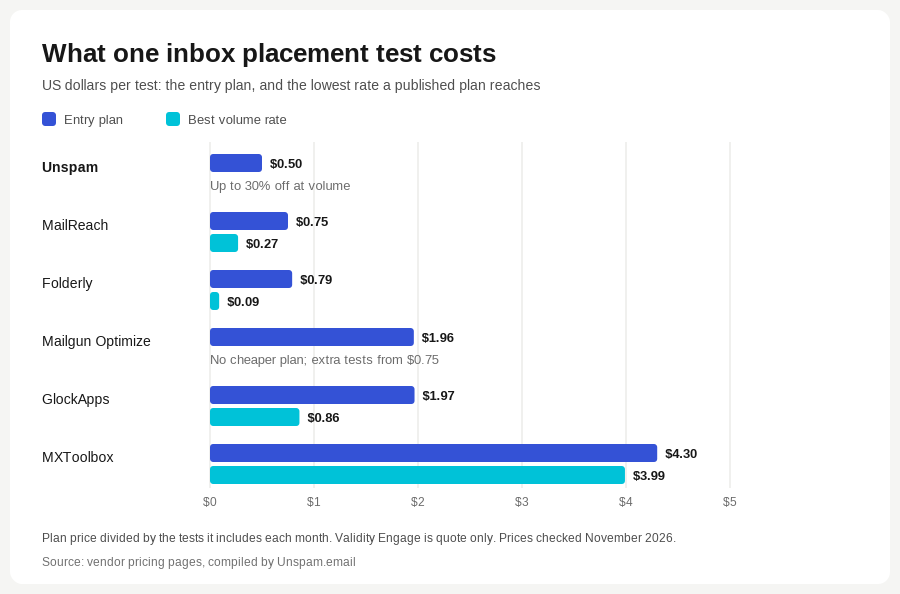
The cheapest tool depends on how many tests you run. At one or two tests a month, a pay-per-test price beats any subscription. At hundreds a month, a volume plan wins. The table shows both ends: the entry plan, and the lowest per-test rate a published plan reaches.
| Tool | Entry plan | Entry cost per test | Best volume rate | Prices checked |
|---|---|---|---|---|
| Unspam | Custom, pay per test, $5 monthly minimum | $0.50 | Up to 30% off | November 2026 |
| GlockApps | Essential, $59 a month billed annually, 30 credits a month | $1.97 | $0.86 (Enterprise, $129 a month for 150) | November 2026 |
| MailReach | Spam Tester, $15 a month for 20 credits | $0.75 | $0.27 ($2,700 a month for 10,000) | November 2026 |
| Folderly | Inbox Insights Monthly, $79 a month for 100 tests | $0.79 | $0.09 ($220 a month for 2,500) | November 2026 |
| Mailgun Optimize | Pilot, $49 a month for 25 tests | $1.96 | No cheaper plan; extra tests from $0.75 | November 2026 |
| MXToolbox | Delivery Center, $129 a month for 30 tests | $4.30 | $3.99 (Delivery Center Plus, $399 a month for 100) | November 2026 |
| Validity | Validity Engage, contact sales | Quote only | Not published | November 2026 |
Three details change the arithmetic:
- Unused tests expire on most subscriptions. GlockApps credits do not roll over to the next month or year. A $59 plan used for 10 tests costs $5.90 a test, not $1.97. Unspam charges only for the tests you run.
- Annual billing is not the monthly price. GlockApps quotes annual rates; monthly billing runs about 44% higher, so Essential costs $85 a month and one test about $2.83.
- Mailgun Optimize's bigger plan is not its cheaper rate. Starter costs $99 a month for 50 tests, about $1.98 a test, because the extra money buys spam trap and blocklist monitoring. Extra tests on either plan cost from $0.75 each, so 100 tests a month on Pilot come to about $1.05 a test.
The tools, ranked by the job each does best
There is no single best inbox placement tool. Each one below is the right pick for one kind of sender, and each has one honest limit.
Unspam: pay-per-test placement plus previews in one account
Unspam is an email deliverability testing platform that runs inbox placement tests, spam tests, email client previews and heatmaps from one account. An Unspam inbox placement test sends your real email to 10 seed mailboxes at 7 providers: Gmail, Outlook, Yahoo, Zoho, ProtonMail, AOL and GMX, including business mailboxes at Google Workspace, Microsoft 365 and Zoho. It reports inbox, tab or spam for each.
- Cost per test: $0.50 on the Custom plan, from a $5 monthly minimum, with volume discounts up to 30% and 15% off annual billing.
- Free: 3 inbox placement tests a month, plus 5 spam tests and 3 device previews, with no card.
- Also in the account: spam tests at $0.18 and device previews at $0.10 per device, on the same bill.
- Limit: 10 seed mailboxes is a smaller list than GlockApps reads, and Unspam does not warm mailboxes or monitor blacklists.
Full prices are on the Unspam pricing page.
Folderly Inbox Insights: the lowest volume rate
Folderly sells Inbox Insights as its own placement testing product, separate from its per-mailbox warmup service (Folderly compared with Unspam). The monthly plan costs $79 for 100 placement tests, and the ladder climbs to 2,500 tests for $220 a month, about $0.09 a test, with 5,000 and more priced on request.
- Best for: agencies that test many clients' campaigns every month.
- Free: 2 placement tests a month at Gmail, Outlook and Yahoo.
- Limit: three providers, and Folderly publishes no seed count. The test allowance belongs to the account, not to each mailbox.
MailReach: placement tests for teams already warming mailboxes
MailReach is a warmup service with a spam tester beside it (MailReach compared with Unspam). One credit runs one inbox placement test with a deliverability report. Standalone, 20 credits cost $15 a month and 50 cost $30, about $0.60 a test, falling to 10,000 credits for $2,700 a month, about $0.27 a test. The All-In-One warmup plan, from $25 per mailbox a month, includes 20 credits.
- Best for: cold email teams that warm their sending mailboxes and want tests on the same bill.
- Free: up to 3 tests every 24 hours.
- Limit: MailReach reports results across 30+ mailboxes but does not list which providers they sit at on its pricing page, and the spam tester has no annual discount.
GlockApps: the broadest seed list
GlockApps is the long-standing name in seed testing (GlockApps compared with Unspam). GlockApps says each test uses 150 seed addresses covering 40 mailbox providers, and one credit runs one test however many seeds it reaches. Its Essential plan costs $59 a month billed annually for 360 spam test credits a year, which is 30 a month and about $1.97 a test. Enterprise, at $129 a month billed annually for 150 credits a month, brings it to about $0.86. A pack of 3 credits costs $16.99 with no subscription.
- Best for: agencies and senders whose lists span many providers, including regional ones.
- Also included: DMARC report processing, uptime monitors and IP reputation monitors.
- Free: 2 spam test credits.
- Limit: credits expire if unused, and a balance is lost on cancellation.
Mailgun Optimize: placement and validation from one vendor
Mailgun Optimize is Mailgun's deliverability product, and it works with any email provider, not only Mailgun Send (Mailgun compared with Unspam). Pilot costs $49 a month for 25 inbox placement tests and 2,500 email validations, about $1.96 a test. Extra tests cost from $0.75 each.
- Best for: teams that want placement tests and list validation from one vendor.
- Free: the first month.
- Limit: the larger Starter plan costs more per test ($99 for 50), so a lower rate comes only from overage tests at $0.75 and up.
MXToolbox Delivery Center: placement inside a monitoring suite
MXToolbox is best known for free DNS and blacklist lookups (MXToolbox compared with Unspam). Its paid Delivery Center costs $129 a month and includes 30 inbox placement tests a month at Google, Yahoo and Outlook.com, about $4.30 a test, alongside DMARC report processing, blacklist monitoring across more than 100 lists and complaint reporting. Delivery Center Plus costs $399 a month for 100 tests.
- Best for: IT and email administrators who want monitoring first and placement tests as part of it.
- Limit: three providers, and the highest cost per test in this comparison. The free MXToolbox tier has no placement tests.
Validity Engage: enterprise with sender certification
Validity sells the placement testing it used to call Everest inside Validity Engage, one subscription that also includes Litmus and BriteVerify. Validity publishes no price; Engage is sold by quote, and Sender Certification is an upgrade on top (Validity compared with Unspam).
- Best for: enterprise email programs that want placement data, rendering previews and sender certification under one contract.
- Limit: no self-serve plan and no published price, so it cannot be compared per test.
When another tool is the better choice than Unspam
Unspam is not the right pick for every sender. These are the cases where a competitor fits better, stated plainly:
- You need the largest seed list. GlockApps says it reads 150 seed addresses at 40 providers in every test, against Unspam's 10 mailboxes at 7 providers.
- You run thousands of tests a month. Folderly Inbox Insights at 2,500 tests for $220 a month, about $0.09 a test, and MailReach at 10,000 credits for $2,700, about $0.27 a test, are cheaper per test than Unspam's $0.50 less its maximum 30% discount.
- You want more free tests. MailReach allows 3 free tests every 24 hours, against Unspam's 3 a month.
- You warm cold email mailboxes. MailReach bundles 20 test credits with its warmup plan, and Unspam does not offer warmup.
- You want monitoring with your tests. MXToolbox Delivery Center adds DMARC report processing and blacklist monitoring, and Mailgun Optimize Starter adds spam trap and blocklist monitoring. Unspam checks blacklists on demand and does not monitor them.
- You need sender certification. Of the tools here, only Validity sells it, as an upgrade to Validity Engage.
- You only want a spam score. mail-tester.com gives a free one-off score from a single address, with no seed placement at all.
How to choose an inbox placement tool
Match the tool to how often you test and what else you need on the bill:
- One test before an occasional campaign: a free allowance or a pay-per-test price, such as MailReach's 3 free tests a day, or Unspam's 3 free tests a month and then $0.50 a test.
- Every campaign, a few a month: a pay-per-test price still wins below the point where a subscription's included tests run out unused.
- An agency testing many clients: a volume ladder, such as Folderly Inbox Insights, MailReach or GlockApps Enterprise.
- Cold email: MailReach, with test credits on the same bill as its warmup.
- An IT team that owns DNS and monitoring: MXToolbox Delivery Center.
- An enterprise program: Validity Engage, by quote.
Whatever you pick, test the real campaign from your real sending setup, with its real links and images. A stripped-down copy sent from a different tool can land in the inbox while the real campaign lands in spam.
Sources
Every price above was read from each vendor's own pricing page on the date in the cost table. Figures for Unspam come from the published Unspam pricing.
- GlockApps: Pricing
- GlockApps: Email seed list testing
- MailReach: Pricing
- Folderly: Inbox Insights email deliverability test
- Mailgun: Optimize pricing
- MXToolbox: Delivery Center
- Validity: Pricing
- Unspam: 2026 Email Deliverability Benchmark Report, for the provider inbox rates
Run a free inbox placement test on your next campaign before you pay for any tool: Unspam includes 3 a month, with no card.
