

Send from both. Keep the address your recipients see on your root domain, and move the technical sending identity, meaning the Return-Path and the DKIM signing domain, onto a subdomain reserved for one kind of mail.
The reason this reads as an either-or choice is that "which domain do I send from" is really four separate choices, and almost every guide moves one of them without saying which. Once you separate the four, most of the disagreement in the threads dissolves, and so does the anxiety: if you send under roughly 5,000 marketing messages a month, or your marketing volume does not dominate your other mail, the correct answer is to leave your setup alone and spend the afternoon on your list instead.
Here is the whole decision, before the reasoning behind it.
| Your situation | What to do |
|---|---|
| Not sending yet, or under roughly 5,000 marketing messages a month | Stay on the root domain. Publish SPF, DKIM and DMARC properly and keep the list clean. Splitting a small signal in two gives you two under-observed identities instead of one warm one. |
| Marketing volume is several times your corporate and transactional volume combined | Split. Marketing envelope and DKIM on news.yourbrand.com, transactional on txn.yourbrand.com, corporate mail stays on the root, and every visible From: stays on the root. |
| Already sending from the root with no problem and a Postmaster Tools spam rate under 0.10% | Do not migrate. You would give up a warm sending identity to buy a benefit you cannot currently measure. Add the subdomain the next time you change platforms, when the ramp is happening anyway. |
| Already sending from the root and your one-to-one replies are landing in spam | Split, and understand that the split alone is not the fix. The behavior that caused the damage travels with you. |
| Your platform cannot align on a subdomain | Stay on the root, or change the platform tier first. A subdomain that cannot align is worse than a root domain that can. |
| Cold outreach | A separate domain, not a subdomain. The answer genuinely flips here, and it costs you something. |
A subdomain is news.yourbrand.com. A lookalike domain is yourbrand-news.com
A subdomain lives underneath a domain you already own, so nobody outside your organization can create one, while a lookalike or "cousin" domain is a separate registration that recipients and filters have no way to tie back to you. Half the contradictory advice on this topic comes from people using the word "domain" for both.
Your organizational domain is the registrable name you pay for, yourbrand.com. Everything to the left of it is a subdomain you create with a DNS record and no additional purchase: news.yourbrand.com, txn.yourbrand.com, links.yourbrand.com. A cousin domain such as yourbrand-news.com or yourbrandmail.com is a second registration with no cryptographic or administrative relationship to the first.
That distinction is the strongest argument for subdomains, and it has nothing to do with reputation scoring. A subdomain cannot be faked by an outsider. M3AAWG discourages cousin domains for exactly this reason: they look like phishing campaigns to recipients and to anti-abuse systems alike, because that is precisely what attackers register. The three records a sending name needs are the same either way, and email authentication works identically on a subdomain.
One myth to clear before the mechanics. Changing the mailbox name in front of the @, from info@ to hello@, is not a subdomain and separates nothing. Every reputation identifier that mailbox providers publish is a domain or an IP address.
One message carries four domains, and only one of them is what people argue about
Every message you send exposes four independently changeable domains: the visible From: domain, the envelope Return-Path domain that SPF is actually checked against, the DKIM signing domain in the d= tag, and the hostname in your tracked links. "Use a subdomain" means at least four different things depending on which one moves.
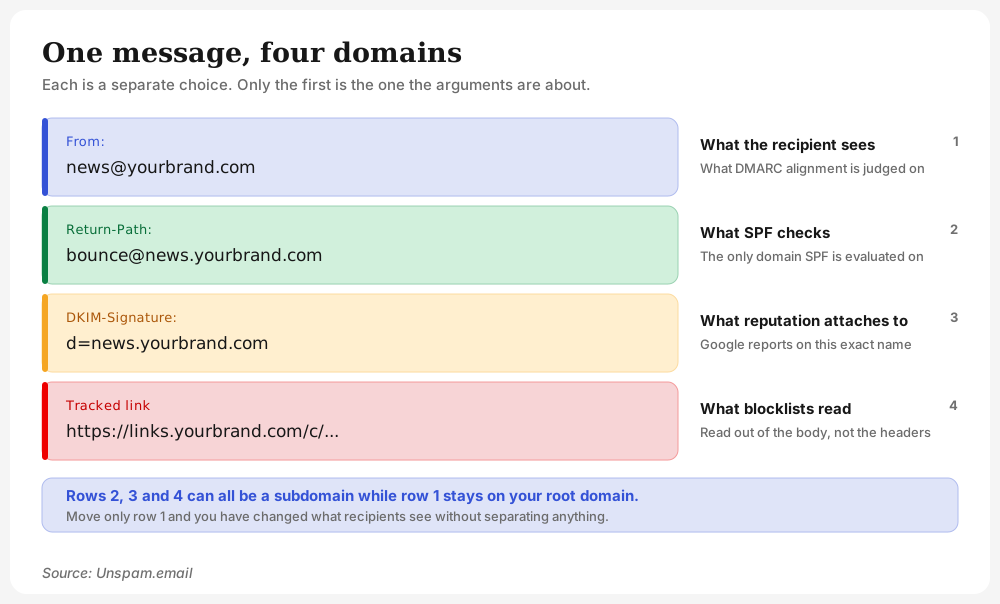
This four-surfaces framing comes from Laura Atkins at Word to the Wise, and it dissolves most of the argument on its own.
| Domain slot | Where it lives | Visible to recipient | What it is used for |
|---|---|---|---|
Visible From: domain | the From: header | Yes, this is the address in the inbox | The DMARC alignment target, and what recipients and consumer filters read |
| Envelope Return-Path | SMTP MAIL FROM, shown as Return-Path: | Only if they open the details | SPF is evaluated against this and nothing else, plus bounce routing |
| DKIM signing domain | d= in the DKIM-Signature header | No | The identity taking responsibility for the message, and what Google's domain reputation report is keyed to |
| Link and tracking host | hostnames in the HTML body | In the status bar, on hover | Read out of the body by domain blocklists during content inspection |
Three of those four can be a subdomain while the visible From: stays on your root domain. That is not a compromise, it is what the standards intend. M3AAWG's own worked example pairs a From: of service@mybrand.com with a Return-Path of bounce@bounce.mybrand.com, and it passes DMARC because relaxed alignment only requires the organizational domains to match.
I call the audit below the Unspam four-domain header check: read four values out of a single delivered message and you know exactly what your current setup isolates. It takes about a minute with the free email header analyzer.
| Read this | A healthy split looks like | If it looks like this instead |
|---|---|---|
From: | news@yourbrand.com | The platform's own domain, meaning you are not sending as yourself at all |
Return-Path: | ...@news.yourbrand.com | ...@sendgrid.net, ...@mcsv.net, ...@hubspotemail.net: SPF cannot align, and DMARC is passing on DKIM alone |
DKIM-Signature: d= | news.yourbrand.com or yourbrand.com | The platform's domain, meaning the reputation you are building belongs to your vendor |
| tracked link host | links.yourbrand.com | A shared vendor tracking host, so you share a blocklist surface with every other customer on it |
That last row is a separate decision with its own consequences, covered in link tracking and deliverability.
What a sending subdomain isolates, and what crosses anyway
A sending subdomain buys you separate authentication, separate reporting, and a distinct reputation identifier that receivers document themselves as able to judge independently. What it does not buy is a firewall, and it is not a clean slate.
What genuinely separates
SPF does not inherit. Each SPF record sits at the exact name it pertains to, so news.yourbrand.com is governed by its own record or by none at all.
DKIM is whatever the signer chooses. The key is fetched at <selector>._domainkey.<the d= domain>, so the signing identity is a deliberate configuration choice rather than a property of the message.
Reporting is per authenticated domain. Google's domain reputation report covers only the exact domain used for DKIM or SPF authentication, and subdomains can be added to Postmaster Tools as independent properties. Yahoo states plainly that each IP and DKIM domain has a reputation, and its best practices tell senders to segregate streams by function.
The standards recommend it by name. RFC 5863 advises different d= subdomains for different traffic streams, using marketing.example.com and transaction.example.com as its example, specifically so receivers can make differential assessments. Microsoft goes further and recommends a subdomain for bulk email with the rationale stated outright: you do not want problems with mail from those services affecting the reputation of mail sent by users in your main domain. That is the strongest provider-documented endorsement that exists, and it is worth knowing that Google's sender guidelines never use the word "subdomain" at all.
What crosses the boundary anyway
Six mechanisms ignore the subdomain boundary completely, and between them they account for every case where a sender did the split properly and still got hurt.
| Mechanism | Direction | What it means |
|---|---|---|
| Shared sending IPs | Both ways | Two subdomains on one IP pool are not separated at any receiver that filters mainly on IP |
| Shared click-tracking host | Both ways | A spotless From: domain can still be filtered on the link host, because blocklists read domains out of the body |
| Domain blocklist listing | Parent to child | A listing on the registrable domain returns "listed" for every subdomain beneath it |
| Google compliance status | Child to parent | Compliance is reported for primary domains only, using data from their subdomains |
| Google's bulk-sender threshold | Child to parent | 5,000 messages a day is counted across the whole primary domain, and the classification never expires |
A From: left on the root | Child to parent | If only the envelope moved, the domain recipients see and report against is still your root |
Google's own arithmetic makes the bulk-sender threshold concrete: 2,500 messages a day from your root plus 2,500 from a subdomain makes you a bulk sender, permanently. Splitting streams does not split that count. The full set of obligations that follow is in the Gmail and Yahoo sender requirements.
The protection is asymmetric, and it runs the useful way
A listing on news.yourbrand.com does not automatically list yourbrand.com, while a listing on yourbrand.com returns "listed" for every subdomain beneath it, including the one carrying your receipts. Spamhaus lists at the main domain level and the wildcard works downward only.
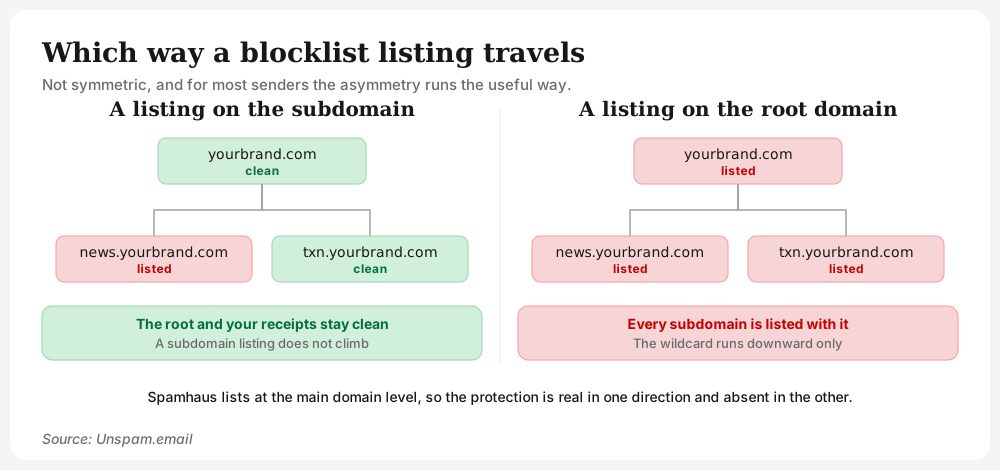
For most senders that asymmetry runs the right way, because the stream most likely to earn a listing is the bulk one, and the mail you least want to lose is everything else. It also explains why "a subdomain protects my main domain" and "reputation separation via subdomains is not a thing" are both defensible positions: the first is about the direction that works, the second about the direction that does not.
The blocklist itself is one mechanism among several, and the domain checks that surface it run on demand rather than continuously. Across the domains we test, 6% turn up on an IP blacklist, and an IP listing does not care which of your domains the message came from.
What nobody documents is the part senders most want to know: how heavily a parent domain's reputation weighs on a child's in the filtering decision itself. RFC 5863 concedes the point rather than resolving it, observing that a receiver might use only some rightmost portion of the identifier and that the signer cannot know which portion. Treat any confident number on this as invention.
What happens to your employee mail when a campaign sours
Everyday mail on your root domain really can start landing in spam because of a marketing send, and the mechanisms are enumerable, not mysterious. This is the failure that makes the whole question worth asking, and it is the one competing guides skip.
There are four routes. Shared sending IPs, so the two streams were never separated at the layer that mattered. A compliance record kept at your primary domain, fed by subdomain data. A blocklist listing that landed on the registrable domain and wildcarded down. And a visible From: that never left the root in the first place, which is the most common of the four by a wide margin.
The shape senders report is consistent: a low-volume notification stream picks up a handful of complaints, which is a large percentage of a small denominator, and corporate replies sit in spam for weeks afterwards. The Google Workspace "Send As" alias makes it worse by putting employee mail and campaign mail on the same visible identity, a pattern covered in the Mailchimp deliverability guide.
The three streams, and what each should send from
Split corporate mail, marketing and transactional across three sending identities, keep all three visible From: addresses on your root domain, and treat cold outreach as a fourth case with a different answer.
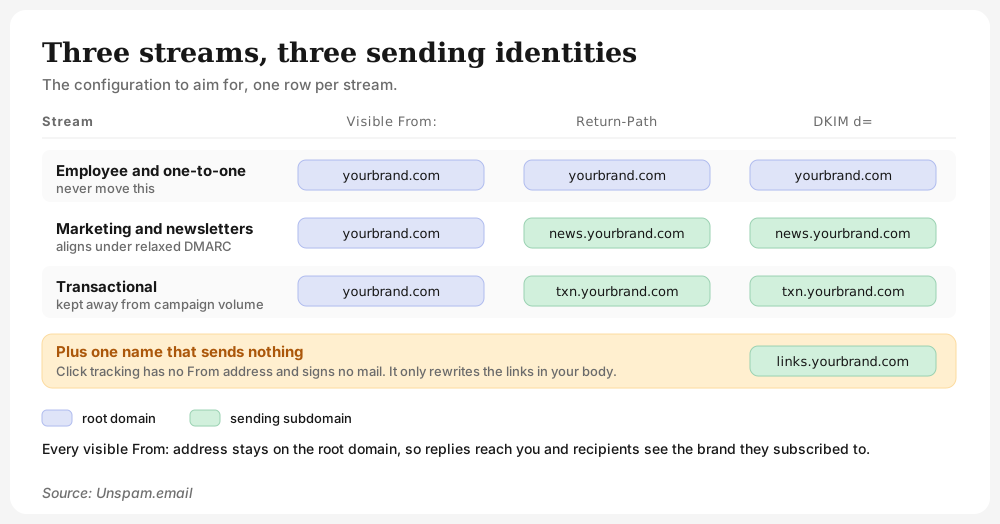
| Stream | Visible From: | Return-Path | DKIM d= | Why |
|---|---|---|---|---|
| Employee and one-to-one mail | you@yourbrand.com | root domain | yourbrand.com | Never move this. It is the mail you cannot afford to re-warm. |
| Marketing and newsletters | news@yourbrand.com | bounce@news.yourbrand.com | news.yourbrand.com | Aligns under relaxed DMARC because the organizational domains match |
| Transactional | alerts@yourbrand.com | bounce@txn.yourbrand.com | txn.yourbrand.com | So a bad campaign cannot take password resets down with it |
| Click tracking | not applicable | not applicable | not applicable | links.yourbrand.com, a different subdomain from the sending ones |
| Cold outreach | separate domain | separate domain | separate domain | Different answer, different reasons, and a real trade-off |
Keeping receipts and password resets away from campaign volume is the separation that pays off most reliably, and it matters most for SaaS senders, where a promotional send and a login code travel the same pipe by default.
There is a wrinkle worth naming, because it inverts the usual advice. The heuristic practitioners use is a ratio, not an absolute: isolation starts earning its keep when marketing volume runs several times your transactional volume. That implies isolation is less useful at low volume, which is the opposite of what beginners are usually told.
Cold outreach is where the answer changes to a separate domain
For cold outreach the answer flips to a wholly separate registered domain, and the reason is mechanical: a separate registration severs the organizational-domain link that DMARC alignment, main-domain blocklist listing and Google's primary-domain message counting all key on. A subdomain keeps every one of those links intact, which is the point of a subdomain and the problem for cold mail.
That advice comes with a cost that is rarely stated next to it. M3AAWG discourages exactly this pattern, because a domain that is not provably connected to your brand reads as phishing to recipients and to anti-abuse systems. So the separate domain is a trade-off you are choosing, not a best practice you are following. If you send cold, the cold outreach playbook covers the rest of the setup.
How many subdomains is too many
Each sending subdomain needs enough consistent volume to build a reputation of its own, so the ceiling on splitting is set by your volume rather than by how many streams you can name. M3AAWG states the constraint directly: each segment needs sufficient and relatively consistent traffic to establish its own reputation.
Under-splitting fails in one way: a bad campaign takes your password resets with it. Over-splitting fails in a worse way. Spamhaus describes many rapidly changing domains and IP addresses as the snowshoe pattern, notes that reputable bulk mailers use far fewer domains than snowshoers do, and treats domains that behave like snowshoers accordingly. RFC 5863 makes the same point from the other direction, warning that granularity that is too fine stops related streams from benefiting from an aggregate reputation.
Two or three sending subdomains, named after the traffic they carry, is where nearly everyone should stop.
What you have to publish on the subdomain, record by record
SPF and DKIM do not inherit from the parent domain and DMARC does, so a new sending subdomain needs its own SPF record and usually its own DKIM key, while the parent's DMARC record already covers it.
SPF goes where the bounces go, not where the From is
SPF is evaluated against the envelope MAIL FROM domain, never against the From: header, so publish the record on the name your bounces come back to. If your platform bounces at bounce.yourbrand.com, that is the name that needs v=spf1, and the subdomain in your From: header may need no SPF record at all.
A subdomain with no SPF record does not fail SPF, it returns none, which is a different result with the same practical effect: DKIM has to carry alignment alone. In our benchmark data, 93% publish a valid SPF record, and it is the 7% that still lack one who get caught here, because a brand new sending subdomain joins that group the moment you create it.
There is a real engineering win hiding in this. Each domain gets its own independent ten-lookup budget, so moving a marketing platform's include off your root record relieves the root, and a permerror on one does not touch the other. If your root record is close to the limit, this is the cleanest way out. Details are in the SPF guide, and the free SPF checker counts the lookups for you on whichever name you point it at.
DKIM only matters at the subdomain if you sign as the subdomain
The DKIM key is fetched at <selector>._domainkey.<the d= domain>, and d= is whatever the signing platform is configured to use, so a subdomain needs no key of its own if you deliberately sign with the root. This is the step people skip: changing only the visible From: domain is not enough, because the mail has to be DKIM-signed by the subdomain for any separation to exist at all.
Of the domains we check, 90% sign their mail with a working DKIM key and 10% without one. Confirm which name yours signs as with the DKIM checker, and read the DKIM guide if you are choosing a selector for the first time.
DMARC already covers the subdomain
One DMARC record at yourbrand.com already governs every subdomain that has no record of its own, applying the sp= policy if that tag is present and the p= policy if it is not. Alignment defaults to relaxed, which is why From: news@yourbrand.com signed by d=news.yourbrand.com passes without any special configuration. Strict mode (adkim=s, aspf=s) is the opt-in, and it turns your subdomain choice into a hard constraint and a common self-inflicted failure, which the guide to DMARC failures works through case by case.
Two traps live in the sp= tag, and both are counterintuitive. sp= is ignored on any record published at a subdomain, because policy discovery finds that record first and stops looking. And publishing a DMARC record at the subdomain replaces the parent's record for that name, reporting addresses included, so omitting rua= blinds you on precisely the stream you set out to watch. The DMARC guide covers the tags in full, and the free DMARC checker shows which record a given name actually resolves to.
The useful move while a new sending subdomain warms up is p=reject on the root with sp=none alongside it, which keeps your enforcement while the new stream finds its feet. One cost to know before you do it: sp=none anywhere in the chain stops BIMI processing, so a brand logo will not display while that record is live. Across the domains we test, 48% now publish a DMARC policy and 52% still have none at all, so for half of all senders this question has not started yet.
A standards note that matters for anything you read on this topic. RFC 9989 replaced RFC 7489 in May 2026, swapping the Public Suffix List for a DNS tree walk, removing the pct= tag and making p= optional. Receiver adoption is another matter: Microsoft's DMARC documentation was updated in July 2026 and still cites RFC 7489 and still documents pct=. Assume the older organizational-domain model in practice, and do not reach for the new psd=n tag as an isolation tool, because it breaks relaxed alignment against your parent's d= and nobody has confirmed receivers honor it.
Replies, MX, and the bounce nobody sees
No standard requires an MX record on a sending subdomain, and that is exactly the problem. With no MX record, a reply to news.yourbrand.com is not rejected loudly; the sender's mail server attempts delivery to whatever that name's A record points at, usually a web server that is not listening for mail, so the reply sits in a retry queue and bounces back to the person who wrote it days later, or is swallowed outright if something there does accept it. Either way it never reaches you.
M3AAWG's guidance is unambiguous here: every domain used in Return-Path, From:, Sender or Reply-To should have a working MX record, and abuse@ and postmaster@ must exist, be read, and never bounce. This is the practical reason Klaviyo tells its customers to keep the From: address on the root domain. Point the MX record lookup at any sending subdomain you create and confirm mail resolves somewhere real.
Does a new subdomain need its own warmup
Yes, and the reason is not that receivers have never met the subdomain. It is that you changed the combination of signals they were already scoring, and a new sending domain paired with your existing IP addresses is a new combination. Iterable frames it as a combination, which is exactly right.
Plan on two to four weeks for a subdomain added to an already-warm program, consistent with the ramp in the deliverability checklist, and closer to the six weeks M3AAWG cites as an average when the volume or the audience is new as well. M3AAWG treats a domain change in either direction as grounds for a fresh ramp-up.
The sharpest operational trap has nothing to do with duration. Some platforms throttle warmup per IP rather than per domain, so a new subdomain assigned to an already-warm IP gets no ramp at all unless you build one deliberately. Check which your platform does before you trust its defaults.
Be skeptical of any specific ladder you are given, including ours. No published dataset or provider statement supports a particular daily volume schedule for a new sending domain, and the incompatible numbers in circulation, from ten a day to a thousand a day in week one, are evidence that nobody is measuring. The variables that actually decide are your target steady-state volume and how engaged your list is. The domain warmup guide covers the mechanics.
Migrating from the root: the cost nobody prices
Moving an established root-domain program onto a subdomain costs you a fresh ramp on a new combination, and it buys you nothing if the sending behavior that caused your problem comes along with it.
Three things to check before you start. Unknown reputation begins closer to poor than to neutral, per Spamhaus, so the new name is not a fresh start. A new subdomain of a currently blocklisted domain is already listed before its first send, so check the root first with the domain blocklist checker. And confirm the subdomain you picked carries no existing A, CNAME or MX records from some earlier project.
Your platform can also decide this for you, and two cases come up repeatedly. On HubSpot's shared IPs the return-path stays on hubspotemail.net, so SPF cannot align on your subdomain; only dedicated-IP customers can configure a custom envelope return path, which the HubSpot deliverability guide covers. Amazon SES needs a custom MAIL FROM subdomain with exactly one MX record plus its own SPF record before the Return-Path is yours at all, detailed in the Amazon SES guide. A misconfigured custom MAIL FROM is worse than a working default.
If you can, do the migration during a platform change, when the ramp is happening anyway and you are only paying for it once. And to repeat the case that most readers of this section are actually in: if you are sending from your root domain today, your spam rate is under 0.10%, and nothing is landing in spam, do not migrate.
What your ESP actually does with the subdomain
Most platform subdomain requirements exist because their onboarding uses CNAME delegation or a vendor-controlled return-path, not because anyone measured a deliverability gain, and two of the largest give directly opposite instructions about where the visible From: belongs.
| Platform | Where the visible From: goes | What the subdomain actually carries |
|---|---|---|
| Klaviyo | Root domain, and it tells you so, because replies stop reaching you otherwise | Return-Path and DKIM on a send. subdomain, plus a separate click host |
| HubSpot | Must match the connected subdomain | DKIM and the connected sending domain, with the return-path staying on hubspotemail.net on shared IPs |
| Mailchimp | No position either way | Return-Path is always a Mailchimp domain, so DMARC passes on DKIM alone |
| SendGrid | The root domain is what you type during Domain Authentication | An auto-generated em####. CNAME you never chose |
| Amazon SES | Your own domain | A custom MAIL FROM subdomain needing one MX record and its own SPF |
| Customer.io | Root domain, untouched | An account-specific subdomain of your own domain for return-path, SPF and signing, named by them rather than by you |
| MailerSend | Any subdomain of a verified domain | Nothing by default: subdomain mail is signed with the parent domain |
The MailerSend row is worth pausing on, because it is the case where following the advice buys literally nothing: the mail is still signed with the parent domain, so no separate identity ever exists. The vendors also disagree with themselves. Klaviyo's own community has published both positions fourteen months apart, one support answer saying reputation attaches to the root domain rather than the subdomain and another saying a sending subdomain isolates marketing activity, and Mailgun contradicts itself across two of its own documentation pages. When vendors disagree with themselves, the subdomain rule is a constraint of their architecture rather than a law of deliverability, and the honest read is that both answers are partly right: the isolation is real for the DKIM reputation identifier and for the blocklist direction, and absent for shared sending IPs and for the compliance record Google keeps at your primary domain.
Sending bulk email from your root domain does not hurt your SEO
No search engine and no mailbox provider documents any link between email sending and search rankings, in either direction, and the metric people usually name is not one Google keeps. Google's search spam policies do not mention email, mail servers, or authentication records anywhere, and domain authority is a third-party vendor score rather than a Google signal.
The accurate version of the worry is about reachability, not ranking. A domain blocklist listing can be enforced at resolver level for anyone behind a DNS firewall built on those feeds, which makes your website unreachable for those users while your rankings stay exactly where they were. Your hosting or platform terms of service are a third, separate risk. None of these is SEO.
Check what you are actually sending from
Run the Unspam four-domain header check on the last message your program delivered: the visible From: domain, the Return-Path domain, the DKIM d= value, and the host in a tracked link. Most people who believe they have separated their streams turn out to have moved only the first.
Then check the names themselves. Run the root domain and each sending subdomain separately through the email health check, because a clean root tells you nothing about a subdomain that has no SPF record and no MX. The global average is currently 88/100, and a brand new sending subdomain will not start there.
When the records are right, send the message rather than the theory. Run the campaign you are about to send through the free Unspam spam test and read the authentication panel: if the Return-Path and d= values are the subdomain you chose and the From: is still your root domain, the split is real, and you will see where the message actually lands before a subscriber does.
