

Cleaning an email list means removing the addresses that will bounce, complain, or never open again, and doing it on a schedule rather than after a campaign goes wrong. The process is the same whether you have 500 contacts or 500,000: identify the dead weight, remove what is unsalvageable, and try to re-engage the rest before you delete it.
It is worth doing because mailbox providers judge you on how the people you send to react. Addresses that no longer exist produce hard bounces, abandoned ones become spam traps, and disengaged subscribers drag down the engagement signal that Gmail, Yahoo and Microsoft weigh most heavily. None of that is fixed by sending more.
Cleaning is not the same as deliverability, and this guide assumes you already know the difference. If you do not, what email deliverability is covers the definition and how inbox placement is measured. What follows is the cleaning process itself.
Press play to load this video from YouTube (Google). See our cookie policy.
How Maintaining a Clean Email List Can Help to Improve Deliverability Rate?
You might ask, what does a clean email list have to do with a good deliverability rate? It seems that the latter mainly depends on the Mailbox Provider server that either accepts your digital newsletter or not and the sender server that either sends an email to every recipient in the list or fails. However, everything is not that simple.
Deliverability is a complex term that hinges on many factors. Along with a digital newsletter that must meet a series of criteria to be deemed safe and secure for delivery, other factors hugely influence the overall success. One of them is a clean email list. Consider several good reasons for that.
- First and foremost, a well-cleaned email list does not have invalid, discontinued, or fake emails that cause hard bounce, negatively impacting deliverability, inboxing rate, and the sender’s reputation.
- Second, a well-cleaned email list does not have email spam traps. This keeps the company from blacklists and secures a hardly-earned reputation and sender score that affect deliverability.
- Third, good cleaning identifies risky emails, possibly leading to unexpected hard or soft bounces.
- Finally, a thorough analysis of the email list filters out disengaged and discouraged contacts leaving only those who expect your email in the inbox, thereby minimizing the soft bounce rate.
You might have noticed that we quite often mentioned hard and soft bounces. This is because these two play a crucial role in deliverability. They are the ones that destroy it. The lower these rates are, the higher the deliverability rate is.
There is more. Email service providers use these two parameters to decide whether to suspend the account or not. So, in some way, a clean and healthy email list saves the company from losing the privileges of using the best services in the market and guarantees a good and healthy digital environment for running email marketing campaigns.
Maintaining a clean email list helps reduce soft and hard bounces and keeps your email environment safe and sound, maximizing email deliverability.
How to Keep a Clean Email List?
So, maintaining a clean and healthy email list helps to boost your email deliverability. However, how to do that? Consider several general practices:
Use verification tools
The value of reliable email verification is hard to oversell. Trustworthy and time-proven verification services regularly update their databases of known spam traps. They check and double-check your email list to determine those “honeypots” and remove them immediately, saving your company’s precious reputation and profile. A dedicated email verifier does the heavy lifting here, validating each address before you hit send so invalid contacts never trigger a bounce.
Check against blacklists
Blacklists may destroy everything. They ruin the sender’s score and the overall brand’s reputation. The sad part is that no one notifies you about making it to the list. Therefore, it is your task to determine whether you have a clean slate or not. The good news is that the problem is rarer than many fear: across the domains and IPs we test, our benchmark data shows just 0.30% of domains appear on a domain blacklist and only 6% of sending IPs land on an IP blacklist, leaving 94% clean.
Start with checking against all known blacklists now and then. Afterward, use professional tools to analyze email campaigns and newsletters thoroughly. One of the time-proven solutions in this area is Unspam, which comes with numerous helpful capabilities. For instance,
- It checks emails to see whether they will end up in the spam folder or not.
- It checks blacklists to see whether your domain and IP are clean.
- It does a full accessibility check ensuring your email is accessed by every person in your subscription list.
- It provides an instant preview of email design and content across all popular devices, platforms, and operating systems to spot inconsistency in the display.
- It verifies SPF, DKIM, DMARC, and DNS.
At the end of the analysis, users get an in-depth report that allows them to fix issues with deliverability and improve their email campaigns.
Create various criteria when filtering your list
Removing subscribers with invalid email addresses is just a start. Many more contacts may harm your deliverability rate.
Professional marketers recommend analyzing open and click-through rates to define what contacts are engaged and disengaged with the brand. If the subscriber loses interest, then remove the contact from the list or move it to another one created explicitly for that.
It is also crucial to deal with those contacts who have unsubscribed. There are two options: either remove them entirely from the list or re-engage through special email marketing tricks like “win back” campaigns.
Clean your list regularly
How regularly is regularly? As practice shows, companies are advised to do that at least once in six-twelve months. However, depending on the activity of your email marketing campaign and the speed of acquiring new subscribers, you may need to scan and filter out your email list more often. This also concerns the routine that you stick to: it might also need revision.
Use automation and AI tools
The bigger the email list is, the harder it is to handle. It is here where automation and AI-powered tools save the day. They speed up the process and streamline the workflow, but most importantly, they eliminate mistakes inherent to manual cleaning.
They also provide better process control by giving business owners tools to create unique scan routines. For instance, while sifting through your subscription list, you can automatically tag users that meet specific criteria or even regroup them to take extra measures later.
Be true and authentic
Being authentic is crucial to minimize spam complaints, even when a digital newsletter does not live up to expectations. This can be done in various ways, however first and foremost, companies should add this crucial information to email body copy:
- Company details: full name, registration number, and sometimes even VAT number. This provides transparency in relationships between the company and customers and builds trust. On top of that, this meets the legal requirements of certain European countries.
- Mailing address. Again, this instills trust and allows commercial brands to operate legally in the United States and Europe.
- Contact information: telephone number, customer support emails, and direct link to instant chat with the team members. This makes it easier for your customers to get in touch and resolve their issues.
- Branding: logo, slogan, mascot, or branded icons and illustrations. This contributes to the company’s authenticity.
- Active social media links, buttons, and icons. This increases the company’s credibility and lets your users interact with the brand through their beloved platforms.
- Link to a preference center. No strings attached is the best way to keep your users and maintain healthy relationships with them.
- An unsubscribe link. Perhaps it is the most critical element of the list when it comes to staying away from spam complaints. Just let your customers leave whenever they want, and they will certainly appreciate that or at least will not harm your sender’s reputation. It is also a low bar that most senders still trip over: our benchmark data shows only 14% of senders we check pass the one-click List-Unsubscribe requirement that Gmail and Yahoo now expect.
As a rule, you may find this information in every footer of a well-thought-out email. Although this practice will not increase an engagement rate, it certainly keeps the company away from a low bounce rate, to say nothing about building trust that goes a long way. Consider two good examples to see how it should be done.
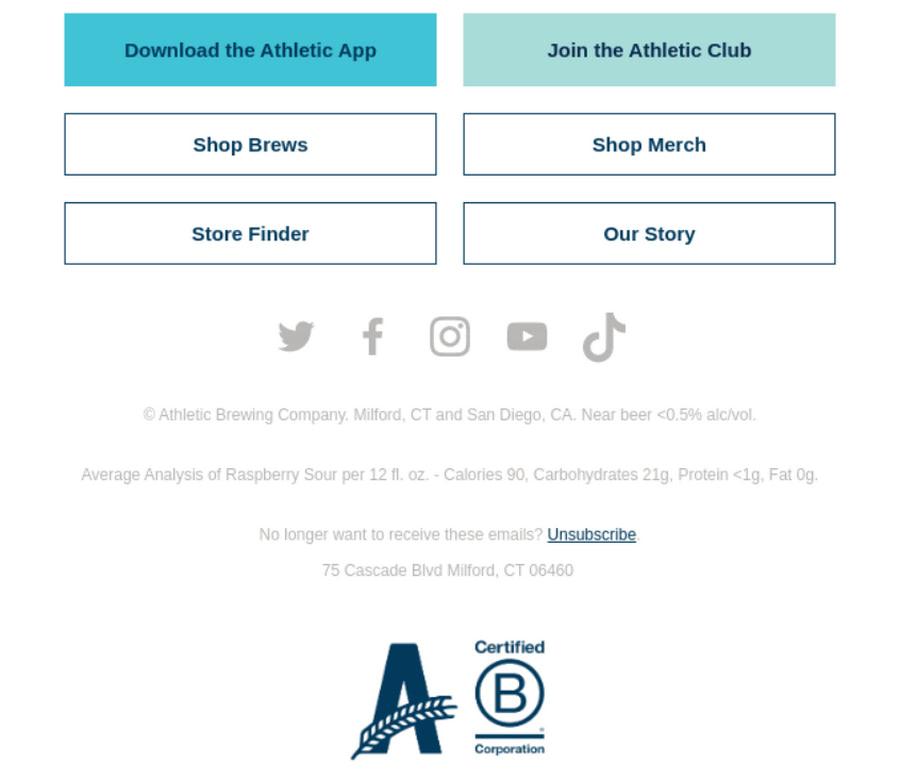
Promo Newsletter from Athletic Brewing
Athletic Brewing provides us with a fantastic example of an email newsletter made with the best practices in mind. The footer area features everything users may need to feel comfortable in these relationships. This includes:
- physical and mailing address,
- social media icons,
- unsubscribe link,
- branding,
- and even proof of certification.
Everything is on the surface. All issues can be addressed, even when the user wants to leave without saying good-buy. Including this relevant information for customers allows the company to avoid spam complaints and cement its position in the market.
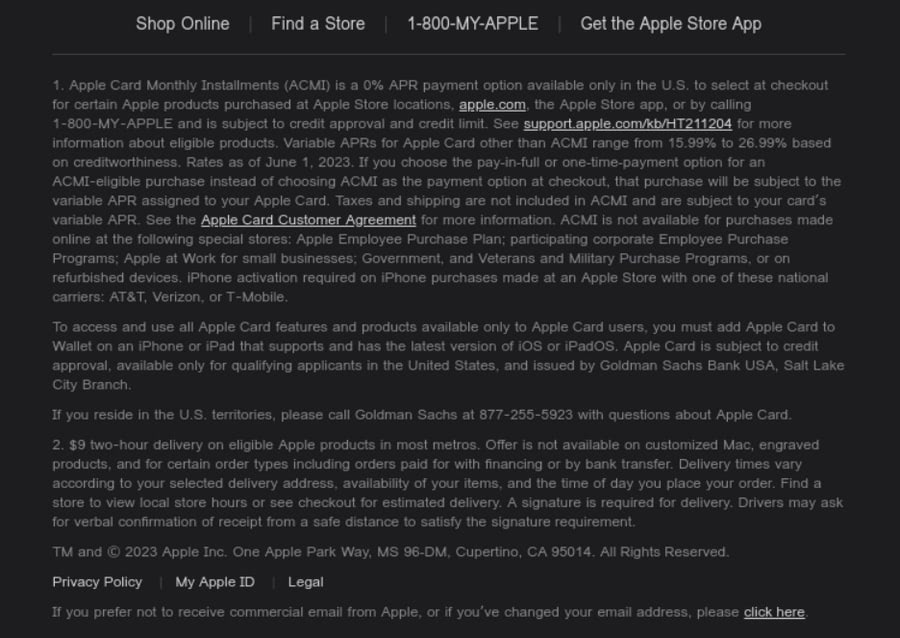
Promo Newsletter from Apple
Apple is famous for its obsession with everything legal and perfect. Therefore, it comes as no surprise that the footer of their digital newsletter has it all. Actually, it is too big for its name. Though, it should be like that to meet current requirements and expectations. It clarifies certain key points in the content as well as includes
- physical address,
- contact information,
- navigation to the most vital pages like Privacy Policy or Legal,
- unsubscribe link,
- and even link to customer agreements.
The team makes the most out of the footer area, adding as much information as possible to eliminate obscurity and confusion.
Last but not least, stick to the best practices for improving deliverability.
The best practices for improving deliverability are:
- Respond to spam filters immediately. If a subscriber marks your email as spam, remove the contact from your list or move it to another group.
- Initiate a cleaning sequence in case of these indicators: an increase in bounces, spam complaints, or a decrease in open rates.
- Create a step-by-step routine based on your unique email marketing strategy.
- Stick with your routine. Consistency is crucial for everything, and maintaining a clean email list is no exception.
- Ask for professional help. It may uncover some hidden problems or non-trivial issues as well as provide quick fixes and solutions.
Strategies to Minimize Bounces and Improve Open Rates
Maintaining a clean email list and applying a series of practices to minimize soft and hard bounce rates is crucial. After all, they are the main reasons that cause the deliverability rate to decline. So, where should you start?
First and foremost, identify the basis of the bounce. Since not all of them are created equally, it is vital to understand the reason.
If it is a hard bounce, it can be a non-existent email address, non-existent domain, blocked or failed recipient’s email server, technical email issue, a typo in the email address, and more. As for soft bounce, the reason can be a full inbox, offline mail server, too big newsletter, invalid email content, and others. Based on this information, address the issue or modify your strategy and the current campaign.
Afterward, adopt these tips:
- Create double opt-in registration. This way, you get a contact generally interested in your service or product.
- Check for mistakes and typos in email addresses in the subscription form. If you currently rely on a pricier validation service, it is worth weighing a ZeroBounce alternative that catches the same risky addresses without the premium cost.
- Decrease spam complaints by revising the frequency of sending newsletters, the quality of content, and even segmentation.
- Resend emails to those accounts that experience soft bounce.
- Remove contacts with hard bounces.
- Retain and nurture your active subscribers.
- Segment your list correctly.
- A/B test all crucial elements of the email campaign: content, subject line, time, and frequency to see what generates customer resonance.
- Run re-engagement campaigns. According to Uplers, almost 50% of recipients who received win-back emails read subsequent emails, thereby opening a golden opportunity to bring life to dead email list segments.
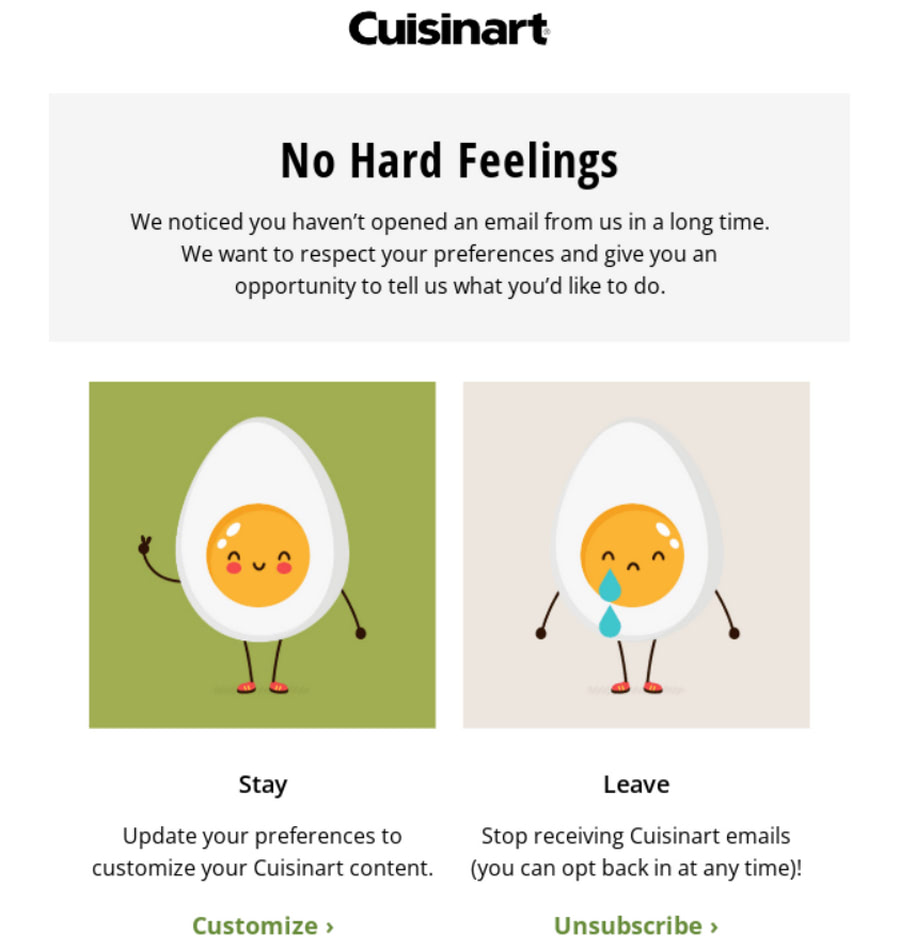
Re-engagement email from Cuisinart
Conclusion
Maintaining a clean email list is imperative for many reasons to reach a maximum deliverability rate. It removes inactive and broken emails, updates contact data, and filters out those who doubt their interest in digital correspondence with your company. It also considers hard and soft bounces to identify possible issues with the system, thereby providing insights into improving the environment and conditions for email marketing campaigns.
Remember that maintaining a clean email list is crucial to ensure a maximum deliverability rate, which increases email marketing performance, amplifies revenue and strengthens the company’s reputation. Therefore, stick to time-proven strategies and adopt the best practices for email deliverability.
Cleaning is the periodic operation. The habits that keep a list healthy in between, so the next cleanup is small, are covered in email list hygiene.
