

Most of us receive spam emails every single day. Cyber-attacks have exploded so badly that according to recent studies, half of the digital newsletters generated daily are unsolicited. This poses a huge danger to users as they are constantly exposed to malicious activity that aims to infect their computers with viruses or lure out sensitive personal data for financial gain.
Even though spam email is not new, people and organizations still fall victim to it. Proofpoint’s State of the Phish Report said that over 80% of companies suffered financial damage from phishing attacks last year.
Both individuals and company representatives need to differentiate legitimate emails from spam and protect themselves. Even with ISPs and ESPs standing on your guard with their sophisticated and regularly improved anti-spam systems, unsolicited emails still find their way to inboxes.
How to differentiate legitimate emails from spam, and what should businesses do to prove to their consumers that their emails are authentic and legal? We are going to address that in our guide.
What Is a Legitimate Email and a Spam Email?
Legitimate emails are digital newsletters created under law or with established legal forms, requirements, and standards. They are authenticated through DNS-based email sender authentication mechanisms such as SPF, DKIM, and DMARC and include information that proves their legitimacy, such as the company’s physical address.
Not only well-established and respected senders create those emails, but also companies and entrepreneurs with positive sender scores and those who follow the recommendations from regulatory bodies and anti-spam organizations.
Legitimate emails obey laws established by the country where the sender operates or serves the audience. For instance, to send legitimate emails to European residents’ companies should meet the requirements of the General Data Protection Regulation and ePrivacy Directive, whereas U.S. regulatory bodies require companies to follow the CAN-SPAM Act.
Spam email is an unsolicited and illegitimate digital newsletter usually sent in bulk to multiple recipients. It might have a promotional intention, aim to infect your computer with malware, or trick customers into sharing sensitive information. It is irrelevant, unwanted, unethical, and dangerous. Popular types of spam emails are commercial advertisements, antivirus warnings, email spoofing, money scams, and sweepstakes winners.
Why Is It Important to Differentiate Legitimate Emails from Spam?
It is important to differentiate legitimate emails from spam for many good reasons. First and foremost, the number of cyber-attacks has reached a threatening level. According to recent studies, 160 billion spam emails are generated daily, resulting in a staggering 96% of people receiving spam messages in some form.
Second, they make it difficult for users to navigate their inboxes comfortably and safely. As ISP filters do not catch all spam emails, many easily clutter user’s mailboxes. This causes distractions, irritation, and annoyance. Almost 70% of those who had received phishing messages reported their mental health being impacted.
Third, spam could drag productivity, especially for people within a company. Facing malicious emails causes employees to lose concentration and motivation and waste their precious time and effort.
Fourth, spam email might be the initial vector for a more sophisticated cyberattack. According to recent statistics, over half of people have lost money to online scams.
Finally, companies without proper defenses are liable under the GDPR, CAN-SPAM Act, and other anti-spam email regulations and compliances. If their messages and activity are considered spammy by ISPs or mailbox providers, they might face some drastic consequences. These might range from limiting their email activity in the channel to becoming subject to huge fines (up to millions of dollars) and even imprisonment of employees responsible for data leakage.
It is important to differentiate legitimate emails from spam not only for individuals who might suffer financial loss but also for companies that risk being blocked by ISPs and mailbox providers, losing their opportunity to conduct email marketing campaigns.
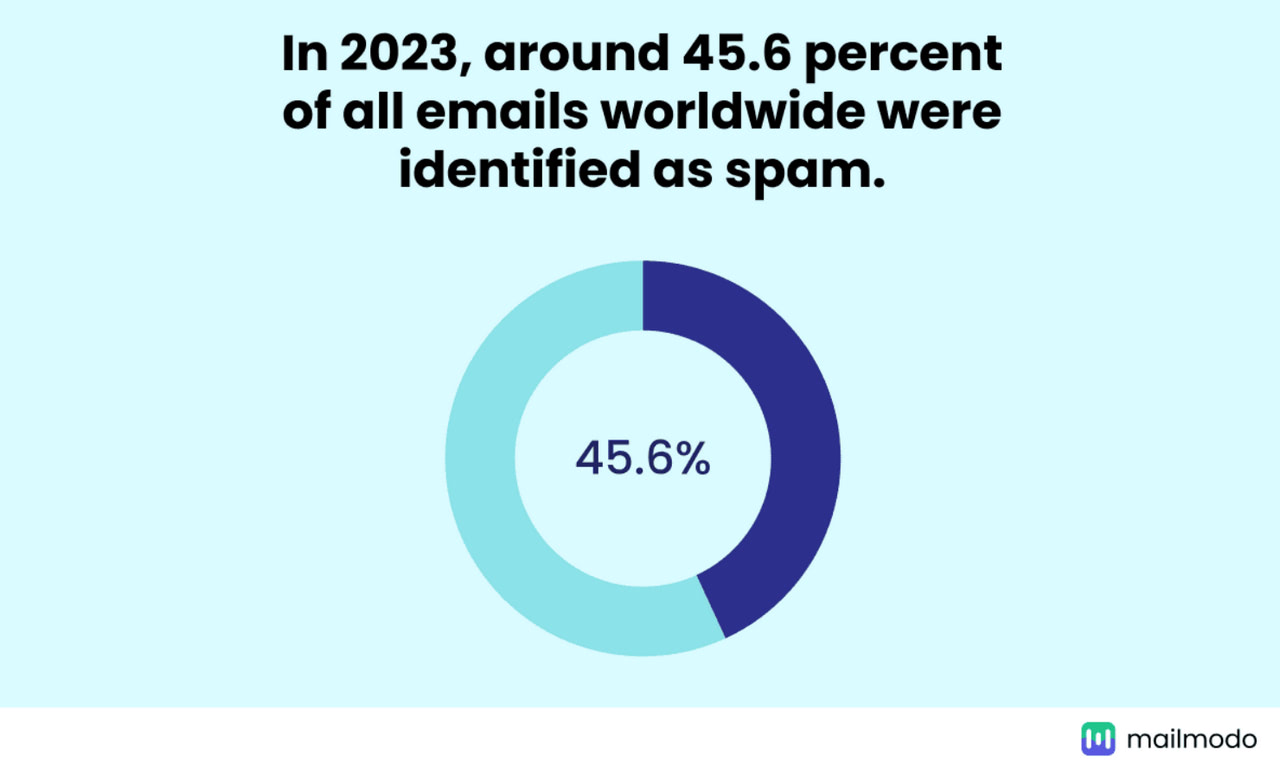
Spam statistics by Mailmodo
How to Differentiate Legitimate Emails from Spam Successfully?
Spam emails come in all shapes and sizes. From obvious sweepstake winners announcements to some tricky commercial advertisements. Some may even look legitimate at first glance, as malicious actors may easily imitate famous brand identities or even add some personalization to win the reader’s trust.
Here are the top pieces of advice that help users differentiate legitimate emails from spam and avoid bad consequences.
Examine Sender’s Address
One of the best recommendations to anyone who wants to protect themselves from spam is never to open it. Therefore, the first thing to do is thoroughly examine the sender’s address. If it looks suspicious or you are unfamiliar with the sender, delete it from your inbox.
However, in the business world, this is not always possible. Sometimes, emails with unfamiliar addresses might be from your colleagues, partners, or organizations. In this case, it is crucial to inspect the sender’s details. Ask yourself:
- Does the email come from the public domain? No legitimate company, no matter how small or young, will send emails from an address that ends with the public domain, such as ” Gmail” or “Yahoo.”
- Does the sender’s domain have typos, errors, or tiny misspellings that make it look like a legitimate email from famous brands, especially those operating in financial or commercial niches?
- Does the sender’s address use similar characters from other languages to appear recognizable?
- Does the sender’s address have random combinations of numbers and letters, or does it look comical?
- Does the sender’s address differ from the company’s usual email format?
- Is the email addressed specifically to your email account?
Finally, it would also help to check the subject line and BIMI.
The subject line could indicate something is wrong with the email, as malicious actors do not invest their time and effort in it. As a rule, it is banal, odd, and weird and does not make sense to you.
As for BIMI, standing for Brand Indicators for Message Identification, it is a part of the email authentication squad. It displays the brand’s visual identity elements like a logotype, tiny mascot, or icon. Using protections against illegitimate senders spoofing logos, it might become an additional source of information. Therefore, ask yourself, does it look exactly like the brand’s visual identity? Bear in mind that adoption is still rare (99% of the domains we check publish no BIMI record at all), so a missing logo is far from proof that an email is spam.
Pay Attention to Attachments and Links
As people prefer scanning emails rather than reading them word by word, they might easily take action without giving it extra thought, falling victim to tricky wording or impressive offers. If you are one of those who skims through the text, at least ensure to pay thorough attention to attachments and links.
These two common details of digital newsletters are the main sources of malware, viruses, and malicious files. The rule of thumb is to refrain from downloading files or clicking through links that look weird or suspicious. However, as dangerous files can come in any form, especially in familiar extensions, it could be hard to differentiate legitimate emails from spam. Ask yourself these questions to recognize them:
- Does the appeal make sense to you?
- Does the offer look too good to be true?
- Does the email place urgency on acting fast?
- Does the email contain generic call-to-action buttons with phrases like “Click here” or “Download Now”?
- Does the URL or hover-over data differ from the link caption?
If the answer is yes to any of these questions, then the email deserves your thorough inspection.
Inspect Email Body Copy and Design
Unfortunately, if the sender’s address does not look suspicious, it does not mean the email is legitimate. The good news is that you will not infect your computer or lose sensitive personal information by opening an email. Actions must be taken to fall victim to malicious actors, like downloading files from links or opening attachments. Therefore, inspecting the body of the email copy and its design is crucial.
Start with design, as it is the first thing we usually notice. Does it look brandy to you? Does it look modern? Is it aligned with the company’s normal style? As malicious actors do not have time to create good-looking email templates, their digital newsletters might look unprofessional, blunt, and distorted.
Then, examine the body copy. Several signs might indicate spam email:
- Unrealistic offers. If the content seems too good to be true, like a promise of large sums of money for simple actions, it is probably a phishing scam to collect bank account information.
- Grammar mistakes. As spam emails are quickly assembled to be sent in bulk, they are usually prone to typos, mistakes, and inconsistencies.
- Generic greeting. Legitimate emails usually use a person’s real name to address them.
- Unusual phrasing or awkward wording. Again, as spam emails are created on the fly, they might contain weird chunks of text. They might look like being translated from a foreign language or do not appear to be correctly written in your language in terms of context.
- Artificial urgency. Hackers use a sense of urgency to compel readers to act fast. Usually, it is combined with a threat like “your computer is infected.”
- Threaten negative consequences. Threats with negative consequences always make people worried. This feeling is a driving force for taking action without thinking, which malicious actors use in their attacks.
- Confidential data requests. This is perhaps one of the most popular signs of spam emails. No legitimate company will ask to share sensitive personal information through email. Therefore, if you see a demand for bank account details or password resetting, it is a sign of an unsolicited message.
- Inconsistencies with the sender’s information. Information in the sender’s address (such as domain name or name of the sender) must match the sender’s information in the email signature in legitimate emails. If you spot inconsistencies, then it is probably spam.
How to Make Your Outreach Look Legitimate?
From impersonating famous brands to looking pretty much authentic and legal, it could be a challenge to differentiate legitimate emails from spam for users, ISPs, and mailbox providers. Therefore, the latter regularly introduce enhancements to their anti-spam protection systems. Their rigorous scanning processes strive to create a safe email ecosystem.
However, while protecting users from cyber-attacks, these filters raise obstacles for email marketers, making it difficult to reach subscribers even with legitimate email. Here are top practices for businesses to avoid looking like spammers for ISPs and mailbox providers to maintain connection with subscribers.
Check Every Email in Unspam
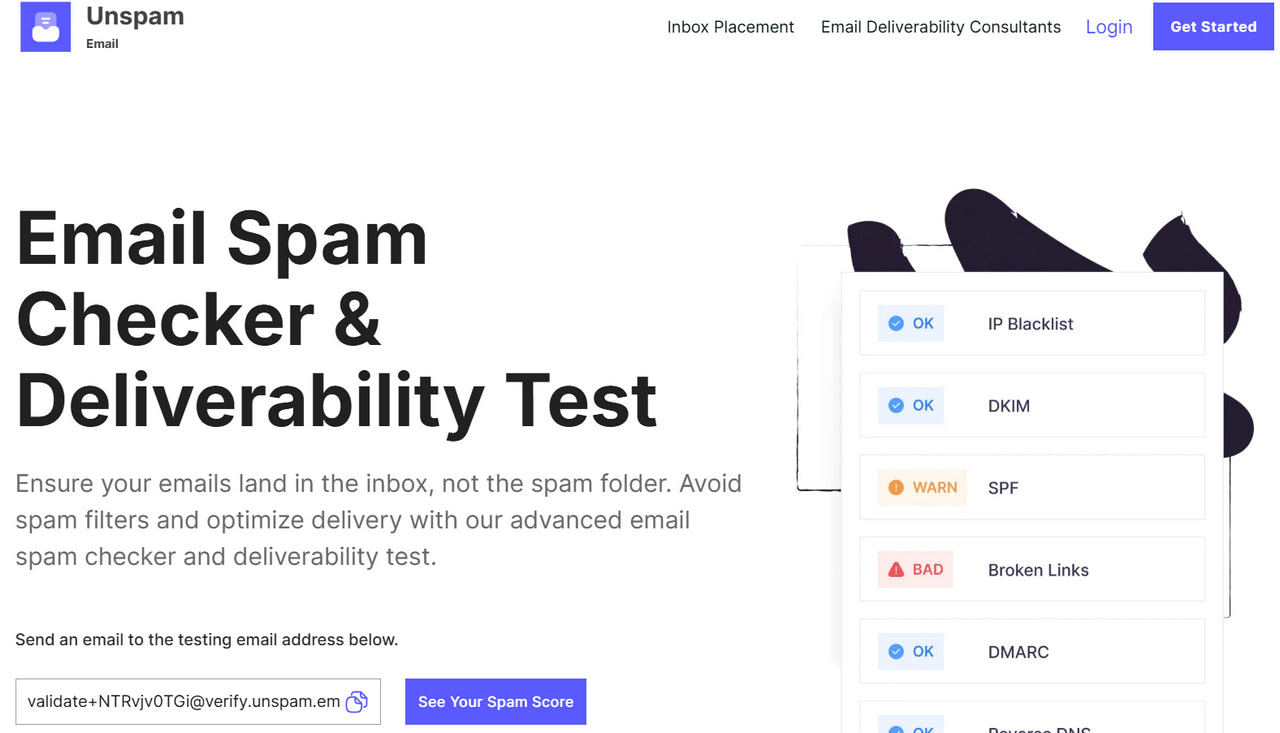
The first thing every email marketing team that operates in the channel must do is thoroughly examine their current email marketing campaigns. This inspection helps to locate details that might make their outreach look illegitimate for ISPs and mailbox providers. As anti-spam algorithms are highly advanced and sophisticated enough to match the artful level of malicious actors, these weak spots could be anything from tricky wording in email body copy to incorrectly set-up DMARC records.
Therefore, it is highly recommended to check these details of your current email campaigns:
- SPF and DMARC records. Are they correctly set up? Are they valid? Do they meet standards?
- DKIM signature. Is it valid and verified?
- Reverse DNS. Does the mail server have Reverse DNS in place? Are Mail Server and HELO aligned?
- List-Unsubscribe Header. Does it include an easy unsubscribe mechanism? This is an easy detail to overlook: only 14% of senders we test pass the one-click List-Unsubscribe requirement.
- Domain Suffix. Is it trustworthy?
- Subject Line. Is it aligned with an email body copy? Is it meaningful and clear? Does it include spam words?
- Email body copy and design. Does it have a healthy balance of textual and visual information? Does it have broken links? Does it meet anti-spam regulations? Does it behave consistently across screen sizes?
At first glance, it might seem like a lot of stuff to cover, but ensuring your email campaign is authentic and looks legitimate to ISPs and mailbox providers is imperative.
The good news is that companies do not have to do these inspections manually and independently. They also do not need any extra staff or time. They only need an Unspam, a professional instrument to run anti-spam email checks and deliverability tests. It does everything said above and even more. For instance,
- It checks whether your domain and IP are not listed on any significant blacklists.
- It overviews the digital newsletter’s accessibility level and suggests improvements.
- It assesses possible inbox placement.
- It generates a heat map.
- It previews email across popular devices to spot inconsistencies in its display.
In addition, their team of experts may also provide you with professional brand-specific recommendations to resolve your email deliverability issues. And all that will not burn your budget, as Unspam has one of the best prices in the niche.
Authenticate Every Digital Newsletter
If you have only embarked on your email marketing journey and are in the middle of creating your first email campaign, authentication is one of the most critical steps you should take. There are many good reasons for their importance, but first and foremost, Gmail will not let in emails without properly configured SPF, DKIM, and DMARC records. So, all your efforts to craft beautiful designs, compelling copy, and hyper-personalized offers would be in vain.
Authentication takes care of the technical side of the communication. It provides ISPs and mailbox providers with valid proof that email is legitimate. Adoption is uneven, though: across the domains we test, 93% publish a valid SPF record and 90% sign mail with a working DKIM key, yet only 48% publish a DMARC policy, so 52% of domains still have none at all, leaving a large share of senders exposed to the spoofing that makes spam so hard to tell apart. To introduce it into your email campaigns, it is highly recommended to perform these steps:
- Establish the consistent “from” addresses and friendly “from” names. Do not use cousin domains or domains with slight variations from your brand’s name, as it looks fishy for ISPs and customers.
- Create a list of authorized IP addresses and create a valid SPF record.
- Sign your message using cryptography by adopting the DKIM mechanism.
- Publish DMARC records alongside your DNS records to maximize SPF and DKIM protocols.
- Create a BIMI record.
- Ensure all your domains, subdomains, and types of emails (including transactional ones) are protected with authentication protocols.
- Continuously monitor authentication reports. Establish alerts for anomalies in authentication results.
- Stay updated with the latest email authentication standards.
Following these recommendations might be tricky as technical skills are required. However, it is imperative to ensure the legitimacy of outreach, secure an online reputation, and maintain brand trust with customers.
Improve Your Sender’s Score and Reputation
The sender’s score is a digital number that ESPs assign to every company to describe brand reputation, activity, and history in the email channel. It is a combined score between IP and domain reputation.
Determining the level of trust mailbox providers have in the company, the sender’s score underlies ESP’s decision to let the company’s email in, put it into the spam folder, or reject it immediately. It influences deliverability rate, conversion rate, revenue, and ultimate ROI. The higher the sender’s score, the more chances the company has to pass rigorous ESPs filtering system and anti-spam screening and secure positive email performance.
Therefore, it is important to track and improve your sender’s score. Here are some of the best practices:
Keep your subscribers engaged with compelling copy, hyper-personalization, meaningful user experience, valuable offers, responsive design, and the right cadency.
Clean your subscription list regularly. Get rid of email contacts that might compromise your channel activity. These could be spam traps, invalid email addresses, or disengaged contacts.
Never purchase or rent subscription lists. Always get consent from your subscribers to send them correspondences. Whether it is a promo, info, or transactional connection, ensure your users explicitly agree to receive them.
Perfect the technical side of your digital outreach. This implies introducing multiple practices, but first and foremost, ensure you have authenticated emails, use a trusted hosting provider with a dedicated IP address, and protect your infrastructure with high-end security systems.
Avoid blacklisting. Check regularly the most popular email blacklist vendors. If you have been caught, follow their instructions to get out of the list.
Address spam complaints and work closely with hard and soft bounces.
Obey anti-spam regulations and laws. Introduce double opt-in registration, provide an unsubscribe link, and address customers’ requests to delete their data from your database as quickly as possible.
Monitor email deliverability and key performance metrics to spot email campaign and communication weaknesses.
Last but not least, it is important to note that every ESP has its algorithms to determine a sender’s score. However, many of them are guided by the best practices in the niche and require businesses to follow their recommendations. Therefore, please familiarize yourself with their instructions and try to introduce them into your email marketing routine.
Conclusion
Spam can do more than be a nuisance. The average annual loss per employee because of spam is approximately $1,934, with financial losses of millions of dollars for companies, according to Nucleus Research. It is crucial to differentiate legitimate emails from spam and protect yourself from those drastic outcomes.
Fortunately, preventive measures are not so hard to implement, especially with ESPs’ advanced anti-spam mechanisms standing on your guard. Doing your part requires examining the sender’s information and email body copy to spot suspicious elements and sticking to the general advice of not downloading anything from unknown sources or clicking on links with dubious destinations.
As for businesses that want to maintain their connection with subscribers and deliver their brand messages despite all protective measures, they must ensure their correspondence looks legitimate for all participants in the ecosystem.
For that, they need to authenticate their emails, build a strong sender’s reputation, introduce the best practices, and check their digital newsletters in Unspam to surface inconsistencies that might make them look suspicious.
